Join us at FabCon Vienna from September 15-18, 2025
The ultimate Fabric, Power BI, SQL, and AI community-led learning event. Save €200 with code FABCOMM.
Get registered- Power BI forums
- Get Help with Power BI
- Desktop
- Service
- Report Server
- Power Query
- Mobile Apps
- Developer
- DAX Commands and Tips
- Custom Visuals Development Discussion
- Health and Life Sciences
- Power BI Spanish forums
- Translated Spanish Desktop
- Training and Consulting
- Instructor Led Training
- Dashboard in a Day for Women, by Women
- Galleries
- Data Stories Gallery
- Themes Gallery
- Contests Gallery
- Quick Measures Gallery
- Notebook Gallery
- Translytical Task Flow Gallery
- TMDL Gallery
- R Script Showcase
- Webinars and Video Gallery
- Ideas
- Custom Visuals Ideas (read-only)
- Issues
- Issues
- Events
- Upcoming Events
Enhance your career with this limited time 50% discount on Fabric and Power BI exams. Ends September 15. Request your voucher.
- Power BI forums
- Forums
- Get Help with Power BI
- Desktop
- Re: Auto-detect cardinality one to one relationshi...
- Subscribe to RSS Feed
- Mark Topic as New
- Mark Topic as Read
- Float this Topic for Current User
- Bookmark
- Subscribe
- Printer Friendly Page


- Mark as New
- Bookmark
- Subscribe
- Mute
- Subscribe to RSS Feed
- Permalink
- Report Inappropriate Content
Auto-detect cardinality one to one relationships from SQL Server DirectQuery tables?
How can we set up tables in a SQL Server database so Power BI auto-detects cardinality one to one relationships with or without cross filter direction both?
We can get one to many or many to one by adding Primary Keys and Foreign Keys, but cannot get one to one relationships.
We need one to one relationships so we can display columns from all three of the following tables.
- Table Customers has CustomerId as Primary Key
- Table FoodOrders has CustomerId as Foreign Key
- Table DrinkOrders has CustomerId as Foreign Key
We can only display columns from Customers and either FoodOrders or DrinkOrders.


- Mark as New
- Bookmark
- Subscribe
- Mute
- Subscribe to RSS Feed
- Permalink
- Report Inappropriate Content
Hi @DirectQuery ,
Do the suggestions from engineers make sense? If so, kindly mark the proper reply as a solution to help others having the similar issue and close the case. If not, let me know and I'll try to help you further.
Best regards
Amy
- Mark as New
- Bookmark
- Subscribe
- Mute
- Subscribe to RSS Feed
- Permalink
- Report Inappropriate Content
The suggestions from engineers does not solve the problem.

- Mark as New
- Bookmark
- Subscribe
- Mute
- Subscribe to RSS Feed
- Permalink
- Report Inappropriate Content
Ok, fine.
Can you please expand on exactly what you are hoping to achieve (given the structure of your model and data)?
Did I answer your question? Mark my post as a solution!
In doing so, you are also helping me. Thank you!
Proud to be a Super User!
Paul on Linkedin.
- Mark as New
- Bookmark
- Subscribe
- Mute
- Subscribe to RSS Feed
- Permalink
- Report Inappropriate Content
Take these three tables from SQL Server DirectQuery loaded with relationships detected as one-to-one.
| CustomerId | Name |
| 1 | John |
| 2 | Joe |
| 3 | Mary |
| CustomerId | FoodOrderId | Food |
| 1 | 11 | Food11 |
| 2 | 22 | Food22 |
| 3 | 33 | Food33 |
| CustomerId | DrinkOrderId | Drink |
| 1 | 44 | Drink44 |
| 2 | 55 | Drink55 |
| 3 | 66 | Drink66 |
Display this in a report.
| CustomerId | Name | FoodOrderId | DrinkOrderId | Food | Drink |
| 1 | John | 11 | 44 | Food11 | Drink44 |
| 2 | Joe | 22 | 55 | Food22 | Drink55 |
| 3 | Mary | 33 | 66 | Food33 | Drink66 |
- Mark as New
- Bookmark
- Subscribe
- Mute
- Subscribe to RSS Feed
- Permalink
- Report Inappropriate Content
See if this works:

Did I answer your question? Mark my post as a solution!
In doing so, you are also helping me. Thank you!
Proud to be a Super User!
Paul on Linkedin.


- Mark as New
- Bookmark
- Subscribe
- Mute
- Subscribe to RSS Feed
- Permalink
- Report Inappropriate Content
@DirectQuery , You can join Customer with food orders and drink order and analyze data together.
Also, assume you take a not summarized column food orders and customer Id from the customer, You can take any aggregated from drink orders
- Mark as New
- Bookmark
- Subscribe
- Mute
- Subscribe to RSS Feed
- Permalink
- Report Inappropriate Content
@amitchandak, When I have a table with fields from Customers and FoodOrders, Power BI gives me this error if I add fields from DrinkOrders.
Can't determine relationships between the fields
Can't display the data because Power BI can't determine relationship between two or more fields.
@amitchandak wrote:@DirectQuery, You can join Customer with food orders and drink order and analyze data together.
Also, assume you take a not summarized column food orders and customer Id from the customer, You can take any aggregated from drink orders
- Mark as New
- Bookmark
- Subscribe
- Mute
- Subscribe to RSS Feed
- Permalink
- Report Inappropriate Content
In your visuals, you should be using the fields from the Customer table, and then add whatever fields/measures from the other tables.
If you do not use the field from the Customer Table to "bridge" the other 2, you will get the error.
If you have any other fields common to both FoodOrders and DrinkOrders (for example a date field, postal code etc... you should create dimension tables for these too, and link them in a one-to-many relationship with both fact tables using the common fields.
Did I answer your question? Mark my post as a solution!
In doing so, you are also helping me. Thank you!
Proud to be a Super User!
Paul on Linkedin.
- Mark as New
- Bookmark
- Subscribe
- Mute
- Subscribe to RSS Feed
- Permalink
- Report Inappropriate Content
I get the error if Customers are one-to-many with FoodOrders and DrinkOrders.
I do not get the error if Customers are one-to-one with FoodOrders and DrinkOrders.
If I have a 100 Order tables, I do not want to manually switch relationships from one-to-many to one-to-one.
Power BI auto-detects one-to-many, but I cannot get it to auto-detect one-to-one relationships from SQL Server databases.
What are a dimension tables?
@PaulDBrown wrote:In your visuals, you should be using the fields from the Customer table, and then add whatever fields/measures from the other tables.
If you do not use the field from the Customer Table to "bridge" the other 2, you will get the error.
If you have any other fields common to both FoodOrders and DrinkOrders (for example a date field, postal code etc... you should create dimension tables for these too, and link them in a one-to-many relationship with both fact tables using the common fields.
- Mark as New
- Bookmark
- Subscribe
- Mute
- Subscribe to RSS Feed
- Permalink
- Report Inappropriate Content
One-to-one is fine: it just means that both tables have unique values. So you can have relationships which are one-to-one or one-to-many.
What you need to avoid at all costs are Many-to-Many relationships, since these can cause havoc in calculations.
Dimension tables have unique values of a particular field (and can have more than one field) which is then used to create a relationship with other table(s). These dimension tables make the model efficient, and are used for slicers. filters, filter expressions in measures....
Did I answer your question? Mark my post as a solution!
In doing so, you are also helping me. Thank you!
Proud to be a Super User!
Paul on Linkedin.
- Mark as New
- Bookmark
- Subscribe
- Mute
- Subscribe to RSS Feed
- Permalink
- Report Inappropriate Content
We want to display fields from the Customers table and multiple Order tables without manually changing relationships to one-to-one.
Power BI only auto-detects one-to-many and one-to-many gives us errors.
Is there a way to auto-detect one-to-one?
Is there a way use one-to-many relationships to display fields from the Customers table and multiple Order tables?
@PaulDBrown wrote:
One-to-one is fine: it just means that both tables have unique values. So you can have relationships which are one-to-one or one-to-many.
What you need to avoid at all costs are Many-to-Many relationships, since these can cause havoc in calculations.
Dimension tables have unique values of a particular field (and can have more than one field) which is then used to create a relationship with other table(s). These dimension tables make the model efficient, and are used for slicers. filters, filter expressions in measures....
- Mark as New
- Bookmark
- Subscribe
- Mute
- Subscribe to RSS Feed
- Permalink
- Report Inappropriate Content
Firstly, you should beware of relying on auto-detect table relationships: you might find there are some surprises or relationships created beween fields which aren't "correct" or the desirable relationship.
"Power BI only auto-detects one-to-many and one-to-many gives us errors."
In what sense does a one-to-many relationship give you errors?
Did I answer your question? Mark my post as a solution!
In doing so, you are also helping me. Thank you!
Proud to be a Super User!
Paul on Linkedin.
- Mark as New
- Bookmark
- Subscribe
- Mute
- Subscribe to RSS Feed
- Permalink
- Report Inappropriate Content
- Customers is one-to-many to FoodOrders
- Customers is one-to-many to DrinkOrders
- Report Visual Table contains fields from Customers and FoodOrders
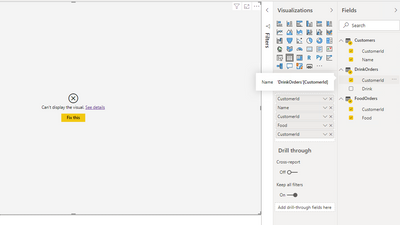
Given above, Power BI gives below error when I add fields from DrinkOrders to the Report Visual Table.
Can't determine relationships between the fields
Can't display the data because Power BI can't determine relationship between two or more fields.
- Mark as New
- Bookmark
- Subscribe
- Mute
- Subscribe to RSS Feed
- Permalink
- Report Inappropriate Content
Can you please show the model view for the affected tables + an example of the visual and specify which fields you are using and from which tables?
If the model is set up correctly you will not get this message. It depends on the bridge tables (dimension tables) you have to relate the fields,
If you try to create a visual which does not include fields from bridge/dimension tables, you get this error.
Did I answer your question? Mark my post as a solution!
In doing so, you are also helping me. Thank you!
Proud to be a Super User!
Paul on Linkedin.
- Mark as New
- Bookmark
- Subscribe
- Mute
- Subscribe to RSS Feed
- Permalink
- Report Inappropriate Content
I don't have a dimension table. I only have three tables.
What should the dimension table have for connecting Customers one-to-many with FoodOrders and DrinkOrders?
- Mark as New
- Bookmark
- Subscribe
- Mute
- Subscribe to RSS Feed
- Permalink
- Report Inappropriate Content
We may be having a problem with terminology.
A dimension table, or lookup table, is a table containing at least one field with unique values which is linked to fact tables (where the same field has multiple instances of the same values) by means of a one-to-many (or one-to-one) relationship. Sometimes these dimension tables are called "bridge tables" because they are used to create a "bridge" between two tables containing a common field.
These bridge/dimensiotables are then used in slicers, filters, measures etc to enable the filter conext necessary to allow for measures comparing values from different tables (for example sales from one table vs target from another table by using the "bridge table"/dimension table of "customer".
The fields from these Bridge/Dimension tables are the "link" between your fact tables. Without them, your visuals will render the error message you are seeing (unless your measures include an expression such as TREATAS in the filter expression, but that should be a plan "b" or used if a relationship cannot be established using a "bridge table" - but ignore this comment in brackets since we are looking for a solution to the model itself)
As I mentioned in my previous post, can you please post an image of your model (relevant tables), and what fields you are using to create your visual?
Did I answer your question? Mark my post as a solution!
In doing so, you are also helping me. Thank you!
Proud to be a Super User!
Paul on Linkedin.
- Mark as New
- Bookmark
- Subscribe
- Mute
- Subscribe to RSS Feed
- Permalink
- Report Inappropriate Content
I only have three tables from the SQL Server database.
- Customers
- FoodOrders
- DrinkOrders
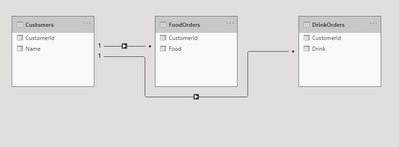
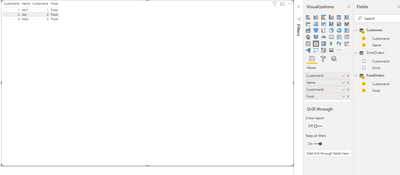
No error when I click fields on second table.
I get an error when I click a field on the third table.
- Mark as New
- Bookmark
- Subscribe
- Mute
- Subscribe to RSS Feed
- Permalink
- Report Inappropriate Content
The question is why do you need to add the CustomerID fields from your "Fact tables" (ie FoodOrder and DrinkOrder tables)?
Once you have the Dimension Table (your "Customers" table), you only use the field (Customers[CustomerID]) from this table in your visual (you don't need the customerID fields from other tables).
The Customers[CustomerID] field in the visual will filter the rows in each fact table to return the corresponding values for other columns you include in the visual. No need to add the CustomerID columns from your fact tables)
Did I answer your question? Mark my post as a solution!
In doing so, you are also helping me. Thank you!
Proud to be a Super User!
Paul on Linkedin.
- Mark as New
- Bookmark
- Subscribe
- Mute
- Subscribe to RSS Feed
- Permalink
- Report Inappropriate Content
I get the error when I add any column. It doesn't matter which column I add.
I'm adding CustomerID fields as a test to see if I get the error.
- Mark as New
- Bookmark
- Subscribe
- Mute
- Subscribe to RSS Feed
- Permalink
- Report Inappropriate Content
Ok, I see what you are getting at (I've created a sample PBIX). Sorry about the my confusion.
You are getting the error when you add columns from the tables without an aggregation. This is becasue the structure of the data does not establish a relationhip between each column (food and drink) for the fact tables (they are independent occurrences) . Unless you have a field which establishes "which drink was ordered with each food" (an order ID for example) the visual cannot establish the relationship between the two columns, hence you get the error.
1) You can force an "Artificial" Combination (ie. depict the possible combinations of food and drink for each customer) either by merging the tables in Power Query or creating a measure using the CROSSJOIN function (you can apply this measure in the visual' filter pane).
Crossjoin = CALCULATE(
                DISTINCTCOUNT(Customers[CustomerID]),
                        CROSSJOIN(FoodOrders, DrinkOrders))
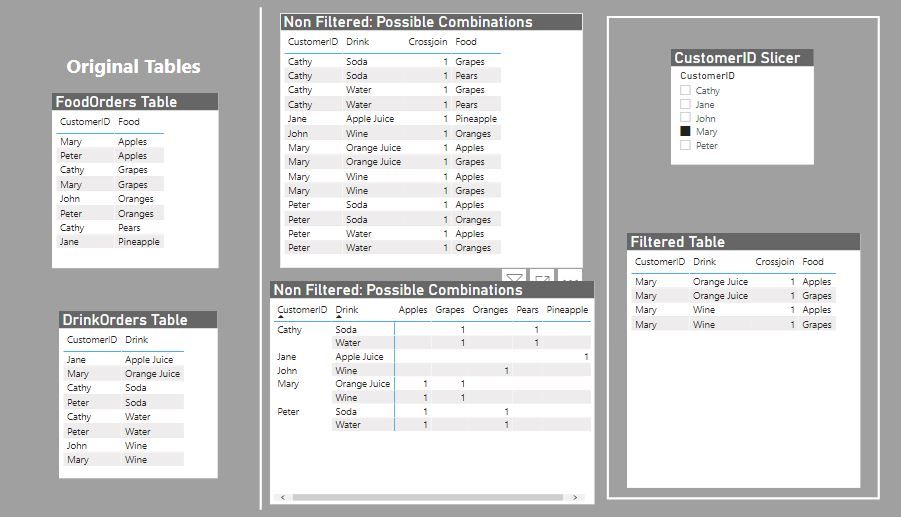
But as I say, this is simply a depiction of the possible combinations
2) If you want to see the exact list for each customer, create a new dimension table (I've called it 'Type') by joining both food and drink fields:
Type = UNION(VALUES(FoodOrders[Food]), VALUES(DrinkOrders[Drink]))
Now create a relationship between this new table and both your fact tables linking Type with the FoodOrder[Food] and DrinkOrder[Drink]

and use the Customers[CustomerID] and Type[Type] fields to build your visuals:
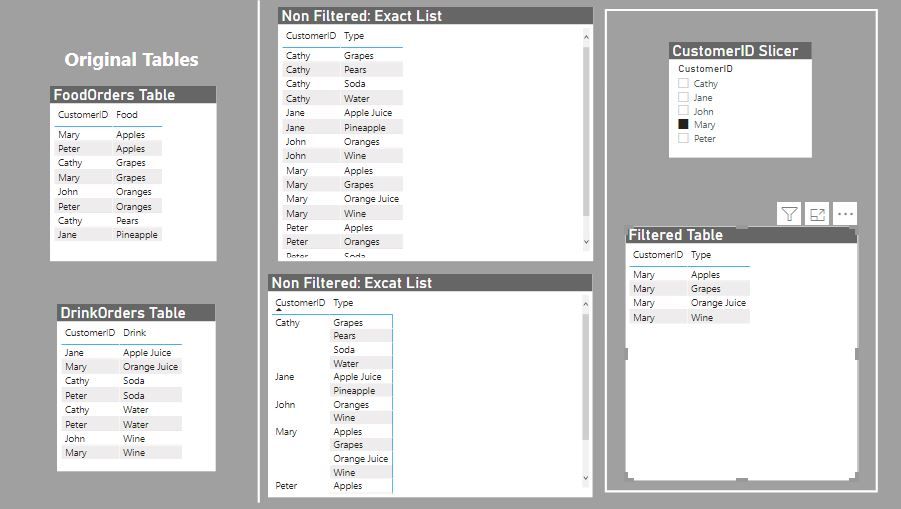
Apologies again for my initial confusion!
Did I answer your question? Mark my post as a solution!
In doing so, you are also helping me. Thank you!
Proud to be a Super User!
Paul on Linkedin.

Helpful resources

Power BI Monthly Update - August 2025
Check out the August 2025 Power BI update to learn about new features.

Fabric Community Update - August 2025
Find out what's new and trending in the Fabric community.

| User | Count |
|---|---|
| 71 | |
| 64 | |
| 62 | |
| 50 | |
| 28 |


| User | Count |
|---|---|
| 117 | |
| 75 | |
| 62 | |
| 55 | |
| 43 |


