Forum Discussion

Australia maps
 9 years ago
Hi charmainer,
Yes, I'm a Power BI Pro user(not Pro Trial), and the ArcGIS Map can be shown on my dashboard.
Regards
- 9 years ago
Hi charmainer,
No, just finish the steps here to enable ArcGIS Map for Power BI.:smileyhappy:
Regards
 9 years ago
Done all those steps already in desktop.
Will organise my Lic and see if this works. - i will be in touch with my success
Thanks a Million
Cheers
What does NOT appear in the service - the highlighted in yellow:-
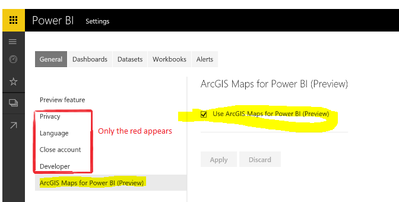

charmainer, I get a little confused, with which PBI account the setting is unavailable? In your PBI account or in your administrator's account? As you already figured out, you need a Pro user account to get it work. Please have a double check.
- Vicky_Song9 years agoImpactful Individual
charmainer, thanks for the additional info. Your issue is strange because you should get the ArcGIS Maps for Power BI setting as you have a Pro licensed user account. I will try to involve other senior engineer to have a check on it.
- Vicky_Song9 years agoImpactful Individual
charmainer, as the ArcGIS Maps is still under preview, there are still some issues with it currently. I was acknowledged that it will be released in the very near future, I will monitor to see whether this same issue still exits.
- charmainer9 years agoHelper III
Ok Let calrify my Scene:)
Database : SQL Server 2016, - Onpremisis.
On My Machine : Power BI Dektop Setpember 2016 Addittion.
-this one has the ArcGIS control .
I have enabled all settings on My desktop.
map created for Australia - and settings to preview in Desktop -Ticked.
I Then Publish the Same to PowerBI service.
In power BI Service. I (online) - i am a licenced Power BI pro user. ( I am not the Administrator of Power BI).
- Result In Power BI service - The Map is not Visible - Black Report. ( however via the PBI desktop it is visible).
The Administraor has enabled the Preview for Users via Admin Portal.
Admin Portal
As per the recomedations -
from PowerBi https://powerbi.microsoft.com/en-us/documentation/powerbi-service-tutorial-arcgis/
this is the step the administrator could not perform as the below options do not appear :-
From Administrator Logon i Got This :( not My logon).
The Red crossed - Not availble for Administrator .
- does any one have suggestions on how the admin can get these features?
Thanks
Charmaine
- charmainer9 years agoHelper III
Thanks i appreciate that... its beyond my witts.:smileysad:
- Vicky_Song9 years agoImpactful Individual
charmainer, I reported your issue internally and another senior engineer is checking it. Per her request, we need the following information, in Power BI Service, please go to the question mark in the top right hand corner, then to “About Power BI” and send a screenshot of the information.
 Anonymous9 years agoNot applicable
Hi Vicky,
I have the same issue as charmainer; I am a paid pro user, admin setting is enabled but can't see the map setting or the maps in published reports......
Cheers
Mark
 jmbouffard9 years agoFrequent Visitor
Hi, just wanted to report that I had the same issue here. I'm a Pro user and cannot see the option to enable the ArcGIS preview in the Power BI Service. When publishing reports, the ArcGIS visual just stays blank.
My Power BI Service "About" dialog is similar to thre one posted previously:
Thanks.
- charmainer9 years agoHelper III
Hi Vicky,
My Power BI service Details
Power Bi service -About Charmainer
Charmaine
 saunders9 years agoHelper II
Hi there, just wanted to say that I am having the same issue: ArcGIS enabled in the tenant, ArcGIS visual enabled in PowerBI Desktop, Pro user. I've published a report containing the visual to the service but get a blank display in the report online. In PowerBI.com, I can see the border of the visual but there is no content.
My details below:
- saunders9 years agoHelper II
Hi there, any update on this? Shall we engage MS support or is there someone working on a fix?
Thanks!
Ed
- charmainer9 years agoHelper III
Hi,
i have no update yet. It wlould be good to get MS aswell onto it. I... I am looking at other map alternatives ...as its been a taking a while. In have not yet had any luck thought.
cheers
Charmaine
- charmainer9 years agoHelper III
Hi Vicky. Any update on this issue of ArcGis?
 robrien69 years agoAdvocate IV
Hi Vicky,
Is there any explaination as to why some paid/pro accounts cannot access the preview features and others can?
Are some features only available to certain regions? This is incredibly frustrating to remain in the dark about this.
Edit: I am in Northern Europe (Ireland) region with the data stored in an on premise SSAS instance.
- charmainer9 years agoHelper III
I totally agree... very frustrating:(
I did recieve a message fro Esri that MS is working on this as there are few issues.
So yep cant wait for this to be sorted.
Regards
Charmaine
- charmainer9 years agoHelper III
The issue has nothing to do with the PRo account and Service.. i was under the imprssion too , since Power Bi doc mentioned we neede to have this account , however it only is working for desktop. :(
- Anonymous9 years agoNot applicable
Seems to be fixed now, just noticed that latest blog post so had a quick check and Esri now working for me in the service.....