Join us at FabCon Atlanta from March 16 - 20, 2026, for the ultimate Fabric, Power BI, AI and SQL community-led event. Save $200 with code FABCOMM.
Register now!The Power BI Data Visualization World Championships is back! Get ahead of the game and start preparing now! Learn more
Hello,
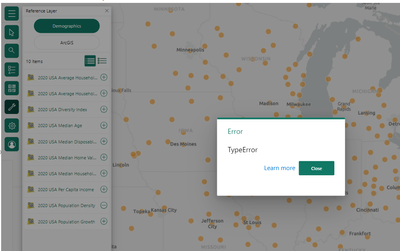
I recently built an ArcGIS map that utilizes the 2020 USA Population Density ArcGIS demographics layer that is available in the demographics reference layer menu. Last week I noticed this reference layer had disappeared from my saved project, and now when I try to add it back to the map it returns this 'TypeError' error message:
I have tried to start a new file to see if there was something corrupted in the original project file, but was unable to get the reference layer to work in a new file. I have also attempted to test in power bi service versus desktop and neither are working. I have another colleague that this same issue has now happened with their projects which utilize these reference layers as well.
Is it possible there is an outage between ArcGIS/ESRI and Power BI? Please help, thanks!
Solved! Go to Solution.
Hi @baltemus ,
You will probably need to contact ESRI support to get an answer to this:
https://support.esri.com/en-us/products/arcgis-for-power-bi
https://support.esri.com/en-us/contact
Hi @baltemus ,
You will probably need to contact ESRI support to get an answer to this:
https://support.esri.com/en-us/products/arcgis-for-power-bi
https://support.esri.com/en-us/contact
Thank you, I also posted in their community forum/submitted bug report as well.
The Power BI Data Visualization World Championships is back! Get ahead of the game and start preparing now!
| User | Count |
|---|---|
| 38 | |
| 38 | |
| 37 | |
| 28 | |
| 28 |
| User | Count |
|---|---|
| 124 | |
| 89 | |
| 73 | |
| 66 | |
| 65 |