Join us at FabCon Atlanta from March 16 - 20, 2026, for the ultimate Fabric, Power BI, AI and SQL community-led event. Save $200 with code FABCOMM.
Register now!Vote for your favorite vizzies from the Power BI Dataviz World Championship submissions. Vote now!
Hi
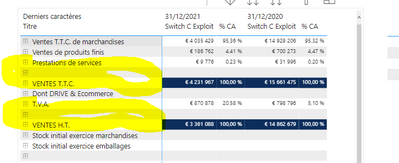
I made a matrix with a sub level who show the account number used for the calculation
It works well
I want to add space between some row in order to make the visual more pleasant
I try different solutions, and i finally use a dedicated line on my matrix
My problem is that i didn't know how to avoid the sub level for thoses lines
Because as logique, i should not have account number and value for them
Or at least to avoid the list of all accounts
Here my pbix file
https://1drv.ms/u/s!AoqtZHsX4BzvhIdzhrd9JHy81fTYPg?e=JAuJ1v
Thanks
Nicolas
Solved! Go to Solution.
hI
I finally use profitbase visual, to do what i wanted
@nicolast29 , In power bi it can only come using data only.
But there is some options discussed here using excel and power bi app
Power bi Excel for P&L , add in app
Curbal
https://www.youtube.com/watch?v=IISYzTaIyu4
Guyinacube
https://www.youtube.com/watch?v=1yJnmZRTNZg
Hi
Thansks for the links, i love those 2 channels
i will not work like that for my case but i take it in a corner of my head for futher uses
Have a nice day
Hi @nicolast29 ,
Do you want to remove the categorys whose measures all return blank in CompteNum level?
I think you can try to create a measure and filter your visual by this measure.
Measure =
IF( SUMX('GL Normé',[Switch C Exploit]) + SUMX('GL Normé',[Switch C Exploit %]) = 0,0,1)
Add this measure into the visual level filter and set it to show items when value =1.
Best Regards,
Rico Zhou
If this post helps, then please consider Accept it as the solution to help the other members find it more quickly.
Vote for your favorite vizzies from the Power BI World Championship submissions!
If you love stickers, then you will definitely want to check out our Community Sticker Challenge!
Check out the January 2026 Power BI update to learn about new features.
| User | Count |
|---|---|
| 58 | |
| 52 | |
| 40 | |
| 17 | |
| 16 |
| User | Count |
|---|---|
| 112 | |
| 108 | |
| 39 | |
| 34 | |
| 27 |