Join us at FabCon Atlanta from March 16 - 20, 2026, for the ultimate Fabric, Power BI, AI and SQL community-led event. Save $200 with code FABCOMM.
Register now!View all the Fabric Data Days sessions on demand. View schedule
So I had two datasets for two halves of the year (both SharePoint Lists) that I modified separately, then appended into one dataset.
Once the dataset was appended, I have made further modifications to it including new columns and measures. I am not in a position to re-append the datasets and start all over again.
I deleted a column that I thought was not needed from both datasets before I appended.
I then figured I might need that column. So I have recovered it from the separate datasets. I now don't know how or even if, I can pull this data into my appended dataset.
Any ideas???
Jemma
Solved! Go to Solution.
Hi @Anonymous
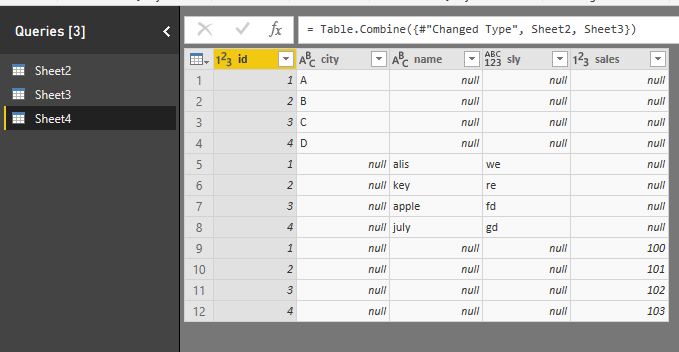
When you delete the column from one dataset before appending, don't worry about it, as tested, i just go to the dataset in Queries editor, click on "remove columns" on the right APPLIED STEPS, this means to recover the removed column to the dataset, then go to the appended table, the column removed before appending will come in the dataset.
Best Regards
Maggie
Hi Jemma, In power query, if you take out the removing step in which you deleted the column in both of your tables, once you final append happens you should see this column in your final dataset.
Hi Joorge,
The append has already happened. And I don't want to re-append, because i've applied many steps since.
So I just want the new columns to be somehow added as a new column in my appended dataset. I assume if I can do this, I would have to add a new column that pulls the data in from the other two datasets based on a unique ID. But I don't know where to begin....
Hi @Anonymous
When you delete the column from one dataset before appending, don't worry about it, as tested, i just go to the dataset in Queries editor, click on "remove columns" on the right APPLIED STEPS, this means to recover the removed column to the dataset, then go to the appended table, the column removed before appending will come in the dataset.
Best Regards
Maggie
Check out the November 2025 Power BI update to learn about new features.
Advance your Data & AI career with 50 days of live learning, contests, hands-on challenges, study groups & certifications and more!