Share feedback directly with Fabric product managers, participate in targeted research studies and influence the Fabric roadmap.
Sign up nowGet Fabric certified for FREE! Don't miss your chance! Learn more
Hi Paginated report experts
I need to add a zero infront of the curency values in a paginated table column. please refer to below example
Current Value Desier Value
$.23 $0.23
$3.26 $3.26
$.78 $0.78
my column expression is like
=format(Field1.Value,"##.##)&"%"
how could I achieve above. Thanks a lot in advance.
Solved! Go to Solution.
Hi @amalrio ,
Here are the steps you can follow:
1. Create calculated column.
value =
var _number=IF([Current Value]=INT([Current Value]),1,0)
return
IF(
_number=1,'Table'[Current Value]/100,'Table'[Current Value])
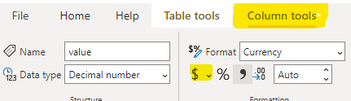
2. Select the [value] column - Column tools -- $
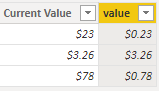
3. Result:
Best Regards,
Liu Yang
If this post helps, then please consider Accept it as the solution to help the other members find it more quickly
@Anonymous yours works too I accepted @amitchandak as a solution since it is a simpler version. Thanks a lot both.
If you love stickers, then you will definitely want to check out our Community Sticker Challenge!
Check out the January 2026 Power BI update to learn about new features.
| User | Count |
|---|---|
| 61 | |
| 58 | |
| 45 | |
| 21 | |
| 18 |
| User | Count |
|---|---|
| 122 | |
| 119 | |
| 37 | |
| 35 | |
| 29 |