Good morning!
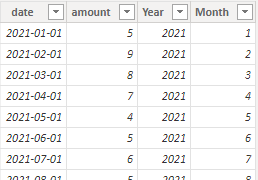
We are dealing with a problem when we try to add the preivous period sales (year) when we select a date from a date range.
So, the first step was add a table to identify de date ranges and make the relation with our calendar table.
Period =
    VAR _DateTable = CALENDAR(DATE(2020,1,1),TODAY())
    VAR _Today = ADDCOLUMNS(FILTER(DateTable,DATEDIFF(TODAY(),[Date],DAY) = 0),"RelativeDate","Today","Sort",1)
    VAR Yesterday = ADDCOLUMNS(FILTER(DateTable,DATEDIFF(TODAY(),[Date],DAY) = -1),"RelativeDate","Yesterday","Sort",2)
    VAR LastWeekday = ADDCOLUMNS(FILTER(DateTable,DATEDIFF(IF(WEEKDAY(TODAY(),2)=1,TODAY()-3,TODAY()-1),[Date],DAY) = 0),"RelativeDate","LastWeekday","Sort",3)
    VAR ThisWeek = ADDCOLUMNS(FILTER(DateTable,DATEDIFF(TODAY(),[Date]-1,WEEK) = 0),"RelativeDate","ThisWeek","Sort",4)
    VAR LastWeek = ADDCOLUMNS(FILTER(DateTable,DATEDIFF(TODAY(),[Date]-1,WEEK) = -1),"RelativeDate","LastWeek","Sort",5)
    VAR ThisMonth = ADDCOLUMNS(FILTER(DateTable,DATEDIFF(TODAY(),[Date],MONTH) = 0),"RelativeDate","ThisMonth","Sort",6)
    VAR LastMonth = ADDCOLUMNS(FILTER(DateTable,DATEDIFF(TODAY(),[Date],MONTH) = -1),"RelativeDate","LastMonth","Sort",7)
    VAR ThisYear = ADDCOLUMNS(FILTER(DateTable,DATEDIFF(TODAY(),[Date],YEAR) = 0),"RelativeDate","ThisYear","Sort",8)
    VAR LastYear = ADDCOLUMNS(FILTER(DateTable,DATEDIFF(TODAY(),[Date],YEAR) = -1),"RelativeDate","LastYear","Sort",9)
    Return
        UNION(_Today,Yesterday,LastWeekday,ThisWeek,LastWeek,ThisMonth,LastMonth,ThisYear,LastYear)
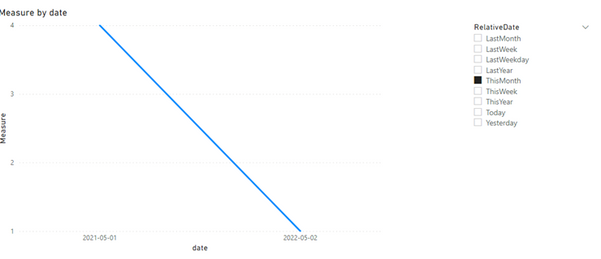
When we create a metric for sales, everything is working fine. However when we create a previous period metric and add to visual, it goes blank when you select a period.
Any help on this?
Kind regards
ATO