Forum Discussion
Add Previous Period (year) based on a custom date range selection
Good morning!
We are dealing with a problem when we try to add the preivous period sales (year) when we select a date from a date range.
So, the first step was add a table to identify de date ranges and make the relation with our calendar table.
Period =
VAR _DateTable = CALENDAR(DATE(2020,1,1),TODAY())
VAR _Today = ADDCOLUMNS(FILTER(DateTable,DATEDIFF(TODAY(),[Date],DAY) = 0),"RelativeDate","Today","Sort",1)
VAR Yesterday = ADDCOLUMNS(FILTER(DateTable,DATEDIFF(TODAY(),[Date],DAY) = -1),"RelativeDate","Yesterday","Sort",2)
VAR LastWeekday = ADDCOLUMNS(FILTER(DateTable,DATEDIFF(IF(WEEKDAY(TODAY(),2)=1,TODAY()-3,TODAY()-1),[Date],DAY) = 0),"RelativeDate","LastWeekday","Sort",3)
VAR ThisWeek = ADDCOLUMNS(FILTER(DateTable,DATEDIFF(TODAY(),[Date]-1,WEEK) = 0),"RelativeDate","ThisWeek","Sort",4)
VAR LastWeek = ADDCOLUMNS(FILTER(DateTable,DATEDIFF(TODAY(),[Date]-1,WEEK) = -1),"RelativeDate","LastWeek","Sort",5)
VAR ThisMonth = ADDCOLUMNS(FILTER(DateTable,DATEDIFF(TODAY(),[Date],MONTH) = 0),"RelativeDate","ThisMonth","Sort",6)
VAR LastMonth = ADDCOLUMNS(FILTER(DateTable,DATEDIFF(TODAY(),[Date],MONTH) = -1),"RelativeDate","LastMonth","Sort",7)
VAR ThisYear = ADDCOLUMNS(FILTER(DateTable,DATEDIFF(TODAY(),[Date],YEAR) = 0),"RelativeDate","ThisYear","Sort",8)
VAR LastYear = ADDCOLUMNS(FILTER(DateTable,DATEDIFF(TODAY(),[Date],YEAR) = -1),"RelativeDate","LastYear","Sort",9)
Return
UNION(_Today,Yesterday,LastWeekday,ThisWeek,LastWeek,ThisMonth,LastMonth,ThisYear,LastYear)
When we create a metric for sales, everything is working fine. However when we create a previous period metric and add to visual, it goes blank when you select a period.
Any help on this?
Kind regards
ATO
- Anonymous4 years ago
Hi ATO23 ,
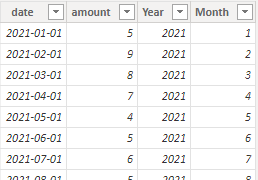
I created some data:
Here are the steps you can follow:
1. Create measure.
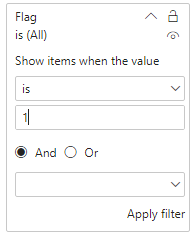
Flag = var _select=SELECTEDVALUE('Period'[RelativeDate]) var _date=CALCULATE(MAX('Period'[Date]),FILTER(ALL(Period),'Period'[RelativeDate]=_select)) return IF( AND( MAX('Table'[Year])=YEAR(_date),MAX('Table'[Month])=MONTH(_date))||AND(MAX('Table'[Year])=YEAR(_date)-1,MAX('Table'[Month])=MONTH(_date)) ,1,0)Measure = SUMX( FILTER( ALLSELECTED('Table'),'Table'[Year]=MAX('Table'[Year])&&'Table'[Month]=MAX('Table'[Month])),[amount])2. Place [Flag]in Filters, set is=1, apply filter.
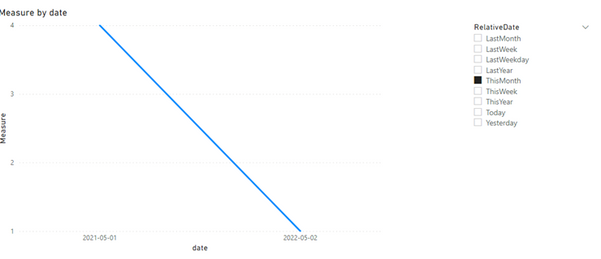
3. Result:
Best Regards,
Liu Yang
If this post helps, then please consider Accept it as the solution to help the other members find it more quickly
3 Replies
- amitchandak
Super User
ATO23 , Not very clear. But you can get previous year using Date table like
Year behind Sales = CALCULATE(SUM(Sales[Sales Amount]),dateadd('Date'[Date],-1,Year))
Year behind Sales = CALCULATE(SUM(Sales[Sales Amount]),SAMEPERIODLASTYEAR('Date'[Date]))week Year behind Sales = CALCULATE(SUM(Sales[Sales Amount]),dateadd('Date'[Date],-364,DAY))
- ATO23Frequent Visitor
Hello, thanks for your answer. We have already the metric create for the previous period, the same way you wrote down, the problem is that metric doesn't work with a date range selector. See example:
I have selected i want to see the sales for this month (may 2022) and i want to compare it with the sales of May 2021. and the metric is not working in with the selection date range
- AnonymousNot applicable
Hi ATO23 ,
I created some data:
Here are the steps you can follow:
1. Create measure.
Flag = var _select=SELECTEDVALUE('Period'[RelativeDate]) var _date=CALCULATE(MAX('Period'[Date]),FILTER(ALL(Period),'Period'[RelativeDate]=_select)) return IF( AND( MAX('Table'[Year])=YEAR(_date),MAX('Table'[Month])=MONTH(_date))||AND(MAX('Table'[Year])=YEAR(_date)-1,MAX('Table'[Month])=MONTH(_date)) ,1,0)Measure = SUMX( FILTER( ALLSELECTED('Table'),'Table'[Year]=MAX('Table'[Year])&&'Table'[Month]=MAX('Table'[Month])),[amount])2. Place [Flag]in Filters, set is=1, apply filter.
3. Result:
Best Regards,
Liu Yang
If this post helps, then please consider Accept it as the solution to help the other members find it more quickly