This time we’re going bigger than ever. Fabric, Power BI, SQL, AI and more. We're covering it all. You won't want to miss it.
Learn moreLevel up your Power BI skills this month - build one visual each week and tell better stories with data! Get started
Buenos días:
Soy bastante nuevo con lo que quizás pregunte una tontería, si es así disculpad.
Tengo un informe en Desktop que obtiene datos de una tabla con conexión ODBC a nuestros servidor. La tabla de datos es muy grande y aumenta cada día, con lo que la actualización es muy lenta porque lee todos los datos,
Me gustaría poder actualizar desde una fecha concreta que indique yo ya que los datos antiguos no cambian, ¿es posible hacerlo?
Hi @CAJMM1 ,
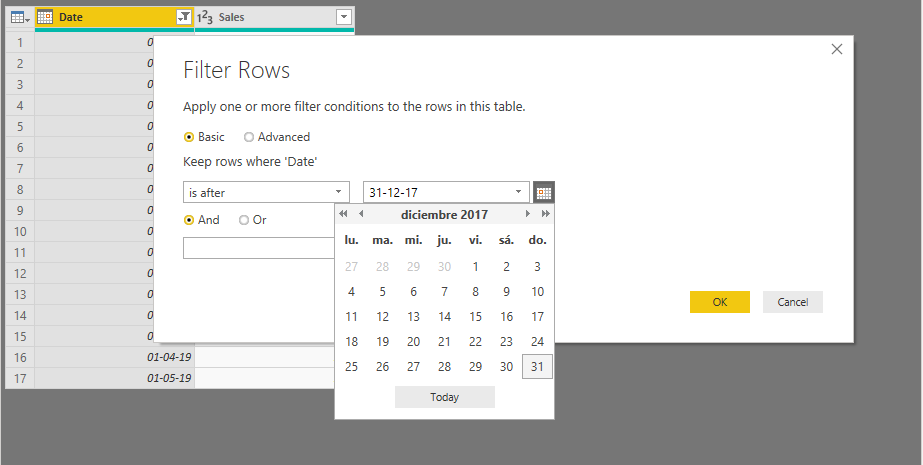
You can filter the data you get from a certain date. Go to Edit Query, choose your fact table, go to date column, and filter to get data after a desired date, like below:
Hope it helps.
Regards,
Fernando
Thank you very much for your answer.
I could do it but, once filtered, I can only see data since that date. What I was looking for is a way to take less time to update the data because I need to use all of them.
Hola, tuviste suerte en encontrar la solución?
Yo tengo el mismo problema.
Saludos,
RG
You can use Incremental Refresh:
https://docs.microsoft.com/en-us/power-bi/connect-data/incremental-refresh-overview
Regards,
Fernando
Hi,
I have the same issue ![]()
Check out the April 2026 Power BI update to learn about new features.
Sign up to receive a private message when registration opens and key events begin.
If you have recently started exploring Fabric, we'd love to hear how it's going. Your feedback can help with product improvements.
| User | Count |
|---|---|
| 30 | |
| 23 | |
| 23 | |
| 17 | |
| 15 |
| User | Count |
|---|---|
| 63 | |
| 36 | |
| 30 | |
| 23 | |
| 22 |