cancel
Showing results for 
Search instead for 
Did you mean: 

The Power BI Data Visualization World Championships is back! Get ahead of the game and start preparing now! Learn more

Reply
gauri
Helper III
Helper III

4 level drill down representation in clustered bar chart

Hello,


I am trying to show 4 level drill down in a tooltip , each at a different line, but somehow the columns in the axis are getting concatenated while representing. In the screenshot below :

Screenshot (20).png


facility name  : florence health services


AdmitdischargeloacationType  : Acute care hospital

Admitdischargelocation : dikinson county hospital

full name : adam clows(3587)

total discharges :175

 The above tooltip in the screen shot should resemble like this. Can someone help me out with the drill down, or any other visual which can be used instead of clustetred bar chart with this type of drill down.


Thanks

1 ACCEPTED SOLUTION
Icey
Community Support
Community Support

Hi @gauri ,


Based on my test, it is not supported in Power BI currently. 

You can post your idea on Power BI Ideas.

It is a place for customers to provide feedback about Power BI.
What's more, if a feedback is highly voted there by other customers, it will be promising that Microsoft Product Team will take it into consideration when designing the next version in the future.


Or, you can try to create a custom tooltip based on report pages like below:


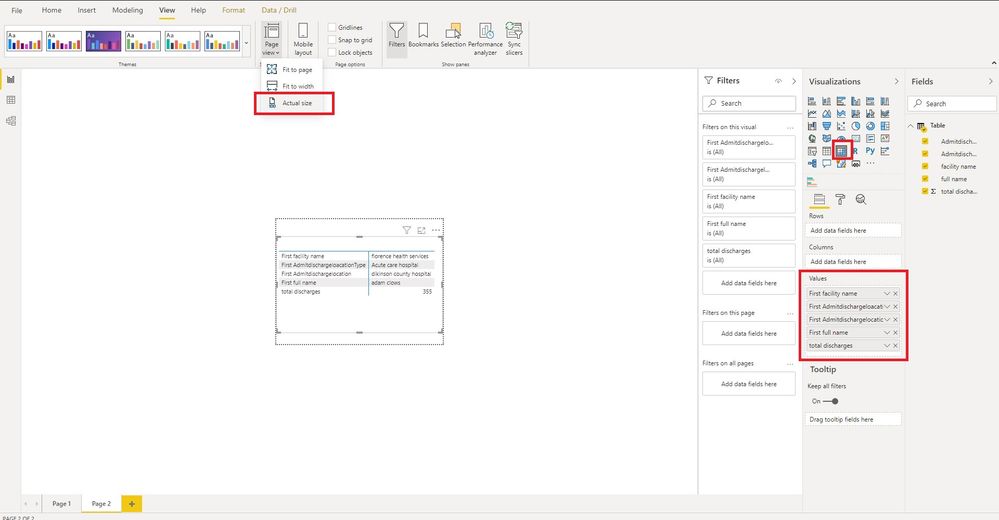
1. Create a report tooltip page. 

tooltip3.jpg


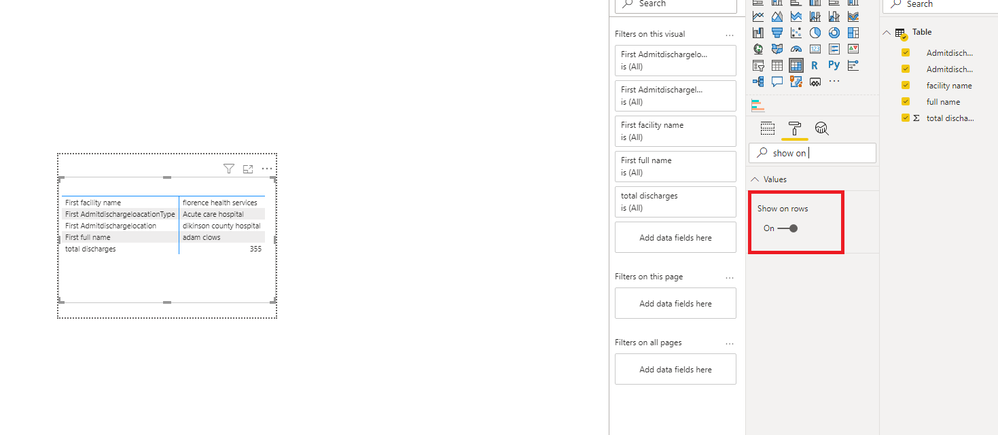
2. Create a Matrix visual and put all columns needed into Values field, set values to show on rows.

tooltip4.PNG


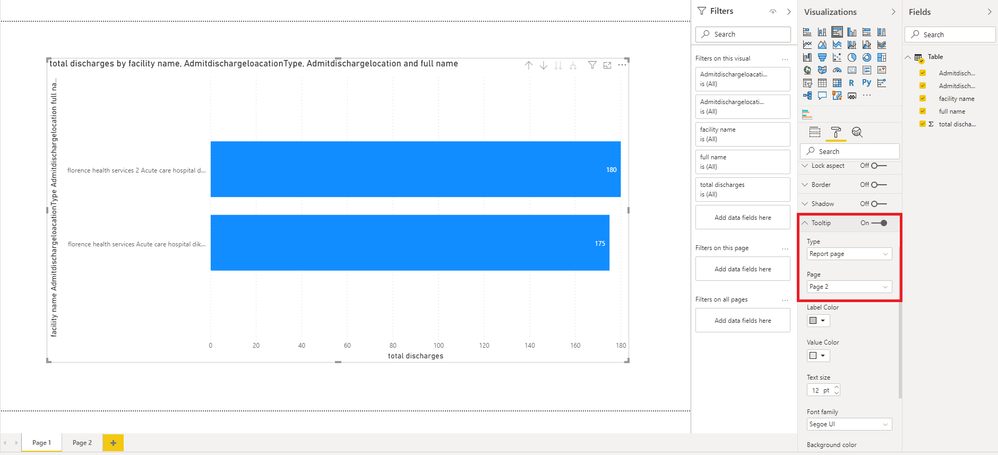
3. set Tooltip of your Cluster bar chart.

tooltip2.PNG


Then, you will get this:

tooltip.jpg

BTW, .pbix file attached.


Best Regards,

Icey


If this post helps, then please consider Accept it as the solution to help the other members find it more quickly.

View solution in original post

2 REPLIES 2
Icey
Community Support
Community Support

Hi @gauri ,


Based on my test, it is not supported in Power BI currently. 

You can post your idea on Power BI Ideas.

It is a place for customers to provide feedback about Power BI.
What's more, if a feedback is highly voted there by other customers, it will be promising that Microsoft Product Team will take it into consideration when designing the next version in the future.


Or, you can try to create a custom tooltip based on report pages like below:


1. Create a report tooltip page. 

tooltip3.jpg


2. Create a Matrix visual and put all columns needed into Values field, set values to show on rows.

tooltip4.PNG


3. set Tooltip of your Cluster bar chart.

tooltip2.PNG


Then, you will get this:

tooltip.jpg

BTW, .pbix file attached.


Best Regards,

Icey


If this post helps, then please consider Accept it as the solution to help the other members find it more quickly.

@Icey  Thank you for your help

Helpful resources

Announcements
Power BI DataViz World Championships

Power BI Dataviz World Championships

The Power BI Data Visualization World Championships is back! Get ahead of the game and start preparing now!

December 2025 Power BI Update Carousel

Power BI Monthly Update - December 2025

Check out the December 2025 Power BI Holiday Recap!

FabCon Atlanta 2026 carousel

FabCon Atlanta 2026

Join us at FabCon Atlanta, March 16-20, for the ultimate Fabric, Power BI, AI and SQL community-led event. Save $200 with code FABCOMM.