cancel
Showing results for 
Search instead for 
Did you mean: 

Next up in the FabCon + SQLCon recap series: The roadmap for Microsoft SQL and Maximizing Developer experiences in Fabric. All sessions are available on-demand after the live show. Register now

Reply
edlevud
New Member

100% stacked chart and line

Hello,


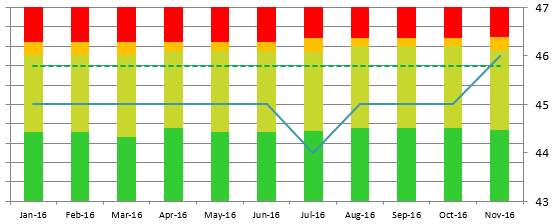
I would like to create a 100% stacked bar graph that inlcludes a line as well, is this possible?


example

1 ACCEPTED SOLUTION

Hi @edlevud

see my example above, it can be done just like you want, but the stacked 100% needs to be a measure with a calculation similar to what i mentioned above.


post a screenshot of your data if you need help,


HTH,

Frank

View solution in original post

5 REPLIES 5
Baskar
Resident Rockstar
Resident Rockstar

Sorry dude.


right now we don't have that chart.


but we have

1. Line and Stacked column

2. Line and clustered column.


but we don't have in default chart in power bi

HI Thanks for the replies will try again to upload my example...


Capture.PNG


Hi @edlevud

see my example above, it can be done just like you want, but the stacked 100% needs to be a measure with a calculation similar to what i mentioned above.


post a screenshot of your data if you need help,


HTH,

Frank

Anonymous
Not applicable

Hello Team ,
can some one help to create DAX Formula for creating a measure for 100 % Stack column.
I want to create chart similar to the attached picture ie 100 % Stack area + line chart.
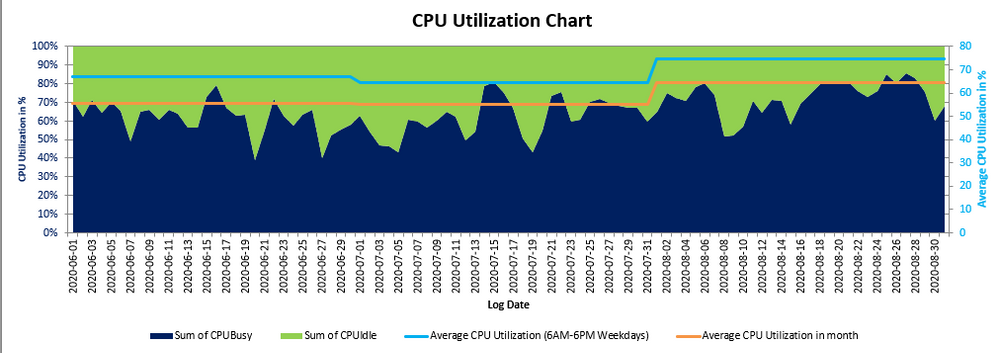
 

Capture.PNG
I have four columns
CPU BUSY - 100% STACKED AREA
CPU IDLE - 100 % STACKED AREA
Average CPU Utilization (6AM-6PM Weekdays) - LINE

Average CPU Utilization in month - LINE

I can achive this using stacked column and line chart with reduced padding , please help pe in writing the formulaeto convert my measure into 100 % measures.

Thanks

BetterCallFrank
Resolver IV
Resolver IV

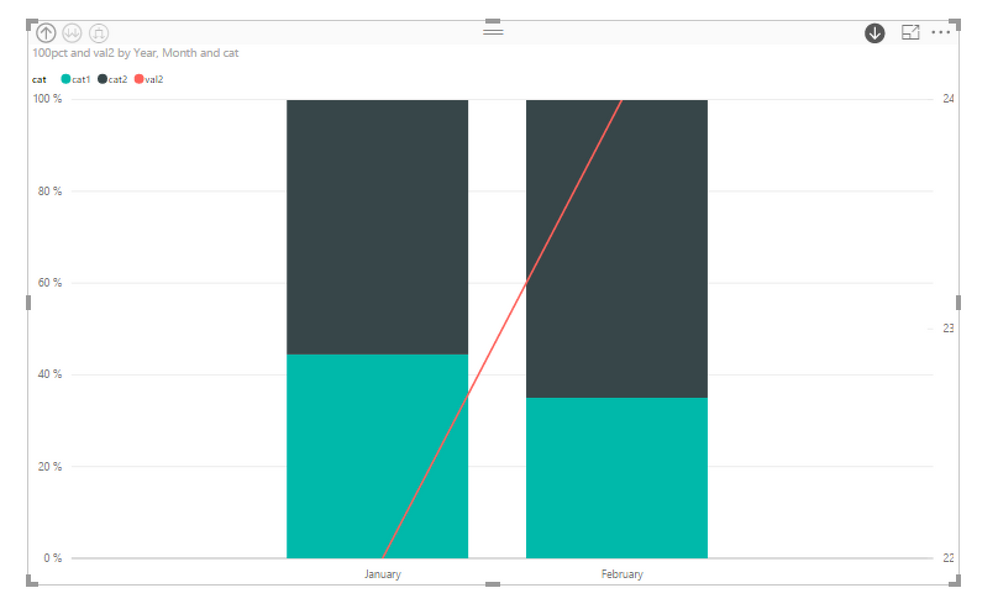
@edlevud you can use "stacked columns & lines" visual and make the calculation for the 100% in a measure.

for example

100pct = 
VAR Val1AllCats = CALCULATE( SUM( Table1[val1] ), ALL( Table1[cat] ) )
RETURN
DIVIDE( SUM( Table1[val1] ), Val1AllCats ) 

result

Screenshot at Jan. 03 15-15-18.png


your example is not showing unfortunately - can you show us something more?


Helpful resources

Announcements
New to Fabric survey Carousel

New to Fabric Survey

If you have recently started exploring Fabric, we'd love to hear how it's going. Your feedback can help with product improvements.

Power BI DataViz World Championships carousel

Power BI DataViz World Championships - June 2026

A new Power BI DataViz World Championship is coming this June! Don't miss out on submitting your entry.

March Power BI Update Carousel

Power BI Community Update - March 2026

Check out the March 2026 Power BI update to learn about new features.