Join us at FabCon Vienna from September 15-18, 2025
The ultimate Fabric, Power BI, SQL, and AI community-led learning event. Save €200 with code FABCOMM.
Get registered- Power BI forums
- Get Help with Power BI
- Desktop
- Service
- Report Server
- Power Query
- Mobile Apps
- Developer
- DAX Commands and Tips
- Custom Visuals Development Discussion
- Health and Life Sciences
- Power BI Spanish forums
- Translated Spanish Desktop
- Training and Consulting
- Instructor Led Training
- Dashboard in a Day for Women, by Women
- Galleries
- Data Stories Gallery
- Themes Gallery
- Contests Gallery
- Quick Measures Gallery
- Notebook Gallery
- Translytical Task Flow Gallery
- TMDL Gallery
- R Script Showcase
- Webinars and Video Gallery
- Ideas
- Custom Visuals Ideas (read-only)
- Issues
- Issues
- Events
- Upcoming Events
Compete to become Power BI Data Viz World Champion! First round ends August 18th. Get started.
- Power BI forums
- Forums
- Get Help with Power BI
- DAX Commands and Tips
- Re: extract year from
- Subscribe to RSS Feed
- Mark Topic as New
- Mark Topic as Read
- Float this Topic for Current User
- Bookmark
- Subscribe
- Printer Friendly Page


- Mark as New
- Bookmark
- Subscribe
- Mute
- Subscribe to RSS Feed
- Permalink
- Report Inappropriate Content
extract year from
Hi all, I have a question on Power Query. I have a column that has some times dates in the right format e.g. 01/25/2025 and some times in the format e.g. Q3-2004. Is there a way I can write a code that will give me the correct year of the date for every entry?
Thanks,
Nav
Solved! Go to Solution.


- Mark as New
- Bookmark
- Subscribe
- Mute
- Subscribe to RSS Feed
- Permalink
- Report Inappropriate Content
Hello there @naveen73 ! If I understood your situation correctly, I think this might give the result you are searching for:
= Table.AddColumn(#"Your previous step", "Year", each if Text.Start([ColumnName],1) = "Q" then Date.StartOfQuarter(Text.Start([ColumnName],2)) else Text.End(Text.From([ColumnName], Culture.Current),4))
If you keep the column formatted as a Date it should work as well!
Hope this answer solves your problem! If you need any additional help please @ me in your reply.
If my reply provided you with a solution, pleased mark it as a solution ✔️ or give it a kudoe 👍
Thanks!
You can also check out my LinkedIn!
Best regards,
Gonçalo Geraldes
- Mark as New
- Bookmark
- Subscribe
- Mute
- Subscribe to RSS Feed
- Permalink
- Report Inappropriate Content
@goncalogeraldes thanks for your swift response.
The cells with a value of "Q1-2002" give "null" with your proposed solution. I tried your solution in the first instance but did not work.
- Mark as New
- Bookmark
- Subscribe
- Mute
- Subscribe to RSS Feed
- Permalink
- Report Inappropriate Content
- Mark as New
- Bookmark
- Subscribe
- Mute
- Subscribe to RSS Feed
- Permalink
- Report Inappropriate Content
that is exactly the problem, sometimes it is and sometimes it is not.
- Mark as New
- Bookmark
- Subscribe
- Mute
- Subscribe to RSS Feed
- Permalink
- Report Inappropriate Content
- Mark as New
- Bookmark
- Subscribe
- Mute
- Subscribe to RSS Feed
- Permalink
- Report Inappropriate Content
yes
- Mark as New
- Bookmark
- Subscribe
- Mute
- Subscribe to RSS Feed
- Permalink
- Report Inappropriate Content
@naveen73 I will assume that it is a text column so try this then:
#"Added Custom" = Table.AddColumn(#"YourPreviousStep", "Year", each Text.End([ColumnName],4))
Hope this answer solves your problem! If you need any additional help please @ me in your reply.
If my reply provided you with a solution, pleased mark it as a solution ✔️ or give it a kudoe 👍
Thanks!
You can also check out my LinkedIn!
Best regards,
Gonçalo Geraldes
- Mark as New
- Bookmark
- Subscribe
- Mute
- Subscribe to RSS Feed
- Permalink
- Report Inappropriate Content
Thanks for this solution. I meanwhile tried a different one:
- convert to text
- take the last four characters
However, as I got the answer i.e. the last four digits realized that is not the answer I was looking for. What I am looking for is actually more complex.
For the values that have Q1, Q2 etc. I want the first day of that quarter in that year. For example: Q3-2007 should be 1 Oct 2007
Will that be possible?
thanks,
Naveen
- Mark as New
- Bookmark
- Subscribe
- Mute
- Subscribe to RSS Feed
- Permalink
- Report Inappropriate Content
Hello there @naveen73 ! If I understood your situation correctly, I think this might give the result you are searching for:
= Table.AddColumn(#"Your previous step", "Year", each if Text.Start([ColumnName],1) = "Q" then Date.StartOfQuarter(Text.Start([ColumnName],2)) else Text.End(Text.From([ColumnName], Culture.Current),4))
If you keep the column formatted as a Date it should work as well!
Hope this answer solves your problem! If you need any additional help please @ me in your reply.
If my reply provided you with a solution, pleased mark it as a solution ✔️ or give it a kudoe 👍
Thanks!
You can also check out my LinkedIn!
Best regards,
Gonçalo Geraldes
- Mark as New
- Bookmark
- Subscribe
- Mute
- Subscribe to RSS Feed
- Permalink
- Report Inappropriate Content
Thanks so much for your help, It is appreciated!!
- Mark as New
- Bookmark
- Subscribe
- Mute
- Subscribe to RSS Feed
- Permalink
- Report Inappropriate Content
Hello there @naveen73 ! You have to select your date column in Power Query and use the "extract year" function as follows:
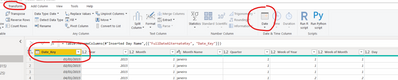
And select Year -> Year and it will create a column with the year for every date.
Hope this answer solves your problem! If you need any additional help please @ me in your reply.
If my reply provided you with a solution, pleased mark it as a solution ✔️ or give it a kudoe 👍
Thanks!
You can also check out my LinkedIn!
Best regards,
Gonçalo Geraldes

Helpful resources

Power BI Monthly Update - August 2025
Check out the August 2025 Power BI update to learn about new features.

Fabric Community Update - August 2025
Find out what's new and trending in the Fabric community.

| User | Count |
|---|---|
| 25 | |
| 10 | |
| 8 | |
| 7 | |
| 6 |


| User | Count |
|---|---|
| 32 | |
| 12 | |
| 10 | |
| 10 | |
| 9 |


