cancel
Showing results for 
Search instead for 
Did you mean: 

The Power BI Data Visualization World Championships is back! Get ahead of the game and start preparing now! Learn more

Reply
Raghda_Alshehhi
Frequent Visitor

display date in min/max card visualization

Hi all, 

I've been searching for a measure to display the date also for my min/max card visualization. 

Can power bi support this?


E.g. I have daily sales since 2022 till now, and i have 2 cards showing the max/min sales in a given day. The card shows the max valu we reaced till today in sales, but i als need to add the date.

Is there a way to do so?


2 ACCEPTED SOLUTIONS
ValtteriN
Super User
Super User

Hi,

Here is one way to do this:

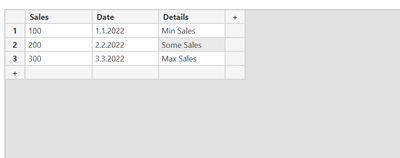
1. Data: 

ValtteriN_0-1657090766837.png

2. Dax:

Max Sales =
CALCULATE(max('MinMax KPI Sales'[Sales]),all('MinMax KPI Sales'))

Max Sales Date =
var _msales =
CALCULATE(max('MinMax KPI Sales'[Sales]),all('MinMax KPI Sales')) return

CALCULATE(max('MinMax KPI Sales'[Date]),ALL('MinMax KPI Sales'),'MinMax KPI Sales'[Sales]=_msales)

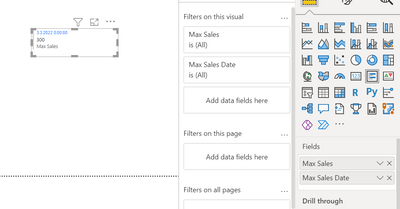
3. Place these values to e.g. Multirow card: 

ValtteriN_1-1657091042303.png

I hope this post helps to solve your issue and if it does consider accepting it as a solution and giving the post a thumbs up!

My LinkedIn: https://www.linkedin.com/in/n%C3%A4ttiahov-00001/


Did I answer your question? Mark my post as a solution!

Proud to be a Super User!


View solution in original post

Hi @Raghda_Alshehhi ,

According to your description, I create a sample. You can add date to the table everyday as you needed.

vkalyjmsft_0-1657676785586.png

Now, create two measures.

Max = CALCULATE ( MAX ( 'Table'[Sales] ), ALLSELECTED ( 'Table' ) )
Min = CALCULATE ( MIN ( 'Table'[Sales] ), ALLSELECTED ( 'Table' ) )

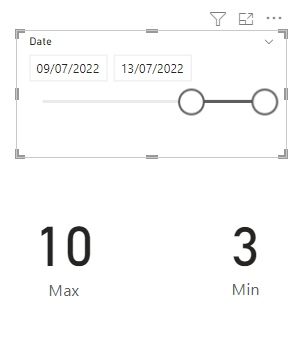
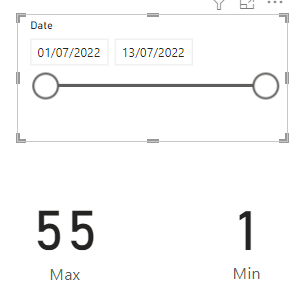
Put the two measures in card visuals and according to the date slicer, they will change dynamically.

vkalyjmsft_1-1657677007671.png

vkalyjmsft_2-1657677020829.png

I attach my sample below for reference.


Best Regards,
Community Support Team _ kalyj

If this post helps, then please considerAccept it as the solution to help the other members find it more quickly.

View solution in original post

4 REPLIES 4
v-yanjiang-msft
Community Support
Community Support

Hi @Raghda_Alshehhi ,

Has your problem been solved? If so, would you mind accept the helpful replies as solutions?
If you have a given date period slicer, you can modify  @ValtteriN 's solution with allselected function intead of ALL.

Max Sales =
CALCULATE ( MAX ( 'Table'[Sales] ), ALLSELECTED ( 'Table' ) )

If you need further help, please feel free to let me know.


Best Regards,
Community Support Team _ kalyj

If this post helps, then please considerAccept it as the solution to help the other members find it more quickly.

Hi kalyj,

Thank you for your response

Can you please explain this more 

Hi @Raghda_Alshehhi ,

According to your description, I create a sample. You can add date to the table everyday as you needed.

vkalyjmsft_0-1657676785586.png

Now, create two measures.

Max = CALCULATE ( MAX ( 'Table'[Sales] ), ALLSELECTED ( 'Table' ) )
Min = CALCULATE ( MIN ( 'Table'[Sales] ), ALLSELECTED ( 'Table' ) )

Put the two measures in card visuals and according to the date slicer, they will change dynamically.

vkalyjmsft_1-1657677007671.png

vkalyjmsft_2-1657677020829.png

I attach my sample below for reference.


Best Regards,
Community Support Team _ kalyj

If this post helps, then please considerAccept it as the solution to help the other members find it more quickly.

ValtteriN
Super User
Super User

Hi,

Here is one way to do this:

1. Data: 

ValtteriN_0-1657090766837.png

2. Dax:

Max Sales =
CALCULATE(max('MinMax KPI Sales'[Sales]),all('MinMax KPI Sales'))

Max Sales Date =
var _msales =
CALCULATE(max('MinMax KPI Sales'[Sales]),all('MinMax KPI Sales')) return

CALCULATE(max('MinMax KPI Sales'[Date]),ALL('MinMax KPI Sales'),'MinMax KPI Sales'[Sales]=_msales)

3. Place these values to e.g. Multirow card: 

ValtteriN_1-1657091042303.png

I hope this post helps to solve your issue and if it does consider accepting it as a solution and giving the post a thumbs up!

My LinkedIn: https://www.linkedin.com/in/n%C3%A4ttiahov-00001/


Did I answer your question? Mark my post as a solution!

Proud to be a Super User!


Helpful resources

Announcements
Power BI DataViz World Championships

Power BI Dataviz World Championships

The Power BI Data Visualization World Championships is back! Get ahead of the game and start preparing now!

December 2025 Power BI Update Carousel

Power BI Monthly Update - December 2025

Check out the December 2025 Power BI Holiday Recap!

FabCon Atlanta 2026 carousel

FabCon Atlanta 2026

Join us at FabCon Atlanta, March 16-20, for the ultimate Fabric, Power BI, AI and SQL community-led event. Save $200 with code FABCOMM.