Join us at FabCon Atlanta from March 16 - 20, 2026, for the ultimate Fabric, Power BI, AI and SQL community-led event. Save $200 with code FABCOMM.
Register now!Vote for your favorite vizzies from the Power BI Dataviz World Championship submissions. Vote now!
Hi guys,
I have 2 tables -
first with uniqe codes
second with dates and category (A,B,C)
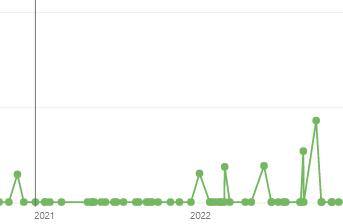
I have created this :
But after appling filter on category - I have this Count 1 values.
Should not this single values add up to the rest?
Can you help me with that please ?
Hi @MasterSonic ,
You can try modifying the function to the following form:
cumulative =
var AB = SUM('Col2'[Column])
return
CALCULATE(
SUM(
'Col1'[10]),
FILTER(
ALLSELECTED('Col2'[Date]),
'Col2'[Date]<= MAX('Col2'[Date])&&
'Col2'[Date]<>BLANK()
))
Best Regards,
Liu Yang
If this post helps, then please consider Accept it as the solution to help the other members find it more quickly
I got this one so it works per category.🤠
I think I cannot use filter on visual level, so needed to do this.
Also I referred to dates within my table not to Date table I created previously.
Column = CALCULATE(DISTINCTCOUNT(‘Col1'[code]))
/
10 = CALCULATE(SUM('Col1'[Column]),'Col1'[Category]="C")
/
cumulative =
var AB = SUM(‘Col1’ [Column])
return
CALCULATE(
'Col1'[10],
FILTER(
ALLSELECTED('Col2'[Date]),
'Col2'[Date]<= MAX('Col2'[Date]]
))
)
/
Could you just tell me how to do not count blanks from Col2[Date] please?
Hi amitchadak,
I have added new table
And applied your code (
instead of sum I have used count tho, column code has also strings within so sum doesn't work)
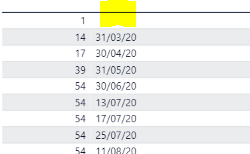
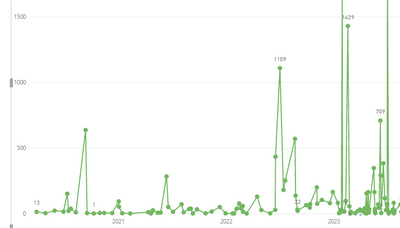
- it works but I would like to see smooth rise of overal values
What currenlty I have as a table view are values on the left.
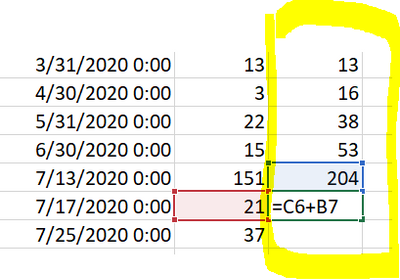
My main goal is to set values like this screenshot from excel in yellow/right.
@MasterSonic , You should always use a separate date table(Joined with date of your table) for that. and in visual use columns from that date table
Count of dates =
CALCULATE(
sum('Col1'[code]),
FILTER(
ALLSELECTED('Date'[Date]),
ISONORAFTER('Date'[Date],MAX('Date'[Date]), DESC)
)
Running Total/ Cumulative: https://www.youtube.com/watch?v=h2wsO332LUo&list=PLPaNVDMhUXGaaqV92SBD5X2hk3TMNlHhb&index=41
)
Vote for your favorite vizzies from the Power BI World Championship submissions!
If you love stickers, then you will definitely want to check out our Community Sticker Challenge!
Check out the January 2026 Power BI update to learn about new features.
| User | Count |
|---|---|
| 9 | |
| 7 | |
| 3 | |
| 3 | |
| 3 |
| User | Count |
|---|---|
| 18 | |
| 16 | |
| 12 | |
| 8 | |
| 5 |