


Join us at FabCon Atlanta from March 16 - 20, 2026, for the ultimate Fabric, Power BI, AI and SQL community-led event. Save $200 with code FABCOMM.
Register now!The Power BI Data Visualization World Championships is back! Get ahead of the game and start preparing now! Learn more
Hi,
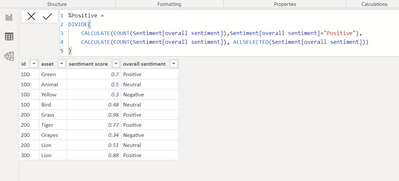
I have created 3 measures for calculating percentage for 3 different sentiments as below.
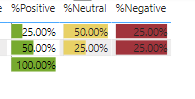
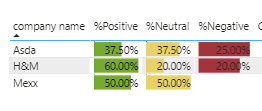
This seems to be working fine and in matrix I can show them as below
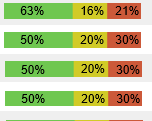
However this appears as 3 different columns, however I want to show it in a single column like below:
In a single bar I want to show positive,negative,neutral
Any help or guidance would be really appreciated
Solved! Go to Solution.
@Anonymous just create this measure:
% of all selected =
DIVIDE(COUNT(Sentiment[overall sentiment]), CALCUALTE(COUNT(Sentiment[overall sentiment]), ALLSELECTED(Sentiment[overall sentiment]))
Put it in a stacked bar chart and the [overall sentiment] column in the lengend.
@Anonymous just create this measure:
% of all selected =
DIVIDE(COUNT(Sentiment[overall sentiment]), CALCUALTE(COUNT(Sentiment[overall sentiment]), ALLSELECTED(Sentiment[overall sentiment]))
Put it in a stacked bar chart and the [overall sentiment] column in the lengend.
Thank You, this works as a separate visual but do we have any trick to make it work in matrix visual like for each row I can show a single bar in matrix or if in table visual.
Right now it shows up in 3 different columns in matrix visual
@Anonymous the regular matrix / table can't do that. They have the sparkline feature but it's not that rich to be able to do a stacked bar chart with legend. Maybe there is a custom visual that does that, but not something I'm aware of.
That helps, Thank You very much. I would still accept the above stacked bar solution since it does our work though in separate visual
@Anonymous great :))
The Power BI Data Visualization World Championships is back! Get ahead of the game and start preparing now!
Check out the November 2025 Power BI update to learn about new features.
| User | Count |
|---|---|
| 19 | |
| 10 | |
| 9 | |
| 4 | |
| 4 |
| User | Count |
|---|---|
| 34 | |
| 32 | |
| 20 | |
| 12 | |
| 11 |