cancel
Showing results for 
Search instead for 
Did you mean: 

View all the Fabric Data Days sessions on demand. View schedule

Reply
bipowerbix
Helper I
Helper I

Tricky Situation with SUM

Here is the Data I am using:

Type               Spent   Returns 

Apple100    
Orange      50200
Banana25150
Pear 500
Kiwi  


If I use 


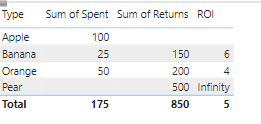
ROI = sum(Data[Returns]) / sum(Data[Spent])


I get the following
bipowerbix_2-1679957490503.png


Information on Data:

the spent and returned data is filled in by the user and will remain blank until then. So will have to create DAX measures that will assign 0 where there is a blank. However, if we do that, we get Infinity and NaN for Pear or Apple. So we have to HardCode such incidents to 0.


Questions

 1)  I also want to show the Kiwi line item as well and assign 0 to the ROI column for Kiwi. 

 2) How to deal with Infinity, show 0 instead of Infinity.

3) Result in either 1 of the shown expected output will work


Any suggestions, tips, and tricks are welcome.


I want to get the following output along with totals at the end for the first two columns and the average for the third column, shown below:

Expected Output

Type   Spent   Returns  ROI

Apple100  
Orange502004
Banana251506
Pear 500 
Kiwi   
Total1758505


OR


Type   Spent   Returns  ROI

Apple100 0
Orange502004
Banana251506
Pear 5000
Kiwi  0
Total1758505
1 ACCEPTED SOLUTION
wdx223_Daniel
Super User
Super User

4 REPLIES 4
wdx223_Daniel
Super User
Super User

wdx223_Daniel_0-1679966831640.png


Hi Daniel, The "+0" at the end gives the result for Kiwi. Is there any documentation for the "+0" online?

i just learned this from somewhere in internet. but you can read this article.

https://www.sqlbi.com/articles/how-to-return-0-instead-of-blank-in-dax/

This works for this case, I noticed that this doesn't work if other fields such as Dynamic Date are joined to the table. I have attached my post here.


https://community.powerbi.com/t5/DAX-Commands-and-Tips/DAX-Combinations-not-working-as-intended/m-p/...

Helpful resources

Announcements
November Power BI Update Carousel

Power BI Monthly Update - November 2025

Check out the November 2025 Power BI update to learn about new features.

Fabric Data Days Carousel

Fabric Data Days

Advance your Data & AI career with 50 days of live learning, contests, hands-on challenges, study groups & certifications and more!

FabCon Atlanta 2026 carousel

FabCon Atlanta 2026

Join us at FabCon Atlanta, March 16-20, for the ultimate Fabric, Power BI, AI and SQL community-led event. Save $200 with code FABCOMM.