cancel
Showing results for 
Search instead for 
Did you mean: 

The Power BI Data Visualization World Championships is back! Get ahead of the game and start preparing now! Learn more

Reply
asdf1608
Helper V
Helper V

To convert Window_avg tableau expression to Power BI

I'm trying to convert the Tableau Expresions to Power BI.

How to I do this window_avg in power BI.

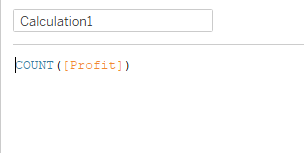
First I got the count of the column "Profit"

asdf1608_0-1685629386272.png


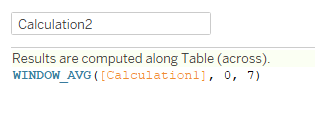
then used that calculated field to find the Window_avg

asdf1608_1-1685629433606.png


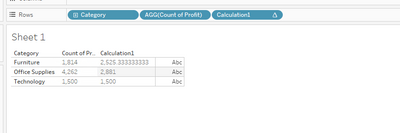
WINDOW_AVG([calculation2], 0, 7).

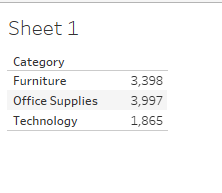
The result is 

asdf1608_2-1685629477108.png

How do I get this in power BI.
I have attached the PBI File.

sample.pbix.


Help in this is needed.

Thanks in advance

6 REPLIES 6
lbendlin
Super User
Super User

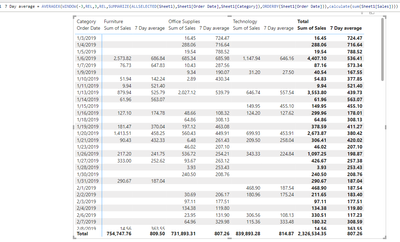
Same way. Use the WINDOW function to create your filter context and then apply your aggregation (AVERAGEX in your case)


lbendlin_0-1685820449363.png


Can you type this window_avg for the above scenario. I tried using yours but it didn't work. I have screenshot the expected result and the PBI file for reference.


Basic concept is 

1)to get the distinctcount of the column "Profit"

2) To find the Window_avg for that distinctcount column


The expected result:

asdf1608_0-1686815853596.png

The result I'm getting:

asdf1608_1-1686815883486.png

The Dax created:

asdf1608_2-1686815912944.png

The file:sample.pbix


Help in this is really needed.
Thanks in advance


Please describe exactly want you want to measure. Is it this? 


- Average of 8-day window sum count of transactions for each day in the table looking forward (0 .. +7)

Yes somewhat like that.

First to get the distinctcount of the column profit then to find the window_avg for that.
to return the average of the expression within the window


The simple explanation is to get the count of the column and to find the window_avg for that count.
I need this in the power BI. 

@lbendlin any idea about this

Please provide sample data (with sensitive information removed) that covers your issue or question completely, in a usable format (not as a screenshot).
https://community.fabric.microsoft.com/t5/Community-Blog/How-to-provide-sample-data-in-the-Power-BI-...
Please show the expected outcome based on the sample data you provided.

https://community.fabric.microsoft.com/t5/Desktop/How-to-Get-Your-Question-Answered-Quickly/m-p/1447...

Helpful resources

Announcements
Power BI DataViz World Championships

Power BI Dataviz World Championships

The Power BI Data Visualization World Championships is back! Get ahead of the game and start preparing now!

December 2025 Power BI Update Carousel

Power BI Monthly Update - December 2025

Check out the December 2025 Power BI Holiday Recap!

FabCon Atlanta 2026 carousel

FabCon Atlanta 2026

Join us at FabCon Atlanta, March 16-20, for the ultimate Fabric, Power BI, AI and SQL community-led event. Save $200 with code FABCOMM.