Get certified for free when you join Fabric Data Days 2026 and dive into Fabric, Power BI, SQL, AI, and other essential data skills.
Join nowData Days is here! Join us now for 60+ days of learning, challenges, and connection. Learn more
Good Afternoon,
I am currently looking for a solution to get the duration between two Date-Time value.
The issue is that I have to handle positivie and negative hour like in these 3 different scenarios :
Here an exemple of the 3 scenarios.
Activity Type Start time End time
| Drive | 20-10-21 00:06 | 20-10-21 00:11 |
| Time correction | 20-10-21 01:10 | 20-10-21 00:06 |
| Drive | 20-10-21 23:06 | 21-10-21 00:22 |
Do you know how I can have the duration in hh:mm:ss of each activity ?
Thank's in advance,
Don
Solved! Go to Solution.
@DonPepe Just subtract them then turn that into seconds and then you can use Chelsie Eiden's duration.
Column = ([Start] - [End]) * 1. * 24 * 60 * 60
Chelsie Eiden's Duration - Microsoft Power BI Community
Simple enough to handle it in PQ,
let
Source = Table.FromRows(Json.Document(Binary.Decompress(Binary.FromText("i45WcinKLEtV0lEyMtA1NNA1MlQwMLAyMEMTMDRUitWJVgrJzE1VSM4vKkpNLsnMzzu0AEWZoZWhAaZBIH1gO1BVGxlDbTFCqDYyUoqNBQA=", BinaryEncoding.Base64), Compression.Deflate)), let _t = ((type nullable text) meta [Serialized.Text = true]) in type table [#"Activity Type" = _t, #"Start time" = _t, #"End time" = _t]),
#"Changed Type" = Table.TransformColumnTypes(Source,{{"Activity Type", type text}, {"Start time", type datetime}, {"End time", type datetime}}, "fr"),
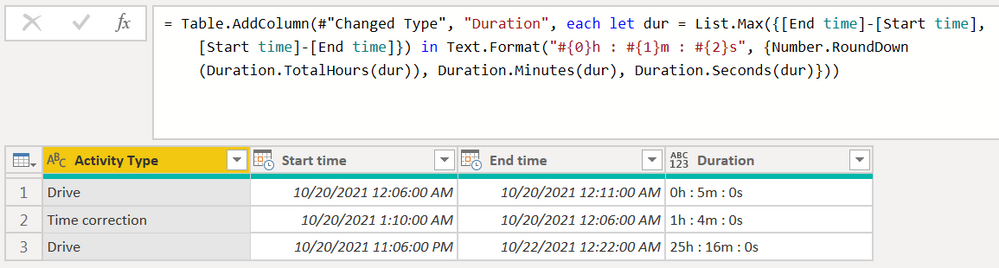
Dur = Table.AddColumn(#"Changed Type", "Duration", each let dur = List.Max({[End time]-[Start time], [Start time]-[End time]}) in Text.Format("#{0}h : #{1}m : #{2}s", {Number.RoundDown(Duration.TotalHours(dur)), Duration.Minutes(dur), Duration.Seconds(dur)}))
in
Dur
| Thanks to the great efforts by MS engineers to simplify syntax of DAX! Most beginners are SUCCESSFULLY MISLED to think that they could easily master DAX; but it turns out that the intricacy of the most frequently used RANKX() is still way beyond their comprehension! |
DAX is simple, but NOT EASY! |
Hi @CNENFRNL,
Thanks a lot, I tried in Power query and it works but I was loking for a DAX solution.
@DonPepe Just subtract them then turn that into seconds and then you can use Chelsie Eiden's duration.
Column = ([Start] - [End]) * 1. * 24 * 60 * 60
Chelsie Eiden's Duration - Microsoft Power BI Community
Hi @Greg_Deckler ,
Thanks for your answer and for the link to your book, I need it also !
Excellent day,
Don
Don't miss out on Data Days, June 15 through August 7. Learn Fabric, Power BI, SQL, AI and more.
Check out the May 2026 Power BI update to learn about new features.
| User | Count |
|---|---|
| 3 | |
| 2 | |
| 2 | |
| 1 | |
| 1 |
| User | Count |
|---|---|
| 6 | |
| 4 | |
| 3 | |
| 3 | |
| 3 |