Join us at FabCon Atlanta from March 16 - 20, 2026, for the ultimate Fabric, Power BI, AI and SQL community-led event. Save $200 with code FABCOMM.
Register now!Vote for your favorite vizzies from the Power BI Dataviz World Championship submissions. Vote now!
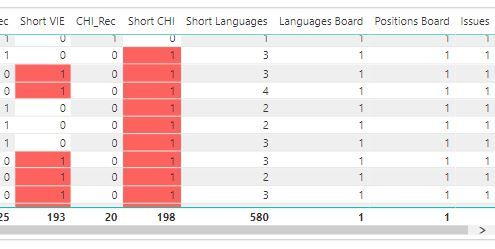
I have a measure Languages Board = IF([Short Languages]<>0,1,0) on a table visualization but the grand total is not showing correct. I am expecting it to Total it just like the other columns not 1, see screen shot.
Solved! Go to Solution.
Hi @Anonymous
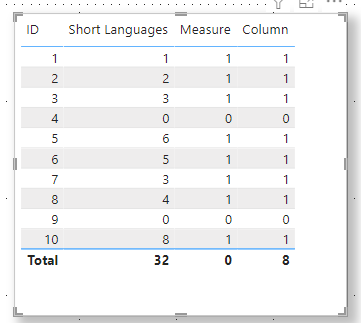
Mesaure is different from calculated column. When it is added to visual, the fields in Values have no aggregate calculation. So it returns a different value than regular column and calculated column. If you need its last value to be total, I suggest you can create calculated column.
In this case , you can created a calculated column like this :
Column = SWITCH(TRUE(),'Table'[Short Languages]<>0,1,0)
The final result is as shown :
I have attached my pbix file , you can refer to it .
Best Regards,
Community Support Team _ Ailsa Tao
If this post helps, then please consider Accept it as the solution to help the other members find it more quickly.
Hi @Anonymous
Mesaure is different from calculated column. When it is added to visual, the fields in Values have no aggregate calculation. So it returns a different value than regular column and calculated column. If you need its last value to be total, I suggest you can create calculated column.
In this case , you can created a calculated column like this :
Column = SWITCH(TRUE(),'Table'[Short Languages]<>0,1,0)
The final result is as shown :
I have attached my pbix file , you can refer to it .
Best Regards,
Community Support Team _ Ailsa Tao
If this post helps, then please consider Accept it as the solution to help the other members find it more quickly.
Hi @Anonymous
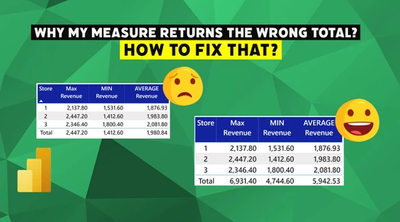
That's a total issue because you used IF statement in your formula, it's very common.
Please check this link and you will find how to handle this situation:
https://www.vahiddm.com/post/why-my-measure-returns-the-wrong-total
If this post helps, please consider accepting it as the solution to help the other members find it more quickly.
Appreciate your Kudos!!
LinkedIn: www.linkedin.com/in/vahid-dm/
Vote for your favorite vizzies from the Power BI World Championship submissions!
If you love stickers, then you will definitely want to check out our Community Sticker Challenge!
Check out the January 2026 Power BI update to learn about new features.
| User | Count |
|---|---|
| 7 | |
| 6 | |
| 3 | |
| 3 | |
| 2 |
| User | Count |
|---|---|
| 17 | |
| 11 | |
| 11 | |
| 6 | |
| 5 |