
cancel
Showing results for 
Search instead for 
Did you mean: 

Data Days is here! Join us now for 60+ days of learning, challenges, and connection. Learn more

Reply
PWRBI
Frequent Visitor

Summarize in DAX, HELP :)

I have the following data:

Dimension1, Dimension2, Value1, and Value2. Now, I want each row to be calculated first in Power BI (PBI), and then the sum of all individual positions from Dimension2 should be added for Dimension1.


Here's how it should look:

Dimension 1Dimension 2Wert 1Wert 2Ergebnis
AAA15= 1/5 --> 0,2
ABB1010= 10/10 --> 1
ATotal  

= 1,2


But that's how it looks in PBI:

Dimension 1Dimension 2Wert 1Wert 2Ergebnis
AAA15= 0,2
ABB1010= 1
ATotal  

= 0,73


I've already tried Summarize with no success. Can you help me please?

1 ACCEPTED SOLUTION
Nathaniel_C
Community Champion
Community Champion

Hi @PWRBI ,
If I understand your issue correctly, you might try this.

Column = IF(Summary[Dim2]="Total",Sumx(Summary,Divide(Summary[Val1],Summary[Val2])),Divide(Summary[Val1],Summary[Val2]))

Nathaniel_C_0-1688565596556.png


Let me know if you have any questions.

If this solves your issues, please mark it as the solution, so that others can find it easily. Kudos 👍are nice too.
Nathaniel


Did I answer your question? Mark my post as a solution!

Proud to be a Super User!


View solution in original post

6 REPLIES 6
Nathaniel_C
Community Champion
Community Champion

Hi @PWRBI ,

Nathaniel_C_0-1690573920339.png

How do you get 38,516.78 on the first row based on this formula.  If you wish me to look at this please include an explanation of what you are trying to do and make your example much clearer than what you did here.  Otherwise you may want to re post this.

Thank you,


Nathaniel


Did I answer your question? Mark my post as a solution!

Proud to be a Super User!


Hi, how can I Upload a PBI File for you with an example?

Nathaniel_C
Community Champion
Community Champion

Hi @PWRBI ,
If I understand your issue correctly, you might try this.

Column = IF(Summary[Dim2]="Total",Sumx(Summary,Divide(Summary[Val1],Summary[Val2])),Divide(Summary[Val1],Summary[Val2]))

Nathaniel_C_0-1688565596556.png


Let me know if you have any questions.

If this solves your issues, please mark it as the solution, so that others can find it easily. Kudos 👍are nice too.
Nathaniel


Did I answer your question? Mark my post as a solution!

Proud to be a Super User!


No, unfortunately it doesn't work, it's not what I expect. Total is not a dimension, but the total line of Power BI, where the sum must be calculated correctly

Hi @PWRBI ,
If I understand your issue correctly, you might try this - it was not clear in your picture.
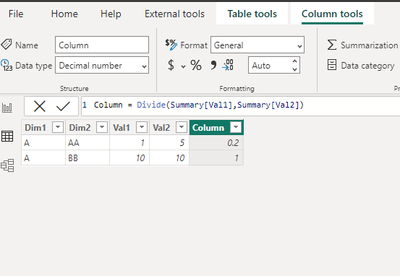
Add a column to your table and add it to the visual.
If this is not what you wanted, please add some more explanation.

Column = Divide(Summary[Val1],Summary[Val2])

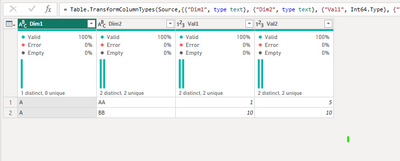
Original table

Nathaniel_C_0-1689277827657.png


With Calculated Column

Nathaniel_C_1-1689277886450.png

In Visual

Nathaniel_C_2-1689277944914.png


Let me know if you have any questions.

If this solves your issues, please mark it as the solution, so that others can find it easily. Kudos 👍are nice too.
Nathaniel


Did I answer your question? Mark my post as a solution!

Proud to be a Super User!


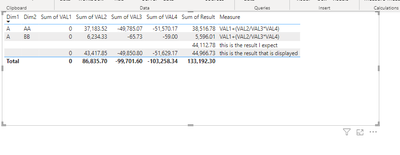
Dim1Dim2VAL1VAL2VAL3VAL4ResultMeasure
AAA037183,52-49785,07-51570,1738516,7772VAL1+(VAL2/VAL3*VAL4)
ABB06234,33-65,73-595596,00593VAL1+(VAL2/VAL3*VAL4)
  043417,85-49850,8-51629,1744966,7319this is the result that is displayed
      44112,7831this is the result I expect

Helpful resources

Announcements
Fabric Data Days is here Carousel

Fabric Data Days 2026

Don't miss out on Data Days, June 15 through August 7. Learn Fabric, Power BI, SQL, AI and more.

May Power BI Update Carousel

Power BI Monthly Update - May 2026

Check out the May 2026 Power BI update to learn about new features.

Power BI DataViz World Championships carousel

Power BI DataViz World Championships - June 2026

A new Power BI DataViz World Championship is coming this June! Don't miss out on submitting your entry.