cancel
Showing results for 
Search instead for 
Did you mean: 

The Power BI Data Visualization World Championships is back! Get ahead of the game and start preparing now! Learn more

Reply
KMadsen
Regular Visitor

Sum values in column instead of calculation

Hi all,


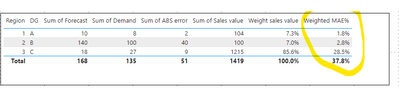
I have an issue trying to get the sum of the values in a measure. In the below screenshot, I want to be able to get the sum of the values in the column Weighted MAE% (33.1% and not 37.8%). In the total line I only get the calculation result for the total level (51/135) and the weights of each row is not considered.


How do I create a measure or column where I can the summed total for the weighted calculation in each row? I need to be able to understand the MAE% on aggregated levels considering the weight for each row and it has to be dynamic so that if I change the slicer to exclude e.g. Region 1, then it recalculates with new weights for each row.

KMadsen_0-1663929713512.png


Hope someone an help...

1 ACCEPTED SOLUTION

Hi,

Thank you for your feedback.

Could you please share your sample pbix file's link here? (Onedrive, googledrive, dropbox, any other...)

And then I can look into it to come up with a more accurate solution.

Or, please try the below if it is realted to two columns....


MEASURE totalfix =
    SUMX (
        SUMMARIZE ( TableName, 'TableName'[Region], 'TableName'[DG] ),
        [Weighted MAE%]
    )

If this post helps, then please consider accepting it as the solution to help other members find it faster, and give a big thumbs up.


Click here to visit my LinkedIn page

Click here to schedule a short Teams meeting to discuss your question.

View solution in original post

5 REPLIES 5
Jihwan_Kim
Super User
Super User

Hi,

I am not sure how your datamodel looks like, but please try to write a new measure like below, and put the below measure into the visualization.


MEASURE totalfix =
    SUMX ( VALUES ( 'TableName'[Region] ), [Weighted MAE%] )

If this post helps, then please consider accepting it as the solution to help other members find it faster, and give a big thumbs up.


Click here to visit my LinkedIn page

Click here to schedule a short Teams meeting to discuss your question.

Thanks for the suggestion @Jihwan_Kim . Unfortunately, it does not yield the right result when I use the filters to select and deselect certain region or DGs. Is there a wa to make it dependent on all filters?


KMadsen_0-1663935487924.png


Hi,

Thank you for your feedback.

Could you please share your sample pbix file's link here? (Onedrive, googledrive, dropbox, any other...)

And then I can look into it to come up with a more accurate solution.

Or, please try the below if it is realted to two columns....


MEASURE totalfix =
    SUMX (
        SUMMARIZE ( TableName, 'TableName'[Region], 'TableName'[DG] ),
        [Weighted MAE%]
    )

If this post helps, then please consider accepting it as the solution to help other members find it faster, and give a big thumbs up.


Click here to visit my LinkedIn page

Click here to schedule a short Teams meeting to discuss your question.

Thanks @Jihwan_Kim , the summarize did the job! And it also works on more than 2 columns in the actual data set 🙂

Greg_Deckler
Community Champion
Community Champion

@KMadsen This looks like a measure totals problem. Very common. See my post about it here: https://community.powerbi.com/t5/DAX-Commands-and-Tips/Dealing-with-Measure-Totals/td-p/63376

Also, this Quick Measure, Measure Totals, The Final Word should get you what you need:
https://community.powerbi.com/t5/Quick-Measures-Gallery/Measure-Totals-The-Final-Word/m-p/547907


Follow on LinkedIn
@ me in replies or I'll lose your thread!!!
Instead of a Kudo, please vote for this idea
Become an expert!: Enterprise DNA
External Tools: MSHGQM
YouTube Channel!: Microsoft Hates Greg
Latest book!:
DAX For Humans

DAX is easy, CALCULATE makes DAX hard...

Helpful resources

Announcements
Power BI DataViz World Championships

Power BI Dataviz World Championships

The Power BI Data Visualization World Championships is back! Get ahead of the game and start preparing now!

December 2025 Power BI Update Carousel

Power BI Monthly Update - December 2025

Check out the December 2025 Power BI Holiday Recap!

FabCon Atlanta 2026 carousel

FabCon Atlanta 2026

Join us at FabCon Atlanta, March 16-20, for the ultimate Fabric, Power BI, AI and SQL community-led event. Save $200 with code FABCOMM.