cancel
Showing results for 
Search instead for 
Did you mean: 

View all the Fabric Data Days sessions on demand. View schedule

Reply
sadiahsapiee
Helper I
Helper I

Show all rows in comment column based on filter

My Table1 like below:


Type              Market         Country      Month           Comment                                 Level

Business       Europe          Italy            Apr20        Project Completed                      Global

Business       Europe          Italy            Apr20       Continue focus on automation   Market

Business       Europe          Denmark    Apr20       Testing ongoing                          Market


If Market slicer select Europe, I want it to display row 2 & row 3.

if Market slicer select All, I want it to display row 1

 I try apply below using a few exp like FirstNonBlank but still not work.  
View= If( HASONEFILTER(Table1[Market];

             Calculate(<exp>(Table1[Comment]); Filter(Table1; Table1[Level]="Market");

            Calculate(<exp>>(Table1[Comment]); Filter(Table1; Table1[Level]="Global")

            )

what <exp> should i use? I tried FirstNonBlank but only one row is displayed. Is there any formula should I use? 

Thank in advance

1 ACCEPTED SOLUTION
stevedep
Memorable Member
Memorable Member

Hi,


This should be what you are looking for:

SelectedValue = 
var v_filterenabled = ( ISFILTERED(Market_Country[Country]) || ISFILTERED(Market_Country[Market]))
var v_filtervalue = IF(v_filterenabled;"Market";"Global") 
return
CALCULATE(COUNTROWS('Table');FILTER('Table';'Table'[Level]=v_filtervalue))


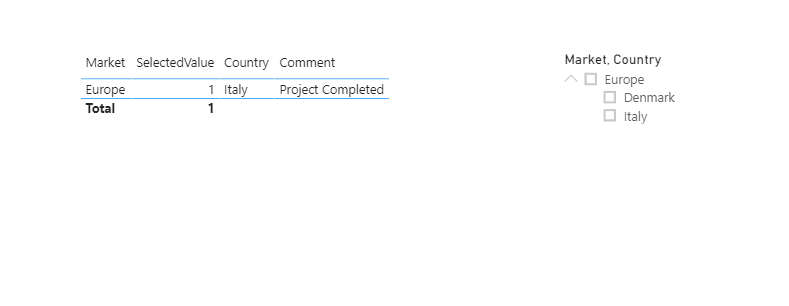
When no filter is applied is shows the global record:

nofilter.png 

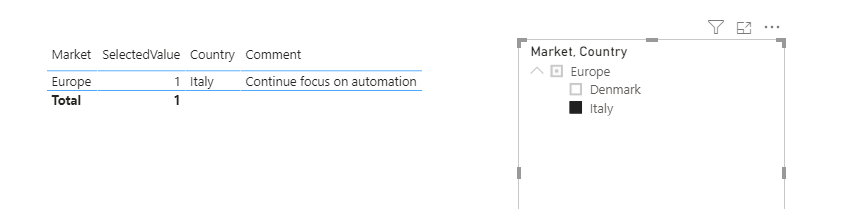
When a filter is applied is shows the "Market" record:

withfilter.png

Please note that it requires this datamodel.

datamodel.png


Power BI file is here.


Please mark as solution if this is what you are looking for. Thanks!


Kind regards,


Steve. 

View solution in original post

4 REPLIES 4
stevedep
Memorable Member
Memorable Member

Hi,


This should be what you are looking for:

SelectedValue = 
var v_filterenabled = ( ISFILTERED(Market_Country[Country]) || ISFILTERED(Market_Country[Market]))
var v_filtervalue = IF(v_filterenabled;"Market";"Global") 
return
CALCULATE(COUNTROWS('Table');FILTER('Table';'Table'[Level]=v_filtervalue))


When no filter is applied is shows the global record:

nofilter.png 

When a filter is applied is shows the "Market" record:

withfilter.png

Please note that it requires this datamodel.

datamodel.png


Power BI file is here.


Please mark as solution if this is what you are looking for. Thanks!


Kind regards,


Steve. 

Hi Steve,


Thank you very much for your solution. Really appreciate it. 

Anonymous
Not applicable

Hi,

Can you please clarify what end result you are trying to obtain? If you added the [Market] column to a slicer and selected Europe, it would return all 3 columns. Are you trying to slice by [Level] instead?


Thanks,

Kim

Hi Kim,


Thanks for the respose.

My slicer is only [Market] and [Country]. If both slicer NOT select anything (All), then only row that has 'Global' value in column Level is displayed. I don't want create [Level] as slicer.


Thanks in advance. 

Helpful resources

Announcements
November Power BI Update Carousel

Power BI Monthly Update - November 2025

Check out the November 2025 Power BI update to learn about new features.

Fabric Data Days Carousel

Fabric Data Days

Advance your Data & AI career with 50 days of live learning, contests, hands-on challenges, study groups & certifications and more!

FabCon Atlanta 2026 carousel

FabCon Atlanta 2026

Join us at FabCon Atlanta, March 16-20, for the ultimate Fabric, Power BI, AI and SQL community-led event. Save $200 with code FABCOMM.