Join us at FabCon Vienna from September 15-18, 2025
The ultimate Fabric, Power BI, SQL, and AI community-led learning event. Save €200 with code FABCOMM.
Get registered- Power BI forums
- Get Help with Power BI
- Desktop
- Service
- Report Server
- Power Query
- Mobile Apps
- Developer
- DAX Commands and Tips
- Custom Visuals Development Discussion
- Health and Life Sciences
- Power BI Spanish forums
- Translated Spanish Desktop
- Training and Consulting
- Instructor Led Training
- Dashboard in a Day for Women, by Women
- Galleries
- Data Stories Gallery
- Themes Gallery
- Contests Gallery
- Quick Measures Gallery
- Notebook Gallery
- Translytical Task Flow Gallery
- TMDL Gallery
- R Script Showcase
- Webinars and Video Gallery
- Ideas
- Custom Visuals Ideas (read-only)
- Issues
- Issues
- Events
- Upcoming Events
Enhance your career with this limited time 50% discount on Fabric and Power BI exams. Ends September 15. Request your voucher.
- Power BI forums
- Forums
- Get Help with Power BI
- DAX Commands and Tips
- Re: RunningTotal to stop at max Date
- Subscribe to RSS Feed
- Mark Topic as New
- Mark Topic as Read
- Float this Topic for Current User
- Bookmark
- Subscribe
- Printer Friendly Page

- Mark as New
- Bookmark
- Subscribe
- Mute
- Subscribe to RSS Feed
- Permalink
- Report Inappropriate Content
RunningTotal to stop at max Date
Good afternoon,
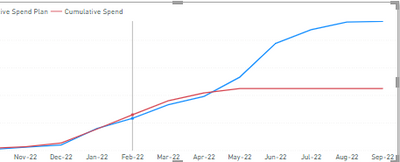
I was just wondering what can of dax formula can I use to show the max date of my line
the orange line is Actual transaction amount and blue line is the Estimated amount problem is I dont want the orange line to keep going the max date should be may.
Thank you!
Solved! Go to Solution.


- Mark as New
- Bookmark
- Subscribe
- Mute
- Subscribe to RSS Feed
- Permalink
- Report Inappropriate Content
Here it is how to do what you want.
Navigate to this page:
Standard time-related calculations – DAX Patterns
and then to this header:
Controlling the visualization in future dates
This shows exactly how to deal with such issues.


- Mark as New
- Bookmark
- Subscribe
- Mute
- Subscribe to RSS Feed
- Permalink
- Report Inappropriate Content
Hi, @Callmeadel
You can try the following methods.
Measure:
RunningTotal =
IF (
    MONTH ( SELECTEDVALUE ( 'Table'[Date] ) ) <= MONTH ( TODAY () ),
    CALCULATE (
        SUM ( 'Table'[Actual transaction] ),
        FILTER ( ALL ( 'Table' ), [Date] <= SELECTEDVALUE ( 'Table'[Date] ) )
    ),
    BLANK ()
)
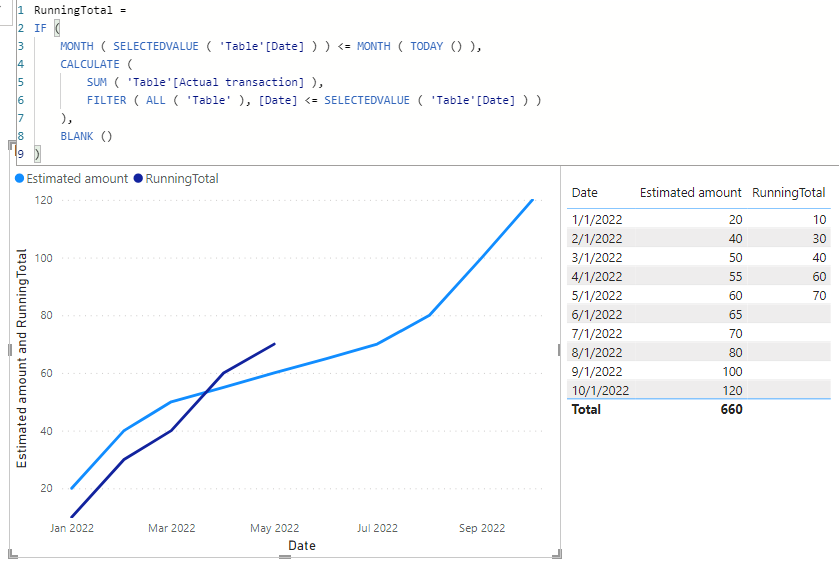
Is this the result you expect?
Best Regards,
Community Support Team _Charlotte
If this post helps, then please consider Accept it as the solution to help the other members find it more.
- Mark as New
- Bookmark
- Subscribe
- Mute
- Subscribe to RSS Feed
- Permalink
- Report Inappropriate Content
Hi, @Callmeadel
You can try the following methods.
Measure:
RunningTotal =
IF (
    MONTH ( SELECTEDVALUE ( 'Table'[Date] ) ) <= MONTH ( TODAY () ),
    CALCULATE (
        SUM ( 'Table'[Actual transaction] ),
        FILTER ( ALL ( 'Table' ), [Date] <= SELECTEDVALUE ( 'Table'[Date] ) )
    ),
    BLANK ()
)
Is this the result you expect?
Best Regards,
Community Support Team _Charlotte
If this post helps, then please consider Accept it as the solution to help the other members find it more.
- Mark as New
- Bookmark
- Subscribe
- Mute
- Subscribe to RSS Feed
- Permalink
- Report Inappropriate Content
Thank you zhangti, I will test your method out
This is a method I used and worked great
- Mark as New
- Bookmark
- Subscribe
- Mute
- Subscribe to RSS Feed
- Permalink
- Report Inappropriate Content
Here it is how to do what you want.
Navigate to this page:
Standard time-related calculations – DAX Patterns
and then to this header:
Controlling the visualization in future dates
This shows exactly how to deal with such issues.
- Mark as New
- Bookmark
- Subscribe
- Mute
- Subscribe to RSS Feed
- Permalink
- Report Inappropriate Content
Thank you for the reply, I have created that measure it did say we can't use it on the report so how can it be used to fitler the graph? Do I drag it to filters because it won't let me add it to values.
- Mark as New
- Bookmark
- Subscribe
- Mute
- Subscribe to RSS Feed
- Permalink
- Report Inappropriate Content
They wanted me to use it in a column and then use a slicer that makes sense, but my table doesnt have any data after may so everything is returning True which still keeps the line 😞

Helpful resources

Power BI Monthly Update - August 2025
Check out the August 2025 Power BI update to learn about new features.

Fabric Community Update - August 2025
Find out what's new and trending in the Fabric community.

| User | Count |
|---|---|
| 15 | |
| 12 | |
| 8 | |
| 7 | |
| 7 |


| User | Count |
|---|---|
| 24 | |
| 20 | |
| 12 | |
| 9 | |
| 7 |


