Don't miss your chance to take exam DP-600 or DP-700 on us!
Request nowLearn from the best! Meet the four finalists headed to the FINALS of the Power BI Dataviz World Championships! Register now
Hi,
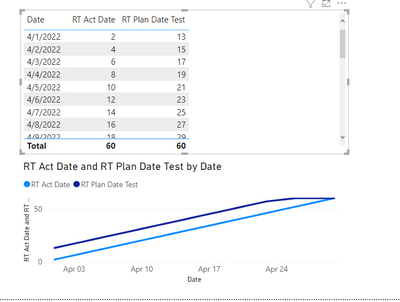
I have a table with two dates "Plan Date" and "Act Date" that I need to compare in one line chart. I have to compare them between reports from different dates ("Report date") . I also have a table with a calendar. I have to show increasing number of rows for particular dates.
The “RT Act Date”
measure works fine, but I am unable to show data for both reports as two lines on chart. The relation "Plan Date" to "Date" in the Calendar table is not active, so the measure "RT Plan Date" is not working. This is my exemle file:
https://www.dropbox.com/s/ap9j5qicvc0zph9/RT.pbix?dl=0
I will be grateful for any suggestions.
Thank you.
Marcin
Solved! Go to Solution.
Hi @maart666
Thanks for reaching out to us.
you can try this measure,
RT Plan Date Test =
CALCULATE(
COUNTROWS(Arkusz1),
FILTER(
ALLSELECTED(Arkusz1),Arkusz1[Plan Date] <=MAX('Calendar'[Date])
)
)
if this doesn't help, could you provide the expected outcome (how to calculate it, the math formula)? Thanks.
Best Regards,
Community Support Team _Tang
If this post helps, please consider Accept it as the solution to help the other members find it more quickly.
Hi @maart666
Thanks for reaching out to us.
you can try this measure,
RT Plan Date Test =
CALCULATE(
COUNTROWS(Arkusz1),
FILTER(
ALLSELECTED(Arkusz1),Arkusz1[Plan Date] <=MAX('Calendar'[Date])
)
)
if this doesn't help, could you provide the expected outcome (how to calculate it, the math formula)? Thanks.
Best Regards,
Community Support Team _Tang
If this post helps, please consider Accept it as the solution to help the other members find it more quickly.
Thank you.
It is what I was looking for!
Marcin
Share feedback directly with Fabric product managers, participate in targeted research studies and influence the Fabric roadmap.
Check out the February 2026 Power BI update to learn about new features.
| User | Count |
|---|---|
| 5 | |
| 4 | |
| 3 | |
| 3 | |
| 2 |