Join us at FabCon Vienna from September 15-18, 2025
The ultimate Fabric, Power BI, SQL, and AI community-led learning event. Save €200 with code FABCOMM.
Get registered- Power BI forums
- Get Help with Power BI
- Desktop
- Service
- Report Server
- Power Query
- Mobile Apps
- Developer
- DAX Commands and Tips
- Custom Visuals Development Discussion
- Health and Life Sciences
- Power BI Spanish forums
- Translated Spanish Desktop
- Training and Consulting
- Instructor Led Training
- Dashboard in a Day for Women, by Women
- Galleries
- Data Stories Gallery
- Themes Gallery
- Contests Gallery
- Quick Measures Gallery
- Notebook Gallery
- Translytical Task Flow Gallery
- TMDL Gallery
- R Script Showcase
- Webinars and Video Gallery
- Ideas
- Custom Visuals Ideas (read-only)
- Issues
- Issues
- Events
- Upcoming Events
Compete to become Power BI Data Viz World Champion! First round ends August 18th. Get started.
- Power BI forums
- Forums
- Get Help with Power BI
- DAX Commands and Tips
- Re: Running Total
- Subscribe to RSS Feed
- Mark Topic as New
- Mark Topic as Read
- Float this Topic for Current User
- Bookmark
- Subscribe
- Printer Friendly Page

- Mark as New
- Bookmark
- Subscribe
- Mute
- Subscribe to RSS Feed
- Permalink
- Report Inappropriate Content
Running Total
HHello, I don't know, how to write in dax Running Total Query for below situation:
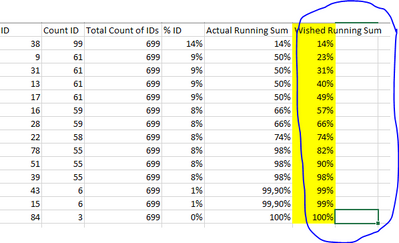
I only find examples for situations where the Count ID is not similar in one Column. So I get values in Column Actual Running Total. Do you know how to write it?
Thank you in advance.
Solved! Go to Solution.


- Mark as New
- Bookmark
- Subscribe
- Mute
- Subscribe to RSS Feed
- Permalink
- Report Inappropriate Content
@LiborK
So, no calculated columns. Create this measure:
Count RT =
VAR _current_count = [COUNT ID'S]
VAR _current_id = SELECTEDVALUE('Table'[ID])
VAR _max_customer_id =
    ROUND(CALCULATE(MAX('Table'[ID]), ALLSELECTED('Table'[ID]),-1)
VAR _ranking_table =
    ADDCOLUMNS(
        ALLSELECTED('Table'[ID]),
        "@%ID", [% ID],
        "@Ranking", [COUNT ID'S] * _max_customer_id + 'Table'[ID]
    )
VAR _current_rank =  _current_sales * _max_customer_id + _current_id
VAR _result =
    SUMX(
        FILTER(
            _ranking_table,
            [@Ranking] >= _current_rank
        ),
        [@%ID]
    )
RETURN
    _result

Showcase Report – Contoso By SpartaBI






- Mark as New
- Bookmark
- Subscribe
- Mute
- Subscribe to RSS Feed
- Permalink
- Report Inappropriate Content
Hi @LiborK,
You may try this solution.
Here are the Measures created.
Count ID = CALCULATE(COUNT('Table'[ID]),ALLEXCEPT('Table','Table'[ID]))

Total Count of IDs = CALCULATE(COUNT('Table'[ID]),ALL('Table'))

%ID = DIVIDE([Count ID],'Table'[Total Count of IDs])

Wished Running Sum = CALCULATE([%ID],FILTER(ALL('Table'),'Table'[RANK]>=MAX('Table'[RANK])))
Here are the Calculated columns created.
DistinctCountID =CALCULATE(COUNT('Table'[ID]),FILTER(ALL('Table'),'Table'[ID]=EARLIER('Table'[ID])))

RANK =
VAR MaxID =
    CALCULATE ( MAX ( 'Table'[ID] ), ALLEXCEPT ( 'Table', 'Table'[DistinctCountID] ) )
VAR Addition =
    ROUND ( 'Table'[%ID], 5 ) * 100000
RETURN
    IF ( 'Table'[ID] < MaxID, Addition + MaxID, Addition )
Then, the result look like this.
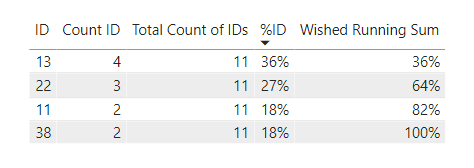
Also, attach the pbix file as reference.
If this post helps, then please consider Accept it as the solution to help the other members find it more quickly. If I misunderstand your needs or you still have problems on it, please feel free to let me know. Thanks a lot!
Best Regards,
Community Support Team _ Caiyun
- Mark as New
- Bookmark
- Subscribe
- Mute
- Subscribe to RSS Feed
- Permalink
- Report Inappropriate Content
Hi @LiborK,
You may try this solution.
Here are the Measures created.
Count ID = CALCULATE(COUNT('Table'[ID]),ALLEXCEPT('Table','Table'[ID]))

Total Count of IDs = CALCULATE(COUNT('Table'[ID]),ALL('Table'))

%ID = DIVIDE([Count ID],'Table'[Total Count of IDs])

Wished Running Sum = CALCULATE([%ID],FILTER(ALL('Table'),'Table'[RANK]>=MAX('Table'[RANK])))
Here are the Calculated columns created.
DistinctCountID =CALCULATE(COUNT('Table'[ID]),FILTER(ALL('Table'),'Table'[ID]=EARLIER('Table'[ID])))

RANK =
VAR MaxID =
    CALCULATE ( MAX ( 'Table'[ID] ), ALLEXCEPT ( 'Table', 'Table'[DistinctCountID] ) )
VAR Addition =
    ROUND ( 'Table'[%ID], 5 ) * 100000
RETURN
    IF ( 'Table'[ID] < MaxID, Addition + MaxID, Addition )
Then, the result look like this.
Also, attach the pbix file as reference.
If this post helps, then please consider Accept it as the solution to help the other members find it more quickly. If I misunderstand your needs or you still have problems on it, please feel free to let me know. Thanks a lot!
Best Regards,
Community Support Team _ Caiyun
- Mark as New
- Bookmark
- Subscribe
- Mute
- Subscribe to RSS Feed
- Permalink
- Report Inappropriate Content
It works thank you so much!
- Mark as New
- Bookmark
- Subscribe
- Mute
- Subscribe to RSS Feed
- Permalink
- Report Inappropriate Content
@LiborK yes, but you need to choose which one is your 2nd important column for the sorting (the 1st is of course the [Count ID] )
Let's say it's the [ID] column and let's say higher ID -> Higher rank
So, first, create this calculated column:
'Table'[Sorting] = 'Table'[Count ID] * ROUND(MAX('Table'[ID]), -1) + 'Table'[ID].
Then create this Count RT column:
'Table'[Count RT] =
VAR _current_rank = 'Table'[Sorting]
RETURN
SUMX(FILTER('Table, 'Table'[Sorting] <= _current_rank), 'Table'[% ID])
Showcase Report – Contoso By SpartaBI
- Mark as New
- Bookmark
- Subscribe
- Mute
- Subscribe to RSS Feed
- Permalink
- Report Inappropriate Content
Hi, thank you for you answer, but I am not able to choose
'Table'[Sorting] = 'Table'[Count ID] * ROUND(MAX('Table'[ID]), -1) + 'Table'[ID].
'Table' [ID] in second step after "+" it says Cannot find name 'ID'.
If its helps Count IDs, Total Count Of IDs, %ID, Actual Running Sum are measures...
- Mark as New
- Bookmark
- Subscribe
- Mute
- Subscribe to RSS Feed
- Permalink
- Report Inappropriate Content
@LiborK you have that column in your model? 'Table'[ID]?
Also, the picture you sent is a matrix visual where you put that column on the rows of a matrix and all the rest are measures? Is all coming from the same table or there are several tables involved? Best if you can share the file but maybe will be able to answer without, just with answers to my questions.
- Mark as New
- Bookmark
- Subscribe
- Mute
- Subscribe to RSS Feed
- Permalink
- Report Inappropriate Content
Yes, the column is in my model...I am able to find it for the green colored part, but not for the red colored part:
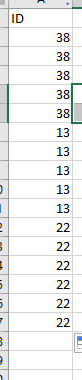
'Table'[Sorting] = 'Table'[Count ID] * ROUND(MAX('Table'[ID]), -1) + 'Table'[ID], only column which is not measure is "ID" from the example above, but it is distinct like in pivot table. Original table looks like this example:
- Mark as New
- Bookmark
- Subscribe
- Mute
- Subscribe to RSS Feed
- Permalink
- Report Inappropriate Content
@LiborK
So, no calculated columns. Create this measure:
Count RT =
VAR _current_count = [COUNT ID'S]
VAR _current_id = SELECTEDVALUE('Table'[ID])
VAR _max_customer_id =
    ROUND(CALCULATE(MAX('Table'[ID]), ALLSELECTED('Table'[ID]),-1)
VAR _ranking_table =
    ADDCOLUMNS(
        ALLSELECTED('Table'[ID]),
        "@%ID", [% ID],
        "@Ranking", [COUNT ID'S] * _max_customer_id + 'Table'[ID]
    )
VAR _current_rank =  _current_sales * _max_customer_id + _current_id
VAR _result =
    SUMX(
        FILTER(
            _ranking_table,
            [@Ranking] >= _current_rank
        ),
        [@%ID]
    )
RETURN
    _result
Showcase Report – Contoso By SpartaBI
- Mark as New
- Bookmark
- Subscribe
- Mute
- Subscribe to RSS Feed
- Permalink
- Report Inappropriate Content
Thank you so much for your help, but it is still not working...I will try to describe it in different way.
I have just table with this column "ID" and values in this column are with structure like in picture below ( for example 13, can be there multiple times) and I dont have there any other measures.
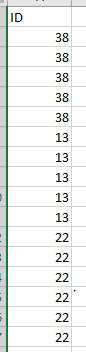
And my task is to create table where in first column will be ID (for each row unique ID) and the rest of the column will be like in picture 2

and I am able to create measures for column B-E, but I am not able to create measure for column F.
VAR _ranking_table =
ADDCOLUMNS(
ALLSELECTED('Table'[ID]),
"@%ID"(parametr is not in correct type), [% ID](I am not able to find the measure, it provide me just standard column from model),
"@Ranking", [COUNT ID'S] * _max_customer_id + 'Table'[ID]
)
- Mark as New
- Bookmark
- Subscribe
- Mute
- Subscribe to RSS Feed
- Permalink
- Report Inappropriate Content
- Mark as New
- Bookmark
- Subscribe
- Mute
- Subscribe to RSS Feed
- Permalink
- Report Inappropriate Content
Table
- Mark as New
- Bookmark
- Subscribe
- Mute
- Subscribe to RSS Feed
- Permalink
- Report Inappropriate Content
- @LiborK ok, then my measure should work. Show me the fields you put on the buckets and also the result of them and of my measure. If you get an error in my measure, please verify that all the column names and measures are correct
- Mark as New
- Bookmark
- Subscribe
- Mute
- Subscribe to RSS Feed
- Permalink
- Report Inappropriate Content
Also, look at my code @ID is a temporary column I created. I'm adding @ to distinguish it from regular model columns


- Mark as New
- Bookmark
- Subscribe
- Mute
- Subscribe to RSS Feed
- Permalink
- Report Inappropriate Content

Helpful resources

Fabric Community Update - July 2025
Find out what's new and trending in the Fabric community.

Power BI Monthly Update - July 2025
Check out the July 2025 Power BI update to learn about new features.

| User | Count |
|---|---|
| 26 | |
| 10 | |
| 8 | |
| 6 | |
| 6 |


| User | Count |
|---|---|
| 31 | |
| 11 | |
| 10 | |
| 10 | |
| 9 |


