cancel
Showing results for 
Search instead for 
Did you mean: 

Next up in the FabCon + SQLCon recap series: The roadmap for Microsoft SQL and Maximizing Developer experiences in Fabric. All sessions are available on-demand after the live show. Register now

Reply
james_pease
Helper III
Helper III

Rolling 12 Month Average

Hello everyone, I need assistance correcting my formula for a 12-month rolling average. I am trying to find out the monthly spending of Amazon and Company Cards (Bento), then find out the monthly average per store. I am summing Amazon and Bento Spend based on status = 'Complete' and not 'Declined' See the following 3 measures:

  • Amazon Sum = CALCULATE(sum('All Amazon and Bento'[Amount]), 'All Amazon and Bento'[Data Table] = "Amazon", 'All Amazon and Bento'[Order Status] <> "Cancelled")
  • Bento Sum = CALCULATE(Sum('All Amazon and Bento'[Amount]), 'All Amazon and Bento'[Data Table] = "Bento", 'All Amazon and Bento'[Order Status] = "Complete")
  • Total Sum = 'All Amazon and Bento'[Amazon Sum] + 'All Amazon and Bento'[Bento Sum]
From here, I created a Number of Stores Calculated column to see the number of stores each employee is responsible for. This column is stored in a different table where I have all the employee's name identifiers and departments. So basically a look-up table.
 
I have a date table which I assigned a relationship as one to many to the 'all amazon and bento' table.
My calculated column for calculating a rolling 12-month average is the following:
  • 12-Month Average per Store =
    CALCULATE (
        AVERAGEX (
            VALUES ( 'All Amazon and Bento'[Year & Month] ),
            DIVIDE ( [Total Sum], COUNT(  Names_Table_Amazon_and_Bento[Number of Stores] ) )
        ),
        DATESINPERIOD (
            Date_Value[DateValue],
            MAX ( 'All Amazon and Bento'[Order Date] ),
            -12,
            MONTH
        )
    )
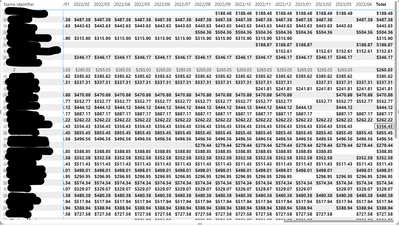
I am expecting to see a moving average, but I am receiving the same average for each month, please see below (I blacked out the names for privacy):
james_pease_0-1686243604237.png


The matrix can be expanded to see how many stores an employee is responsible for. I also created a relationship between the Names_table and the store_list table as one to many. Please let me know what I am doing wrong.
 
Thank you!
2 ACCEPTED SOLUTIONS

Thank you, I actually used that site to help try and diagnose my issue but still couldn't figure out my error.  My formula appears to be identical with the expectation he uses Variables. Also, my tables with the sales do not have daily sales, that's the only difference I can think of, but in my datesinperiod portion, I am using a continuous date table regardless.

View solution in original post

I figured it out, I was trying to make the 12-month moving average a calculated column when it should be a measure. Thank you for helping me navigate this!

View solution in original post

4 REPLIES 4
some_bih
Community Champion
Community Champion

Hi @james_pease if possible share your pbi file to try to see details.


Did I answer your question? Mark my post as a solution!

Proud to be a Super User!


some_bih
Community Champion
Community Champion

Hi @james_pease  check master link https://www.sqlbi.com/articles/rolling-12-months-average-in-dax/  I hope this help


Did I answer your question? Mark my post as a solution!

Proud to be a Super User!


I figured it out, I was trying to make the 12-month moving average a calculated column when it should be a measure. Thank you for helping me navigate this!

Thank you, I actually used that site to help try and diagnose my issue but still couldn't figure out my error.  My formula appears to be identical with the expectation he uses Variables. Also, my tables with the sales do not have daily sales, that's the only difference I can think of, but in my datesinperiod portion, I am using a continuous date table regardless.

Helpful resources

Announcements
New to Fabric survey Carousel

New to Fabric Survey

If you have recently started exploring Fabric, we'd love to hear how it's going. Your feedback can help with product improvements.

Power BI DataViz World Championships carousel

Power BI DataViz World Championships - June 2026

A new Power BI DataViz World Championship is coming this June! Don't miss out on submitting your entry.

Join our Fabric User Panel

Join our Fabric User Panel

Share feedback directly with Fabric product managers, participate in targeted research studies and influence the Fabric roadmap.

March Power BI Update Carousel

Power BI Community Update - March 2026

Check out the March 2026 Power BI update to learn about new features.