cancel
Showing results for 
Search instead for 
Did you mean: 

The FabCon + SQLCon recap series starts April 14th at 8am Pacific. If you’re tracking where AI is going inside Fabric, this first session is a can't miss. Register now

Reply
JoseCamp
Frequent Visitor

Repeat rank value through hierarchy levels

Hello community, 


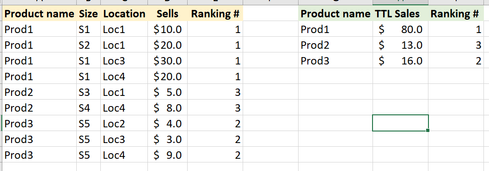
I have a product table with different sizes and locations (Table on the left). I have created a ranking for this table based on Product name total sales (Table on the right)

JoseCamp_0-1615741088521.png

I can't figure out how to replicate the ranking value from the right table, through all the rows that have the same product name, as shown in the Ranking # on the yellow table. I need to to this so I can filter a set of information by ranking (Example the top 2), and be able to display the product information by size and location.


Any idead how to achieve this?


Thanks in advance! 


1 ACCEPTED SOLUTION

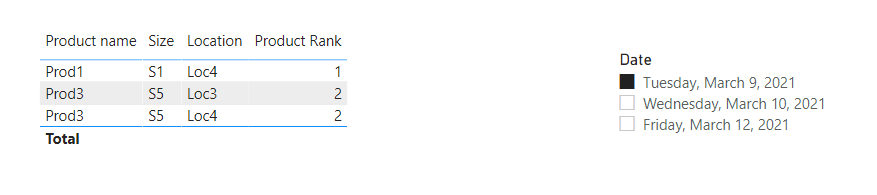
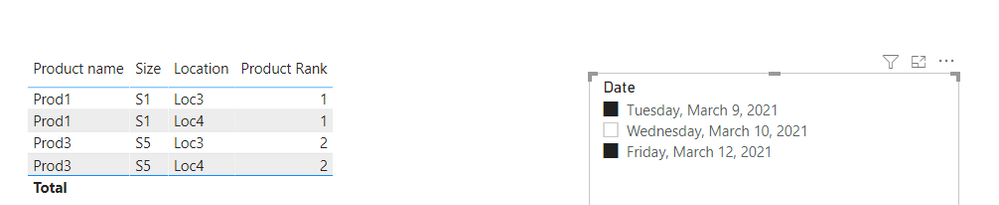
@JoseCamp  The file is attached below my signature:

Product Rank =
IF (
    ISINSCOPE ( Jose[Product name] ),
    VAR CurrentProduct =
        SELECTEDVALUE ( Jose[Product Name] )
    VAR TotalSellAtCurrentProduct =
        CALCULATE (
            [Total Sell],
            Jose[Product name] = CurrentProduct,
            ALLEXCEPT ( Jose, Jose[Date] ),
            ALLSELECTED ( Jose[Date] )
        )
    VAR TotalSellEachProduct =
        CALCULATETABLE (
            ADDCOLUMNS ( VALUES ( Jose[Product Name] ), "@Total Sells", [Total Sell] ),
            ALLEXCEPT ( Jose, Jose[Date] ),
            ALLSELECTED ( Jose[Date] )
        )
    VAR RankCurrentSell =
        FILTER ( TotalSellEachProduct, [@Total Sells] >= TotalSellAtCurrentProduct )
    VAR Result =
        COUNTROWS ( RankCurrentSell )
    RETURN
        Result
)

1.png2.png

View solution in original post

3 REPLIES 3
JoseCamp
Frequent Visitor

@AntrikshSharma thanks for your answer! I should have been a bit more specific about my request! (My bad) The product table has selling dates and I need the ranking to change based on the sales of a specific date range, or if a selection of a specific location (s), or a group (s) of products.

Product nameSizeLocationSellsDate
Prod1S1Loc1 $ 10.02021-03-10
Prod1S2Loc1 $ 20.02021-03-10
Prod1S1Loc3 $ 30.02021-03-12
Prod1S1Loc4 $ 20.02021-03-09
Prod2S3Loc1 $   5.02021-03-10
Prod2S4Loc4 $   8.02021-03-10
Prod3S5Loc2 $   4.02021-03-10
Prod3S5Loc3 $   3.02021-03-09
Prod3S5Loc4 $   9.02021-03-09


Thanks for your help!

@JoseCamp  The file is attached below my signature:

Product Rank =
IF (
    ISINSCOPE ( Jose[Product name] ),
    VAR CurrentProduct =
        SELECTEDVALUE ( Jose[Product Name] )
    VAR TotalSellAtCurrentProduct =
        CALCULATE (
            [Total Sell],
            Jose[Product name] = CurrentProduct,
            ALLEXCEPT ( Jose, Jose[Date] ),
            ALLSELECTED ( Jose[Date] )
        )
    VAR TotalSellEachProduct =
        CALCULATETABLE (
            ADDCOLUMNS ( VALUES ( Jose[Product Name] ), "@Total Sells", [Total Sell] ),
            ALLEXCEPT ( Jose, Jose[Date] ),
            ALLSELECTED ( Jose[Date] )
        )
    VAR RankCurrentSell =
        FILTER ( TotalSellEachProduct, [@Total Sells] >= TotalSellAtCurrentProduct )
    VAR Result =
        COUNTROWS ( RankCurrentSell )
    RETURN
        Result
)

1.png2.png

AntrikshSharma
Super User
Super User

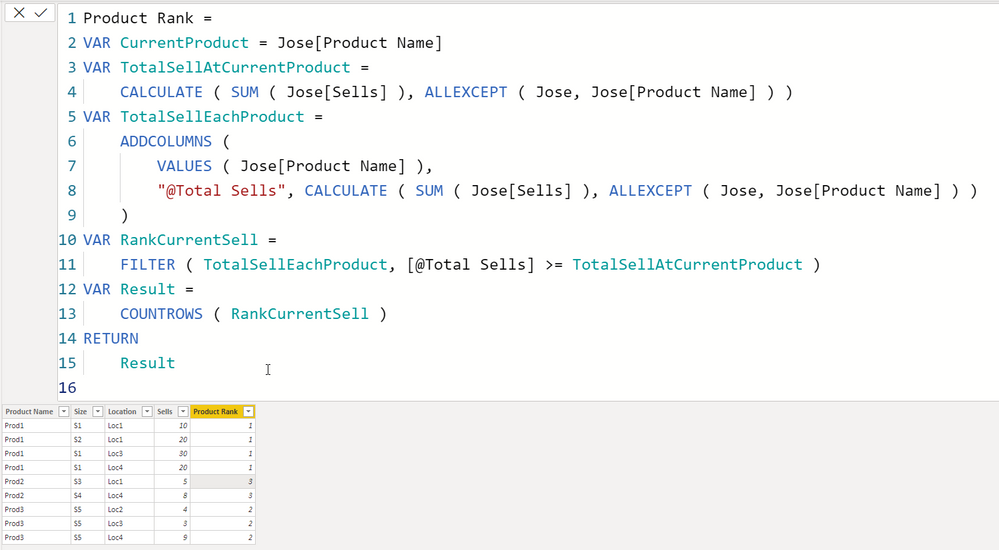
@JoseCamp  Try this:


Product Rank = 
VAR CurrentProduct = Jose[Product Name]
VAR TotalSellAtCurrentProduct =
    CALCULATE ( SUM ( Jose[Sells] ), ALLEXCEPT ( Jose, Jose[Product Name] ) )
VAR TotalSellEachProduct =
    ADDCOLUMNS (
        VALUES ( Jose[Product Name] ),
        "@Total Sells", CALCULATE ( SUM ( Jose[Sells] ), ALLEXCEPT ( Jose, Jose[Product Name] ) )
    )
VAR RankCurrentSell =
    FILTER ( TotalSellEachProduct, [@Total Sells] >= TotalSellAtCurrentProduct )
VAR Result =
    COUNTROWS ( RankCurrentSell )
RETURN
    Result


1.png

Helpful resources

Announcements
New to Fabric survey Carousel

New to Fabric Survey

If you have recently started exploring Fabric, we'd love to hear how it's going. Your feedback can help with product improvements.

Power BI DataViz World Championships carousel

Power BI DataViz World Championships - June 2026

A new Power BI DataViz World Championship is coming this June! Don't miss out on submitting your entry.

Join our Fabric User Panel

Join our Fabric User Panel

Share feedback directly with Fabric product managers, participate in targeted research studies and influence the Fabric roadmap.

March Power BI Update Carousel

Power BI Community Update - March 2026

Check out the March 2026 Power BI update to learn about new features.