Fabric Data Days starts November 4th!
Advance your Data & AI career with 50 days of live learning, dataviz contests, hands-on challenges, study groups & certifications and more!
Get registered- Power BI forums
- Get Help with Power BI
- Desktop
- Service
- Report Server
- Power Query
- Mobile Apps
- Developer
- DAX Commands and Tips
- Custom Visuals Development Discussion
- Health and Life Sciences
- Power BI Spanish forums
- Translated Spanish Desktop
- Training and Consulting
- Instructor Led Training
- Dashboard in a Day for Women, by Women
- Galleries
- Data Stories Gallery
- Themes Gallery
- Contests Gallery
- QuickViz Gallery
- Quick Measures Gallery
- Visual Calculations Gallery
- Notebook Gallery
- Translytical Task Flow Gallery
- TMDL Gallery
- R Script Showcase
- Webinars and Video Gallery
- Ideas
- Custom Visuals Ideas (read-only)
- Issues
- Issues
- Events
- Upcoming Events
Get Fabric Certified for FREE during Fabric Data Days. Don't miss your chance! Request now
- Power BI forums
- Forums
- Get Help with Power BI
- DAX Commands and Tips
- Re: Relate two table without a Key with conditiona...
- Subscribe to RSS Feed
- Mark Topic as New
- Mark Topic as Read
- Float this Topic for Current User
- Bookmark
- Subscribe
- Printer Friendly Page

- Mark as New
- Bookmark
- Subscribe
- Mute
- Subscribe to RSS Feed
- Permalink
- Report Inappropriate Content
Relate two table without a Key with conditional
Hi guys
Could someone tell me if what I need do is possible? I'm really lose with this problem.
I have two tables, in the table "One" I have one colum of "Volume" where you can find tha quantity of protucts I need to send to my costumers, in the second table I have the the colum "Tipo" that says the amount of products each Truck can transportation, you can see the weight range in colums "Capacidade de" and " Capacidade até", but I have two extra conditional, first is the colum "City" because the trucks can be diferent in each city and "Carrier" for the same reason.
So, based in colum "Volume" from the table one, I need de bring witch kind of truck that the weight range is equivalent considering the City and the carrier.
Find below on picture of the tables
(I'm sorry about the my bad english)
Table on

Table two
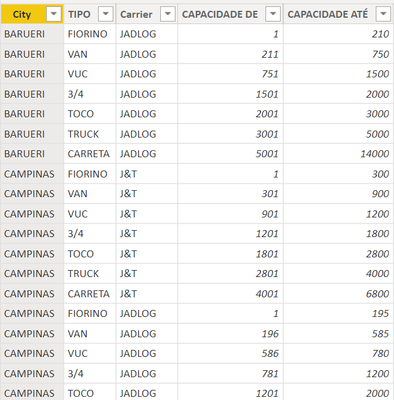
att
Daniela Xavier
Solved! Go to Solution.


- Mark as New
- Bookmark
- Subscribe
- Mute
- Subscribe to RSS Feed
- Permalink
- Report Inappropriate Content
@Anonymous
Ok. Please try
Number of Vehicles =
VAR CurrentVolum = SELECTEDVALUE ( Salles[Volume] )
VAR MAXCapacity = MAX ( Carriers[CAPACIDADE DE] )
RETURN
IF (
    NOT ISBLANK( CurrentVolum ),
    ROUNDUP ( DIVIDE ( CurrentVolum, MAXCapacity ), 0 )
)- Mark as New
- Bookmark
- Subscribe
- Mute
- Subscribe to RSS Feed
- Permalink
- Report Inappropriate Content
Hi @Anonymous
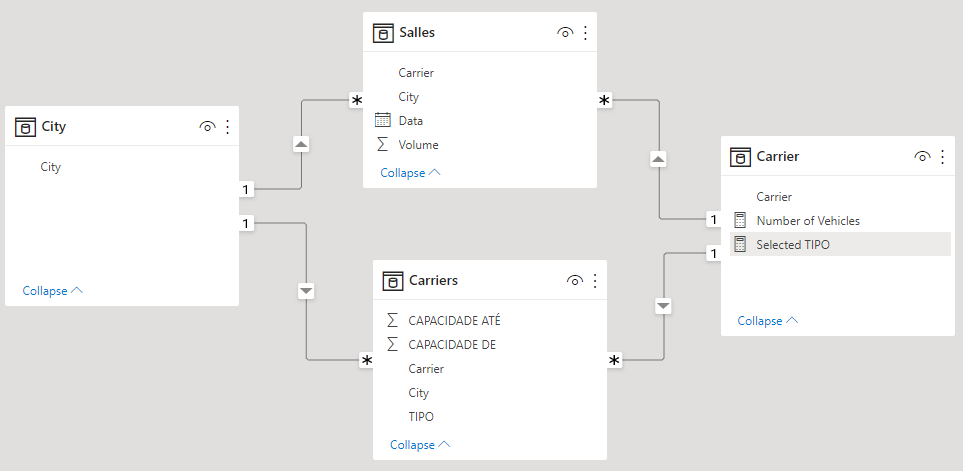
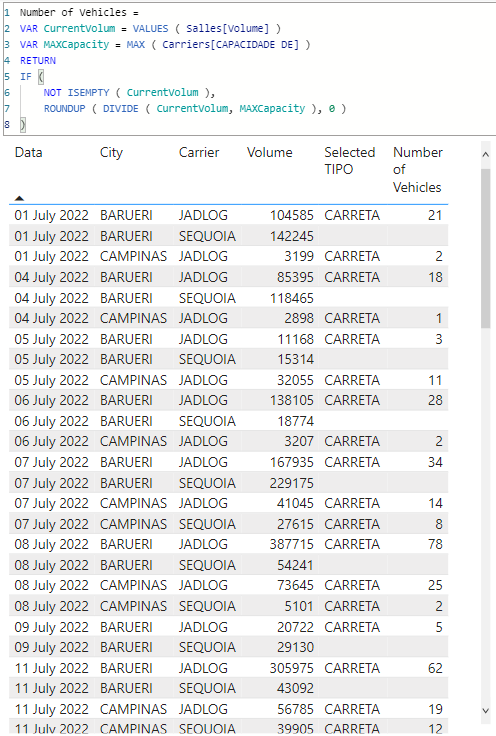
There is mutch that be done here. For example optimizing the selection based on cost of transpotation of all available options or based on maximum utilization factor. That would be the challange. However, th easiest part is to retrieve the capcity of the biggest vehicle avialable from the vendor in the same city. This is a sample file with such example https://we.tl/t-CndjIAATxw
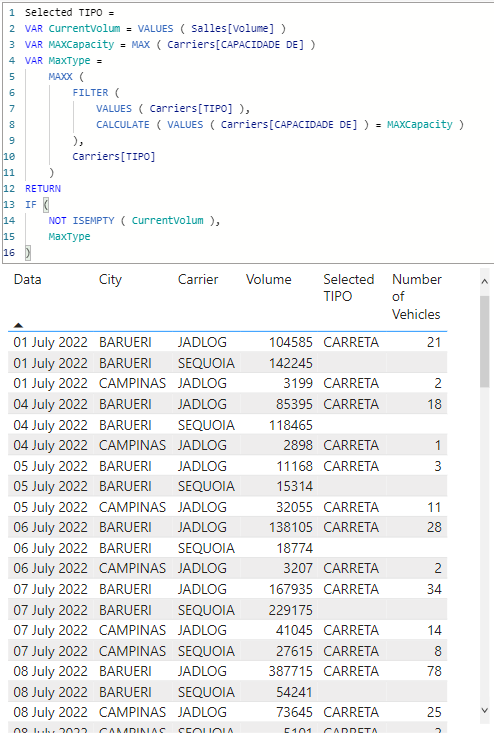
Selected TIPO =
VAR CurrentVolum = VALUES ( Salles[Volume] )
VAR MAXCapacity = MAX ( Carriers[CAPACIDADE DE] )
VAR MaxType =
    MAXX (
        FILTER (
            VALUES ( Carriers[TIPO] ),
            CALCULATE ( VALUES ( Carriers[CAPACIDADE DE] ) = MAXCapacity )
        ),
        Carriers[TIPO]
    )
RETURN
IF (
    NOT ISEMPTY ( CurrentVolum ),
    MaxType
)
Number of Vehicles =
VAR CurrentVolum = VALUES ( Salles[Volume] )
VAR MAXCapacity = MAX ( Carriers[CAPACIDADE DE] )
RETURN
IF (
NOT ISEMPTY ( CurrentVolum ),
ROUNDUP ( DIVIDE ( CurrentVolum, MAXCapacity ), 0 )
)Please let me know how can I support you further.
- Mark as New
- Bookmark
- Subscribe
- Mute
- Subscribe to RSS Feed
- Permalink
- Report Inappropriate Content
Hi @tamerj1
Thanks a lot for help me, I downloaded you file and I tried to do exactly similar you, but It didn't work. Can you see any mistake in my picture? Find below the translation of the message.
Find bellow the translation of the message from the box
"a table of several values was provided, with a single expected value."

- Mark as New
- Bookmark
- Subscribe
- Mute
- Subscribe to RSS Feed
- Permalink
- Report Inappropriate Content
@Anonymous
Ok. Please try
Number of Vehicles =
VAR CurrentVolum = SELECTEDVALUE ( Salles[Volume] )
VAR MAXCapacity = MAX ( Carriers[CAPACIDADE DE] )
RETURN
IF (
    NOT ISBLANK( CurrentVolum ),
    ROUNDUP ( DIVIDE ( CurrentVolum, MAXCapacity ), 0 )
)- Mark as New
- Bookmark
- Subscribe
- Mute
- Subscribe to RSS Feed
- Permalink
- Report Inappropriate Content
- Mark as New
- Bookmark
- Subscribe
- Mute
- Subscribe to RSS Feed
- Permalink
- Report Inappropriate Content
Hi @Anonymous
would you please share a copy/paste sample data?
- Mark as New
- Bookmark
- Subscribe
- Mute
- Subscribe to RSS Feed
- Permalink
- Report Inappropriate Content
Hi @tamerj1
Yes, Here is it
Sorry past it without formatting, but the community did allowed past the table
carrier table 1
City TIPO Carrier CAPACIDADE DE CAPACIDADE ATÉ
BARUERI FIORINO JADLOG 1 210
BARUERI VAN JADLOG 211 750
BARUERI VUC JADLOG 751 1.500
BARUERI 3/4 JADLOG 1501 2.000
BARUERI TOCO JADLOG 2001 3.000
BARUERI TRUCK JADLOG 3001 5.000
BARUERI CARRETA JADLOG 5001 14.000
CAMPINAS FIORINO JADLOG 1 195
CAMPINAS VAN JADLOG 196 585
CAMPINAS VUC JADLOG 586 780
CAMPINAS 3/4 JADLOG 781 1.200
CAMPINAS TOCO JADLOG 1201 2.000
CAMPINAS TRUCK JADLOG 2001 3.000
CAMPINAS CARRETA JADLOG 3001 5.200
CAMPINAS FIORINO SEQUOIA 1 190
CAMPINAS VAN SEQUOIA 191 570
CAMPINAS VUC SEQUOIA 571 760
CAMPINAS 3/4 SEQUOIA 761 1.140
CAMPINAS TOCO SEQUOIA 1141 1.900
CAMPINAS TRUCK SEQUOIA 1901 3.600
CAMPINAS CARRETA SEQUOIA 3601 5.800
RIO DE JANEIRO FIORINO JADLOG 1 210
RIO DE JANEIRO VAN JADLOG 211 750
RIO DE JANEIRO VUC JADLOG 751 1.500
RIO DE JANEIRO 3/4 JADLOG 1501 2.000
RIO DE JANEIRO TOCO JADLOG 2001 3.000
Table two - salles
Data Carrier City Volume
08/07/2022 Sequoia BARUERI 54241
12/07/2022 Sequoia BARUERI 48878,5
13/07/2022 Sequoia BARUERI 44610
11/07/2022 Sequoia BARUERI 43092
08/07/2022 Jadlog BARUERI 38771,5
12/07/2022 Jadlog BARUERI 34879,5
14/07/2022 Sequoia BARUERI 33927
13/07/2022 Jadlog BARUERI 32173
11/07/2022 Jadlog BARUERI 30597,5
09/07/2022 Sequoia BARUERI 29130
14/07/2022 Jadlog BARUERI 24706,5
15/07/2022 Sequoia BARUERI 24013
19/07/2022 Sequoia BARUERI 23937
07/07/2022 Sequoia BARUERI 22917,5
26/07/2022 Sequoia BARUERI 22841,5
27/07/2022 Sequoia BARUERI 20938
09/07/2022 Jadlog BARUERI 20722
20/07/2022 Sequoia BARUERI 20303,5
29/07/2022 Sequoia BARUERI 19669
28/07/2022 Sequoia BARUERI 19669
21/07/2022 Sequoia BARUERI 19213,5
06/07/2022 Sequoia BARUERI 18774
15/07/2022 Jadlog BARUERI 17604,5
19/07/2022 Jadlog BARUERI 17482
26/07/2022 Jadlog BARUERI 16859
07/07/2022 Jadlog BARUERI 16793,5
22/07/2022 Sequoia BARUERI 16669
27/07/2022 Jadlog BARUERI 15454,5
05/07/2022 Sequoia BARUERI 15314
20/07/2022 Jadlog BARUERI 14986
18/07/2022 Sequoia BARUERI 14897,5
29/07/2022 Jadlog BARUERI 14517,5
28/07/2022 Jadlog BARUERI 14517,5
01/07/2022 Sequoia BARUERI 14224,5
21/07/2022 Jadlog BARUERI 14181,5
25/07/2022 Sequoia BARUERI 13958,5
06/07/2022 Jadlog BARUERI 13810,5
22/07/2022 Jadlog BARUERI 12303
04/07/2022 Sequoia BARUERI 11846,5
16/07/2022 Sequoia BARUERI 11679,5
05/07/2022 Jadlog BARUERI 11168
18/07/2022 Jadlog BARUERI 10748
01/07/2022 Jadlog BARUERI 10458,5
25/07/2022 Jadlog BARUERI 10303
16/07/2022 Jadlog BARUERI 8562,5
04/07/2022 Jadlog BARUERI 8539,5
08/07/2022 Jadlog CAMPINAS 7364,5
12/07/2022 Jadlog CAMPINAS 5837,5
11/07/2022 Jadlog CAMPINAS 5678,5
08/07/2022 Sequoia CAMPINAS 5101
13/07/2022 Jadlog CAMPINAS 4245,5
07/07/2022 Jadlog CAMPINAS 4104,5
12/07/2022 Sequoia CAMPINAS 4069
11/07/2022 Sequoia CAMPINAS 3990,5
14/07/2022 Jadlog CAMPINAS 3501,5
15/07/2022 Jadlog CAMPINAS 3457
18/07/2022 Jadlog CAMPINAS 3396
19/07/2022 Jadlog CAMPINAS 3368,5
20/07/2022 Jadlog CAMPINAS 3344,5
21/07/2022 Jadlog CAMPINAS 3325
22/07/2022 Jadlog CAMPINAS 3309
23/07/2022 Jadlog CAMPINAS 3309
25/07/2022 Jadlog CAMPINAS 3280,5
26/07/2022 Jadlog CAMPINAS 3265,5
27/07/2022 Jadlog CAMPINAS 3254
28/07/2022 Jadlog CAMPINAS 3245,5
29/07/2022 Jadlog CAMPINAS 3239
06/07/2022 Jadlog CAMPINAS 3207
05/07/2022 Jadlog CAMPINAS 3205,5
01/07/2022 Jadlog CAMPINAS 3199
30/07/2022 Sequoia BARUERI 2963,5
13/07/2022 Sequoia CAMPINAS 2932
04/07/2022 Jadlog CAMPINAS 2898
07/07/2022 Sequoia CAMPINAS 2761,5
14/07/2022 Sequoia CAMPINAS 2403,5
15/07/2022 Sequoia CAMPINAS 2362
18/07/2022 Sequoia CAMPINAS 2305,5
19/07/2022 Sequoia CAMPINAS 2282
20/07/2022 Sequoia CAMPINAS 2263
21/07/2022 Sequoia CAMPINAS 2247,5
23/07/2022 Sequoia CAMPINAS 2234,5
22/07/2022 Sequoia CAMPINAS 2234,5
25/07/2022 Sequoia CAMPINAS 2212
26/07/2022 Sequoia CAMPINAS 2200
27/07/2022 Sequoia CAMPINAS 2191
- Mark as New
- Bookmark
- Subscribe
- Mute
- Subscribe to RSS Feed
- Permalink
- Report Inappropriate Content
@Anonymous , I do not understand what output you want. Can you please say what output you expect for the first row with volumn 203682?
- Mark as New
- Bookmark
- Subscribe
- Mute
- Subscribe to RSS Feed
- Permalink
- Report Inappropriate Content
Hi @Anonymous
Of course, I want the formula brings "Carreta" that is the biggest truck, I know afertr that I'll need to divide "Volume"/ "Capacidade até" to find a quantitity of trucks I'll nedd. But for now I need bring the truck first.
Look the exemple bellow, in this case a need show "Toco". Because Is equivalent at weight range of Carrier "Jadlog" from the City "Campinas"

- Mark as New
- Bookmark
- Subscribe
- Mute
- Subscribe to RSS Feed
- Permalink
- Report Inappropriate Content
@Anonymous , let me see if I understand the logic.
For the first example, we have in Table 1 Volume =203682 and City = Barueri.
So we search Table 2 for rows that have City = Barueri and choose the row with the highest [Capacidade até].
That row has [Capacidade até] = 14000 and has [Tipo] = Carreta, so Carreta is the desired result.
I will apply the same logic to example 2: we have in Table 1 Volume =1473 and City = Campinas.
So we search Table 2 for rows that have City = Campinas and choose the row with the highest [Capacidade até].
That row has [Capacidade até] = 6800 and has [Tipo] = Carreta, so Carreta is the desired result. But you say it should be "Toco".
I do not understand the logic you are trying to acheive. Can you explain more clearly please with a few more examples?
Edit: OK, I think I understand it better now that you've posted more data.
You want to find the [Tipo] from Table 2 with the same [City] and where [Volume] is between [Capacidade de] and [Capacidade até]. If there is no row, then pick the [Tipo] from Table 2 with the [City] with the highest [Capacidade até].
This measure should achieve it:
Calculated Tipo =
   VAR vCity = SELECTEDVALUE('Table2'[City])
   VAR vVolume = SELECTEDVALUE('Table2'[Volume])
   VAR vTipoInRange =
    MAXX(
        TOPN(
            1,
            FILTER(
                'Table1',
                'Table1'[City] = vCity
                && vVolume >= 'Table1'[CAPACIDADE_DE]
                && vVolume <= 'Table1'[CAPACIDADE_Ate]
            ),
            'Table1'[CAPACIDADE_DE], ASC
        ),
        'Table1'[TIPO]
    )

    VAR vHighestCapacityTipo =
        MAXX(
            TOPN(
                1,
                FILTER(
                    'Table1',
                    'Table1'[City] = vCity
                ),
                'Table1'[CAPACIDADE_Ate], DESC
            ),
            'Table1'[TIPO]
        )

    RETURN
        COALESCE(vTipoInRange, vHighestCapacityTipo)
If the COALESCE function gives an error, then replace
COALESCE(vTipoInRange, vHighestCapacityTipo)with
IF(ISBLANK(vTipoInRange), vHighestCapacityTipo, vTipoInRange)
- Mark as New
- Bookmark
- Subscribe
- Mute
- Subscribe to RSS Feed
- Permalink
- Report Inappropriate Content
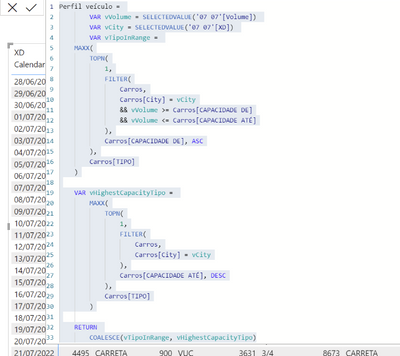
Hi @Anonymous , thanks so much for the help.
It's amoust working rsrsrs
I just didn't undestand why when the "Volume" is 0, it's returning "Carreta", look the replacement of names that I did, can you see any mistake?
If you need any more information, let'me know

Daniela Xavier
Helpful resources

Fabric Data Days
Advance your Data & AI career with 50 days of live learning, contests, hands-on challenges, study groups & certifications and more!

Power BI Monthly Update - October 2025
Check out the October 2025 Power BI update to learn about new features.

FabCon Atlanta 2026
Join us at FabCon Atlanta, March 16-20, for the ultimate Fabric, Power BI, AI and SQL community-led event. Save $200 with code FABCOMM.

| User | Count |
|---|---|
| 8 | |
| 7 | |
| 6 | |
| 5 | |
| 5 |


| User | Count |
|---|---|
| 24 | |
| 11 | |
| 9 | |
| 9 | |
| 8 |


