Join us at FabCon Atlanta from March 16 - 20, 2026, for the ultimate Fabric, Power BI, AI and SQL community-led event. Save $200 with code FABCOMM.
Register now!Get Fabric Certified for FREE during Fabric Data Days. Don't miss your chance! Request now
Hello,
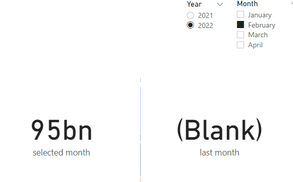
I have problem with previous month dax. I want to show last month sales revenue based on the slicer, but when I select year of 2022 and month in February, this 'last month' card should display the sum of revenue in January but it shows ((blank)).
I tried to change the year to 2021 and it worked fine.
Below the captures:
I already have 2 tables, 1 table is for data and another 1 for calendar, below are my codes:
last month = CALCULATE (
SUM('190222'[daily_revenue]),
PREVIOUSMONTH ( 'Calendar'[Date].[Date] ) )
And this is the table relationship:
This is the result when I tried to change the year to 2021:
Please help if there is something that I skipped to make it error. Thanks in advance!
Solved! Go to Solution.
@bimagty Well, make sure you have a separate date table and that it is marked as a date table. Also, you don't need the .[Date] portion. Alternatively, just say no to DAX time "intelligence" functions.
You may find this helpful - https://community.powerbi.com/t5/Community-Blog/To-bleep-With-Time-Intelligence/ba-p/1260000
Also, see if my Time Intelligence the Hard Way provides a different way of accomplishing what you are going for.
https://community.powerbi.com/t5/Quick-Measures-Gallery/Time-Intelligence-quot-The-Hard-Way-quot-TIT...
@bimagty Well, make sure you have a separate date table and that it is marked as a date table. Also, you don't need the .[Date] portion. Alternatively, just say no to DAX time "intelligence" functions.
You may find this helpful - https://community.powerbi.com/t5/Community-Blog/To-bleep-With-Time-Intelligence/ba-p/1260000
Also, see if my Time Intelligence the Hard Way provides a different way of accomplishing what you are going for.
https://community.powerbi.com/t5/Quick-Measures-Gallery/Time-Intelligence-quot-The-Hard-Way-quot-TIT...
Thank you Greg, it is solved.
I marked the table which contains date as date table, and the result is ok now.
Check out the November 2025 Power BI update to learn about new features.
Advance your Data & AI career with 50 days of live learning, contests, hands-on challenges, study groups & certifications and more!
| User | Count |
|---|---|
| 10 | |
| 10 | |
| 8 | |
| 6 | |
| 6 |
| User | Count |
|---|---|
| 24 | |
| 19 | |
| 19 | |
| 15 | |
| 9 |