cancel
Showing results for 
Search instead for 
Did you mean: 

View all the Fabric Data Days sessions on demand. View schedule

Reply
mark_carlisle
Advocate IV
Advocate IV

Prevent filters from impacting a virtual table inside a measure

We have created some measures which appeared to work as seen in the screenshot below.
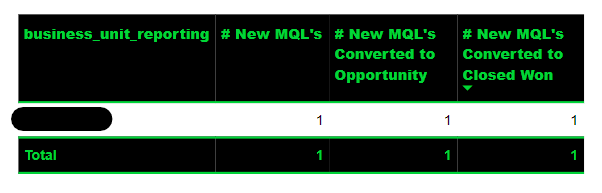
 

Screenshot 2023-03-06 141541.png


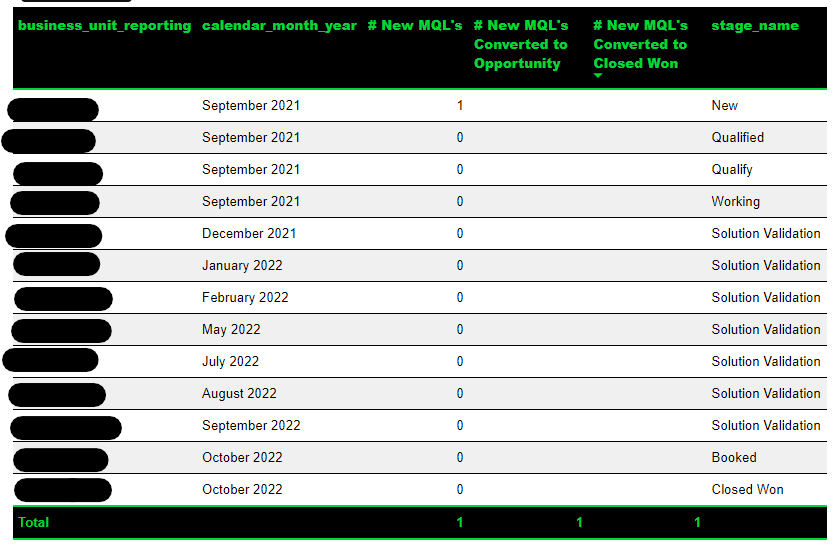
However when adding further fields these measures "break", note the lack of values for # New MQL's Converted to Opportunity and # New MQL's Converted to Closed Won.
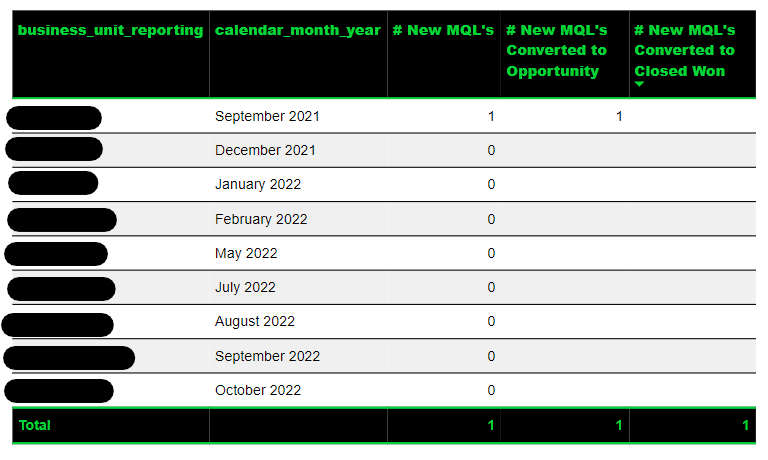
 

3.png


Screenshot 2023-03-06 142638.png


The DAX for these measures is


# New MQL's Converted to Opportunity = 
VAR __table =
    SUMMARIZE (
        fact_pipeline_events,
        fact_pipeline_events[pipeline_journey_id],
        "@has_events",
            [# New MQL's] > 0
                && [# Opportunity Created Events] > 0
    )
VAR __filtered_table =
    FILTER ( __table, [@has_events] = TRUE () )
VAR __journey_id_table =
    SUMMARIZE ( __filtered_table, fact_pipeline_events[pipeline_journey_id] )
VAR __result =
    CALCULATE ( [# New MQL's], __journey_id_table )
RETURN
    __result
# New MQL's Converted to Closed Won = 
VAR __table =
    SUMMARIZE (
        fact_pipeline_events,
        fact_pipeline_events[pipeline_journey_id],
        // dim_pipeline_event[stage_name],
        "@has_events",
            [# New MQL's] > 0
                && [# Stage Name Change Events] > 0
    )
VAR __table_filtered =
    FILTER ( __table, [@has_events] = TRUE () )
VAR __table_with_stage_name =
    SUMMARIZE (
        fact_pipeline_events,
        fact_pipeline_events[pipeline_journey_id],
        dim_pipeline_event[stage_name]
    )
VAR __table_with_stage_name_closed_won =
    FILTER (
        __table_with_stage_name,
        dim_pipeline_event[stage_name] = "Closed Won"
    )
VAR __joined_tables =
    NATURALINNERJOIN ( __table_filtered, __table_with_stage_name_closed_won )
VAR __journey_id_table =
    SUMMARIZE ( __joined_tables, fact_pipeline_events[pipeline_journey_id] )
VAR __result =
    CALCULATE ( [# New MQL's], ALL (fact_pipeline_events), __journey_id_table )
RETURN
    __result


So my question is how do we stop the filters that are applied by adding the columns to the visual from impacting the result of the measure?

1 ACCEPTED SOLUTION
amitchandak
Super User
Super User

@mark_carlisle , use removefilters to your measure for those additional columns

Learn Power BI: All, allselected, removefilters,allexcept- https://www.youtube.com/watch?v=cN8AO3_vmlY&t=24270s


https://www.linkedin.com/pulse/five-recent-power-bi-functions-you-should-use-more-often-amit-chandak

Share with Power BI Enthusiasts: Full Power BI Video (20 Hours) YouTube
Microsoft Fabric Series 60+ Videos YouTube
Microsoft Fabric Hindi End to End YouTube

View solution in original post

2 REPLIES 2
amitchandak
Super User
Super User

@mark_carlisle , use removefilters to your measure for those additional columns

Learn Power BI: All, allselected, removefilters,allexcept- https://www.youtube.com/watch?v=cN8AO3_vmlY&t=24270s


https://www.linkedin.com/pulse/five-recent-power-bi-functions-you-should-use-more-often-amit-chandak

Share with Power BI Enthusiasts: Full Power BI Video (20 Hours) YouTube
Microsoft Fabric Series 60+ Videos YouTube
Microsoft Fabric Hindi End to End YouTube

Thanks, we appear to have got there in the end by wrapping the fact_pipeline_events table in ALLSELECTED().

# New MQL's Converted to Opportunity = 
VAR __table =
    SUMMARIZE (
        ALLSELECTED ( fact_pipeline_events ),
        fact_pipeline_events[pipeline_journey_id],
        "@has_events",
            [# New MQL's] > 0
                && [# Opportunity Created Events] > 0
    )
VAR __filtered_table =
    FILTER ( __table, [@has_events] = TRUE () )
VAR __journey_id_table =
    SUMMARIZE ( __filtered_table, fact_pipeline_events[pipeline_journey_id] )
VAR __result =
    CALCULATE ( [# New MQL's], __journey_id_table )
RETURN
    __result

Helpful resources

Announcements
November Power BI Update Carousel

Power BI Monthly Update - November 2025

Check out the November 2025 Power BI update to learn about new features.

Fabric Data Days Carousel

Fabric Data Days

Advance your Data & AI career with 50 days of live learning, contests, hands-on challenges, study groups & certifications and more!

FabCon Atlanta 2026 carousel

FabCon Atlanta 2026

Join us at FabCon Atlanta, March 16-20, for the ultimate Fabric, Power BI, AI and SQL community-led event. Save $200 with code FABCOMM.