Join us at FabCon Atlanta from March 16 - 20, 2026, for the ultimate Fabric, Power BI, AI and SQL community-led event. Save $200 with code FABCOMM.
Register now!The Power BI Data Visualization World Championships is back! Get ahead of the game and start preparing now! Learn more
Hello all,
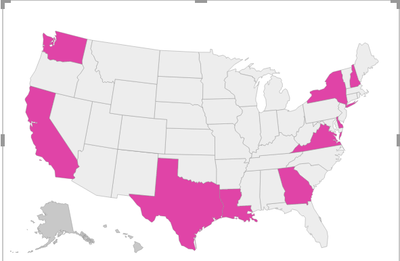
I am using "Shape Map" to show metric values on a US map. I am showing opportunities in terms of values (10,5 and 0). This works perfectly fine. See below:
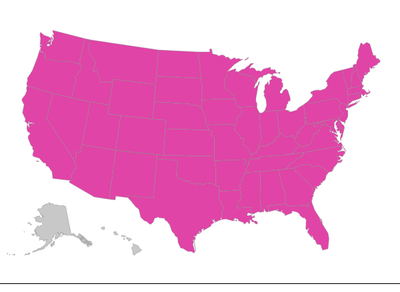
When I use a slicer value (say product "A") , then based on the report logic there are no opportunites or in other words opportunity=0. I get the below map - which is all pink in color. My requirement is to get "Grey" color in the map as the opportunity=0. I tried few things in data values options but am unable to get the required results. Any suggestions?
Solved! Go to Solution.
@lakshay12311 , Not exactly clear on your measure, but try like
new measure = if([opportunity]=0, blank(),[opportunity])
This should greyout 0 values
@lakshay12311 , Not exactly clear on your measure, but try like
new measure = if([opportunity]=0, blank(),[opportunity])
This should greyout 0 values
Thanks @amitchandak ! It worked like a charm 🙂 It amazing to see how small changes make big difference!
The Power BI Data Visualization World Championships is back! Get ahead of the game and start preparing now!
| User | Count |
|---|---|
| 19 | |
| 13 | |
| 8 | |
| 4 | |
| 4 |
| User | Count |
|---|---|
| 29 | |
| 24 | |
| 17 | |
| 11 | |
| 10 |