Join us at FabCon Vienna from September 15-18, 2025
The ultimate Fabric, Power BI, SQL, and AI community-led learning event. Save €200 with code FABCOMM.
Get registered- Power BI forums
- Get Help with Power BI
- Desktop
- Service
- Report Server
- Power Query
- Mobile Apps
- Developer
- DAX Commands and Tips
- Custom Visuals Development Discussion
- Health and Life Sciences
- Power BI Spanish forums
- Translated Spanish Desktop
- Training and Consulting
- Instructor Led Training
- Dashboard in a Day for Women, by Women
- Galleries
- Data Stories Gallery
- Themes Gallery
- Contests Gallery
- Quick Measures Gallery
- Notebook Gallery
- Translytical Task Flow Gallery
- TMDL Gallery
- R Script Showcase
- Webinars and Video Gallery
- Ideas
- Custom Visuals Ideas (read-only)
- Issues
- Issues
- Events
- Upcoming Events
Compete to become Power BI Data Viz World Champion! First round ends August 18th. Get started.
- Power BI forums
- Forums
- Get Help with Power BI
- DAX Commands and Tips
- Re: Month Series
- Subscribe to RSS Feed
- Mark Topic as New
- Mark Topic as Read
- Float this Topic for Current User
- Bookmark
- Subscribe
- Printer Friendly Page

- Mark as New
- Bookmark
- Subscribe
- Mute
- Subscribe to RSS Feed
- Permalink
- Report Inappropriate Content
Month Series
Hi I have date table from 2023 to 2025 i want a column with month series where 36 being december 2025 and 1 being January 2023.
Solved! Go to Solution.


- Mark as New
- Bookmark
- Subscribe
- Mute
- Subscribe to RSS Feed
- Permalink
- Report Inappropriate Content

- Mark as New
- Bookmark
- Subscribe
- Mute
- Subscribe to RSS Feed
- Permalink
- Report Inappropriate Content
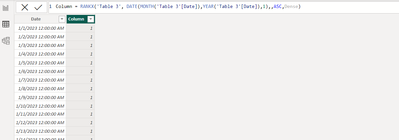
@esam not sure what your Date table looks like, I simply Assumed that you have only 1 column table as Calendar[Date]
Column =
RANKX (
    'Calendar',
    DATE ( MONTH ( 'Calendar'[Date] ), YEAR ( 'Calendra'[Date] ), 1 ),
    ,
    ASC,
    DENSE
)
- Mark as New
- Bookmark
- Subscribe
- Mute
- Subscribe to RSS Feed
- Permalink
- Report Inappropriate Content
- Mark as New
- Bookmark
- Subscribe
- Mute
- Subscribe to RSS Feed
- Permalink
- Report Inappropriate Content
Hi @FreemanZ
The solution you provided gave something similar but not accurate it is giving me result in negative
for jan 2023 it is one than feb 2023 0 and for december 2025 -33
- Mark as New
- Bookmark
- Subscribe
- Mute
- Subscribe to RSS Feed
- Permalink
- Report Inappropriate Content
- Mark as New
- Bookmark
- Subscribe
- Mute
- Subscribe to RSS Feed
- Permalink
- Report Inappropriate Content
Thank you for the solution @FreemanZ can you explain a bit how this logic is working here !!
also how to get better with dax with real world scenarios
- Mark as New
- Bookmark
- Subscribe
- Mute
- Subscribe to RSS Feed
- Permalink
- Report Inappropriate Content
hi @esam
there is no secret, as long as you know the DATEDIFF function, which returns the number of periods between two dates. In this case, the period is MONTH.
In general, learning DAX by doing. Try to bring change and value to your daily work with DAX. If time allows, come back to the community and try to contribute.

- Mark as New
- Bookmark
- Subscribe
- Mute
- Subscribe to RSS Feed
- Permalink
- Report Inappropriate Content
You could try a calculated column like
Month series =
VAR ReferenceDate = 'Date'[Date]
VAR PrevMonths =
    CALCULATETABLE (
        VALUES ( 'Date'[Year month] ),
        REMOVEFILTERS ( 'Date' ),
        'Date'[Date] < ReferenceDate
    )
RETURN
    COUNTROWS ( PrevMonths ) + 1
- Mark as New
- Bookmark
- Subscribe
- Mute
- Subscribe to RSS Feed
- Permalink
- Report Inappropriate Content
Removefilter with comparison operator is not correct
- Mark as New
- Bookmark
- Subscribe
- Mute
- Subscribe to RSS Feed
- Permalink
- Report Inappropriate Content
I think maybe you've missed a close bracket, the REMOVEFILTERS and comparison are separate.
- Mark as New
- Bookmark
- Subscribe
- Mute
- Subscribe to RSS Feed
- Permalink
- Report Inappropriate Content

the series generated by this 13,12,....1
- Mark as New
- Bookmark
- Subscribe
- Mute
- Subscribe to RSS Feed
- Permalink
- Report Inappropriate Content
OK, the below works for me
Month series =
VAR ReferenceDate = 'Date'[Date]
VAR PrevMonths =
    CALCULATETABLE (
        DISTINCT ( 'Date'[Year month] ),
        REMOVEFILTERS ( 'Date' ),
        'Date'[Date] <= ReferenceDate
    )
RETURN
COUNTROWS ( PrevMonths ) 
Helpful resources

Power BI Monthly Update - August 2025
Check out the August 2025 Power BI update to learn about new features.

Fabric Community Update - August 2025
Find out what's new and trending in the Fabric community.

| User | Count |
|---|---|
| 15 | |
| 8 | |
| 6 | |
| 6 | |
| 6 |


| User | Count |
|---|---|
| 23 | |
| 14 | |
| 13 | |
| 8 | |
| 8 |


