

cancel
Showing results for 
Search instead for 
Did you mean: 

The Power BI Data Visualization World Championships is back! Get ahead of the game and start preparing now! Learn more

Reply
sdhn
Responsive Resident
Responsive Resident

Merge Tables & Counts

Hello All,


I have 5 source files on same folder.

I used Get Data -- Folder options to merge all files onto one file called Source. 


I need to counts rows for each file.


 Following measure counts all rows togather  (Count all 5 files rows):

Source Counts  = COUNTROWS(ALLSELECTED('Source'))-1
 
I want to counts rows for each file.
 
OMP
40
 
ABC
8
 
XYZ
10
 
AEIOU
22
 
I have follwing sample columns
 
Source.NameServiceEsclation TeamCreatedOwner
OMPTelephonetest01/01/2022AB
ABC911test112/01/2021CD
XYZ211FF01/02/2022YZ
AEIOU007Pol12/31/2021UV


 help will be appreciated.  Thanks 

1 ACCEPTED SOLUTION

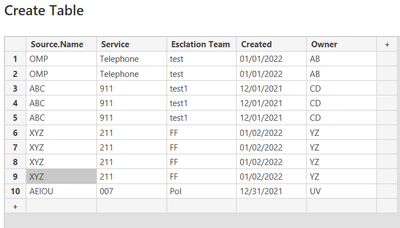
@sdhn  if i have a table like this

smpa01_0-1641403063180.png


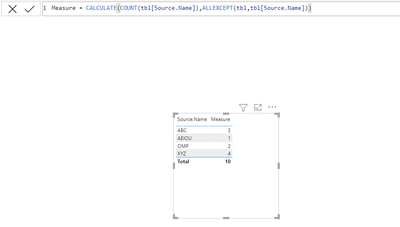
The above measure gives me this

smpa01_1-1641403140659.png


Did I answer your question? Mark my post as a solution!
Proud to be a Super User!
My custom visualization projects
Plotting Live Sound: Viz1
Beautiful News:Viz1, Viz2, Viz3
Visual Capitalist: Working Hrs

View solution in original post

6 REPLIES 6
smpa01
Super User
Super User

@sdhn  try this

measure = CALCULATE(COUNT(tbl[Source.Name]),ALLEXCEPT(tbl,tbl[Source.Name]))
Did I answer your question? Mark my post as a solution!
Proud to be a Super User!
My custom visualization projects
Plotting Live Sound: Viz1
Beautiful News:Viz1, Viz2, Viz3
Visual Capitalist: Working Hrs
sdhn
Responsive Resident
Responsive Resident

measure = CALCULATE(COUNT(tbl[Source.Name]),ALLEXCEPT(tbl,tbl[Source.Name]))


Source.Name is the column name. It is giving me a total row counts of all files. I want each file separately.   Thanks 

@sdhn  if i have a table like this

smpa01_0-1641403063180.png


The above measure gives me this

smpa01_1-1641403140659.png


Did I answer your question? Mark my post as a solution!
Proud to be a Super User!
My custom visualization projects
Plotting Live Sound: Viz1
Beautiful News:Viz1, Viz2, Viz3
Visual Capitalist: Working Hrs
sdhn
Responsive Resident
Responsive Resident

Actuall I got it. I need to click new measue and source.name.  Thank You 


sdhn_0-1641403720312.png


sdhn_1-1641403738456.png


sdhn
Responsive Resident
Responsive Resident

Source.Name column has been created when I merged (transform & load)  files onto one file. Probably becasue of this.  This column was not a part of a files ealier.  Under the source.name col. I have all 5 files names listed with extension.   any thoughts

@sdhn  provide a sample pbix, hard to guess from words.

Did I answer your question? Mark my post as a solution!
Proud to be a Super User!
My custom visualization projects
Plotting Live Sound: Viz1
Beautiful News:Viz1, Viz2, Viz3
Visual Capitalist: Working Hrs

Helpful resources

Announcements
Power BI DataViz World Championships

Power BI Dataviz World Championships

The Power BI Data Visualization World Championships is back! Get ahead of the game and start preparing now!

December 2025 Power BI Update Carousel

Power BI Monthly Update - December 2025

Check out the December 2025 Power BI Holiday Recap!

FabCon Atlanta 2026 carousel

FabCon Atlanta 2026

Join us at FabCon Atlanta, March 16-20, for the ultimate Fabric, Power BI, AI and SQL community-led event. Save $200 with code FABCOMM.