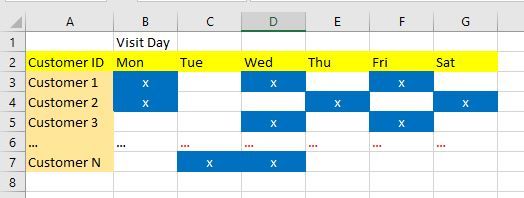
First of all, please learn a bit about dimensional modeling on which Power BI depends for good and performant models (you can find very good material about PBI model design on YT). When you've already done that, then you will know that the format you need for your data is this:
CustomerID|VisitDay
1,2019-01-01
1,2019-01-02
1,2019-01-05
2,2019-01-02
2,2019-01-03
....
Then you'll build a proper Date table which will cover all the (full) years that appear anywhere in your model. The granularity being "the day." You'll then join this table in a 1:many fashion to your VisitDay field. Once this is in place, you'll create a measure:
[Customer Count] = DISTINCTCOUNT ( T[CustomerID] )
From this you'll be able to build everything you need and you only need 1 measure to do it.
By the way, you don't unpivot your data in DAX. You do it in Power Query. This is the ultimate ETL tool to shape your data. DAX is for calculations ONLY and let it sink in - CALCULATIONS ONLY.
Best
Darek