Join us at FabCon Atlanta from March 16 - 20, 2026, for the ultimate Fabric, Power BI, AI and SQL community-led event. Save $200 with code FABCOMM.
Register now!Get Fabric Certified for FREE during Fabric Data Days. Don't miss your chance! Request now
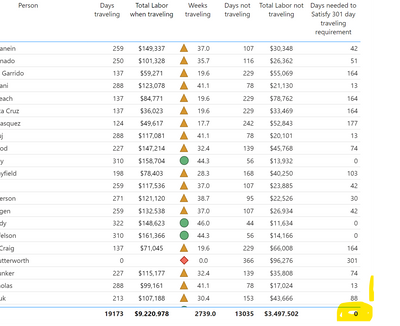
Hello, I have a table visual with number of travel and non travel days per emplyee. The requirements is that each person is supposed to travel 301 days out of the year, so I am trying to make a measure that shows the difference. I need that number to sum to a total at the bottom, but it doesn't and I dont know how to apply SUMx or SUM in this example.
(Note: 'Labor Cost per Day'[Person Traveling) is a value of 1 or 0 in a calendar table. If person is traveling on that day, it's 1. If not, it's 0)
Measure:
Solved! Go to Solution.
Hi @Anonymous
Please try
Days Difference =
SUMX (
VALUES ( 'Labor Cost per Day'[Person] ),
CALCULATE (
VAR diff =
SUM ( 'Labor Cost per Day'[Person Traveling] )
RETURN
IF ( diff >= 301, 0, 301 - diff )
)
)
Hi @Anonymous
Please try
Days Difference =
SUMX (
VALUES ( 'Labor Cost per Day'[Person] ),
CALCULATE (
VAR diff =
SUM ( 'Labor Cost per Day'[Person Traveling] )
RETURN
IF ( diff >= 301, 0, 301 - diff )
)
)
Thank you, that worked like a charm!
Check out the November 2025 Power BI update to learn about new features.
Advance your Data & AI career with 50 days of live learning, contests, hands-on challenges, study groups & certifications and more!
| User | Count |
|---|---|
| 11 | |
| 9 | |
| 9 | |
| 6 | |
| 5 |
| User | Count |
|---|---|
| 27 | |
| 22 | |
| 19 | |
| 17 | |
| 11 |