Join us at FabCon Atlanta from March 16 - 20, 2026, for the ultimate Fabric, Power BI, AI and SQL community-led event. Save $200 with code FABCOMM.
Register now!View all the Fabric Data Days sessions on demand. View schedule
Hi all, i have a table with the columns ID and Category. The goal is to create a new table that lists the IDs, and an index of the number of categorys an ID had in its lifetime.
Example:
Data Table
ID / Category
00001 / SWF Info
00001 / Response FOMA
00001 / Creditreform
00001 / Legal IKU
00001 / Bankcrupcy
Desiered Result should be:
ID / Index
00001 / 5
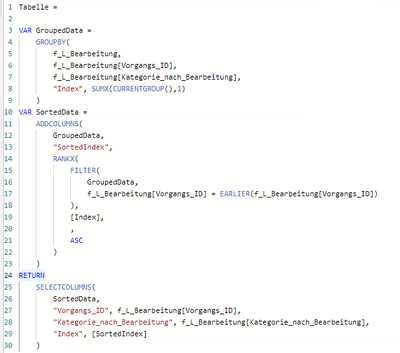
I tried this
Solved! Go to Solution.
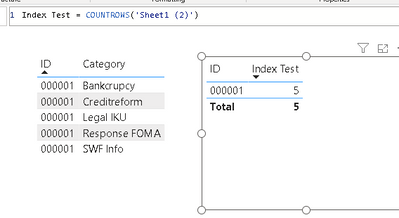
Hi @Samuel7265 I am not familiar with your model, if it is simply like your example with 2 columns, possible solution could be measeure
Replace Sheet1 (2) with your table name. Hope this help
Proud to be a Super User!
Hi @Samuel7265 It seems you need to use DISTINCTCOUNT function over your column Category?
Check link below.
Did I answer your question? Mark my post as a solution! Kudos Appreciated!
https://learn.microsoft.com/en-us/dax/distinctcount-function-dax?WT.mc_id=DP-MVP-4025372
Proud to be a Super User!
Thanks for your answer. DISTINCTCOUNT cant be used in the context of GROUPBY().
Hi @Samuel7265 I am not familiar with your model, if it is simply like your example with 2 columns, possible solution could be measeure
Replace Sheet1 (2) with your table name. Hope this help
Proud to be a Super User!
Hi @Samuel7265 If this is solution, please accept it so other member of community could use it. Thank you
Proud to be a Super User!
Check out the November 2025 Power BI update to learn about new features.
Advance your Data & AI career with 50 days of live learning, contests, hands-on challenges, study groups & certifications and more!
| User | Count |
|---|---|
| 18 | |
| 11 | |
| 9 | |
| 4 | |
| 4 |
| User | Count |
|---|---|
| 31 | |
| 25 | |
| 21 | |
| 14 | |
| 12 |