Forum Discussion

UBComma's avatar
UBComma
Icon for Helper III rankHelper III
5 years ago
Solved

Identifying overlaps in date sequences

I need to find conflicts in date ranges that overlap.  In this case I have many "Projects" and many "Resources".  A given Project will need a Resource for a stated date range.  The date ranges will shift if a project schedule shifts.  We need to know if a shift causes a resource date conflict with another project.  For example, in the table below, Resource-A is needed by two different projects from 8/15/21 through 8/31/21.


ProjectResourceStart DateEnd Date
Project1Resource-A8/1/218/31/21
Project1Resource-B8/15/219/10/21
Project2Resource-C8/28/2110/12/21
Project3Resource-A8/15/2110/1/21


Because we have many projects and many resources it seems impractical to compare start and end dates between resources.  I thought I would generate a table instead with the columns [Project], [Resource], [Days in Use] and create a long table of the days in use and then run counts on the number of times a distinct date occurs for a given Project and Resource.  If the count was greater than "1" it would be a conflict.


My first problem is knowing if this sounds like the best approach, or if someone knows a better way to do it.  My second problem is generating a table that has 1 row for each day that a project has a resource reserved so I can run the count.  I have been working with variations of SUMMARIZE and SUMMARIZECOLUMNS and trying to add another column using GENERATESERIES to create a table of dates but I can't figure out how to make that work.


Any thoughts on this will be greatly appreciated.

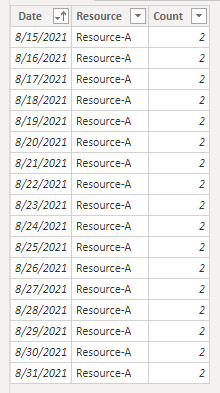
  • I'm imagining you want a calculated table like this:


    Here's the code to generate:

    CalcTable =
    FILTER (
        ADDCOLUMNS (
            CROSSJOIN (
                CALENDAR (
                    MIN ( 'Resource Allocations'[Start Date] ),
                    MAX ( 'Resource Allocations'[End Date] )
                ),
                VALUES ( 'Resource Allocations'[Resource] )
            ),
            "Count",
                COUNTROWS (
                    FILTER (
                        'Resource Allocations',
                        'Resource Allocations'[Resource] = EARLIER ( [Resource] )
                            && 'Resource Allocations'[Start Date] <= EARLIER ( [Date] )
                            && 'Resource Allocations'[End Date] >= EARLIER ( [Date] )
                    )
                )
        ),
        [Count] > 1
    )


4 Replies

  • That sounds about how I'd try to do it (the counting per day). To generate the days, the simplest approach is probably is something like CALENDAR ( MIN ( Table1[Start Date] ), MAX ( Table1[End Date] ) ).

    • UBComma's avatar
      UBComma
      Icon for Helper III rankHelper III

      That will produce the date series but I'm struggling with how to generate that in a table that sequences [Project], [Resource], [Day in use] from the "Resource Allocations' table that has the Start and End dates.

      • AlexisOlson's avatar
        AlexisOlson
        Icon for Super User rankSuper User

        I'm imagining you want a calculated table like this:


        Here's the code to generate:

        CalcTable =
        FILTER (
            ADDCOLUMNS (
                CROSSJOIN (
                    CALENDAR (
                        MIN ( 'Resource Allocations'[Start Date] ),
                        MAX ( 'Resource Allocations'[End Date] )
                    ),
                    VALUES ( 'Resource Allocations'[Resource] )
                ),
                "Count",
                    COUNTROWS (
                        FILTER (
                            'Resource Allocations',
                            'Resource Allocations'[Resource] = EARLIER ( [Resource] )
                                && 'Resource Allocations'[Start Date] <= EARLIER ( [Date] )
                                && 'Resource Allocations'[End Date] >= EARLIER ( [Date] )
                        )
                    )
            ),
            [Count] > 1
        )