Join us at FabCon Vienna from September 15-18, 2025
The ultimate Fabric, Power BI, SQL, and AI community-led learning event. Save €200 with code FABCOMM.
Get registered- Power BI forums
- Get Help with Power BI
- Desktop
- Service
- Report Server
- Power Query
- Mobile Apps
- Developer
- DAX Commands and Tips
- Custom Visuals Development Discussion
- Health and Life Sciences
- Power BI Spanish forums
- Translated Spanish Desktop
- Training and Consulting
- Instructor Led Training
- Dashboard in a Day for Women, by Women
- Galleries
- Data Stories Gallery
- Themes Gallery
- Contests Gallery
- Quick Measures Gallery
- Notebook Gallery
- Translytical Task Flow Gallery
- TMDL Gallery
- R Script Showcase
- Webinars and Video Gallery
- Ideas
- Custom Visuals Ideas (read-only)
- Issues
- Issues
- Events
- Upcoming Events
Enhance your career with this limited time 50% discount on Fabric and Power BI exams. Ends September 15. Request your voucher.
- Power BI forums
- Forums
- Get Help with Power BI
- DAX Commands and Tips
- Re: How to use DAX formula SELECTEDVALUE with Fiel...
- Subscribe to RSS Feed
- Mark Topic as New
- Mark Topic as Read
- Float this Topic for Current User
- Bookmark
- Subscribe
- Printer Friendly Page


- Mark as New
- Bookmark
- Subscribe
- Mute
- Subscribe to RSS Feed
- Permalink
- Report Inappropriate Content
How to use DAX formula SELECTEDVALUE with Field Parameters
Dear Power BI community,
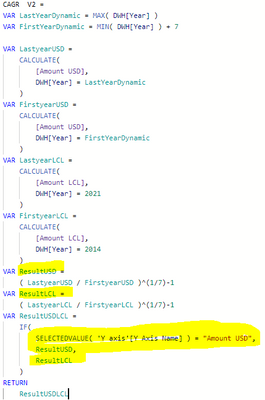
I would like to ask for your help as I am trying to use DAX formula SELECTEDVALUE based on field parameters, however it is not doable based on the following error message:

IF user selects between two value the (Amount USD & Amount LCL) the calculation should be changing based on that:
DAX formula :
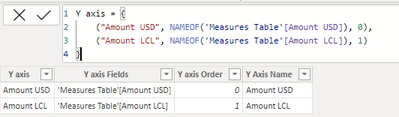
Field Parameter:
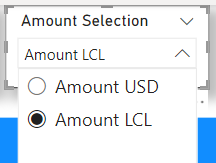
Visualization selection for Amount USD & Amount LCL:
Would it be possible for someone to help how to change the DAX formula SELECTEDVALUE part to make it work?
Thank you for your advice in advance.
Wishing you a wonderful date.
Adam
Solved! Go to Solution.


- Mark as New
- Bookmark
- Subscribe
- Mute
- Subscribe to RSS Feed
- Permalink
- Report Inappropriate Content
Can you perhaps upload a example file without sensitve datas?
Other post to field parameters
It seems to be possible. Perhaps try first to access only to the field parameter value?
Did I answer your question? Mark my post as a solution!
Proud to be a Super User!
- Mark as New
- Bookmark
- Subscribe
- Mute
- Subscribe to RSS Feed
- Permalink
- Report Inappropriate Content
Did you try to add a "calculate" in the var Lastyeardynamic:
Lastyeardynamic = calculate(max(DWH[year])) ?
Did I answer your question? Mark my post as a solution!
Proud to be a Super User!
- Mark as New
- Bookmark
- Subscribe
- Mute
- Subscribe to RSS Feed
- Permalink
- Report Inappropriate Content
What was the solution now in your case ? 🙂
Did I answer your question? Mark my post as a solution!
Proud to be a Super User!
- Mark as New
- Bookmark
- Subscribe
- Mute
- Subscribe to RSS Feed
- Permalink
- Report Inappropriate Content
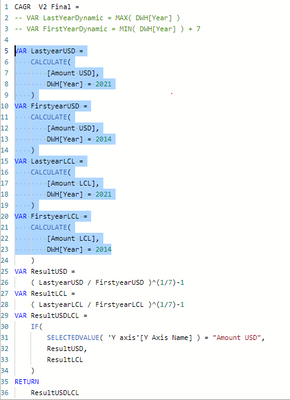
I have added the year column values explicitly instead of using a MIN & MAX measure to find the first and last year in the year column.
I am not 100% clear how it connects to the original issue to be honest but solved the problem.
- Mark as New
- Bookmark
- Subscribe
- Mute
- Subscribe to RSS Feed
- Permalink
- Report Inappropriate Content
Did you try to add a "calculate" in the var Lastyeardynamic:
Lastyeardynamic = calculate(max(DWH[year])) ?
Did I answer your question? Mark my post as a solution!
Proud to be a Super User!
- Mark as New
- Bookmark
- Subscribe
- Mute
- Subscribe to RSS Feed
- Permalink
- Report Inappropriate Content
Oh thank you I have added calculate and it made the formula more dynamic. Thank you.
- Mark as New
- Bookmark
- Subscribe
- Mute
- Subscribe to RSS Feed
- Permalink
- Report Inappropriate Content
Can you perhaps upload a example file without sensitve datas?
Other post to field parameters
It seems to be possible. Perhaps try first to access only to the field parameter value?
Did I answer your question? Mark my post as a solution!
Proud to be a Super User!
- Mark as New
- Bookmark
- Subscribe
- Mute
- Subscribe to RSS Feed
- Permalink
- Report Inappropriate Content
One question: Why it is important to use field parameters instead of a regular table / calculated table?
Did I answer your question? Mark my post as a solution!
Proud to be a Super User!
- Mark as New
- Bookmark
- Subscribe
- Mute
- Subscribe to RSS Feed
- Permalink
- Report Inappropriate Content
Thank you Andhi for your quick reply.
Actually the main reason for that is that this was the only way (based on my knowledge) how I could dynamically change the column chart visualization Y axis between amount usd and amount lcl based on the field parameter selection:

Is it inefficient to do so?
Thank you,
Adam

Helpful resources

Power BI Monthly Update - August 2025
Check out the August 2025 Power BI update to learn about new features.

Fabric Community Update - August 2025
Find out what's new and trending in the Fabric community.

| User | Count |
|---|---|
| 15 | |
| 12 | |
| 8 | |
| 7 | |
| 7 |


| User | Count |
|---|---|
| 24 | |
| 21 | |
| 12 | |
| 10 | |
| 7 |


