FabCon is coming to Atlanta
Join us at FabCon Atlanta from March 16 - 20, 2026, for the ultimate Fabric, Power BI, AI and SQL community-led event. Save $200 with code FABCOMM.
Register now!- Power BI forums
- Get Help with Power BI
- Desktop
- Service
- Report Server
- Power Query
- Mobile Apps
- Developer
- DAX Commands and Tips
- Custom Visuals Development Discussion
- Health and Life Sciences
- Power BI Spanish forums
- Translated Spanish Desktop
- Training and Consulting
- Instructor Led Training
- Dashboard in a Day for Women, by Women
- Galleries
- Data Stories Gallery
- Themes Gallery
- Contests Gallery
- QuickViz Gallery
- Quick Measures Gallery
- Visual Calculations Gallery
- Notebook Gallery
- Translytical Task Flow Gallery
- TMDL Gallery
- R Script Showcase
- Webinars and Video Gallery
- Ideas
- Custom Visuals Ideas (read-only)
- Issues
- Issues
- Events
- Upcoming Events
The Power BI Data Visualization World Championships is back! Get ahead of the game and start preparing now! Learn more
- Power BI forums
- Forums
- Get Help with Power BI
- DAX Commands and Tips
- How to reference an index from another table in a ...
- Subscribe to RSS Feed
- Mark Topic as New
- Mark Topic as Read
- Float this Topic for Current User
- Bookmark
- Subscribe
- Printer Friendly Page


- Mark as New
- Bookmark
- Subscribe
- Mute
- Subscribe to RSS Feed
- Permalink
- Report Inappropriate Content
How to reference an index from another table in a function
Hey everyone,
Just started using Power BI last week and am running into a roadblock. I have a function, Clean/Format, that needs to be applied to every table in the "Record" column. I want to reference the "Index" value in my function so that when I Invoke a Custom Function it applies to each row respectively rather than only applying to the row with an "Index" value of 1.
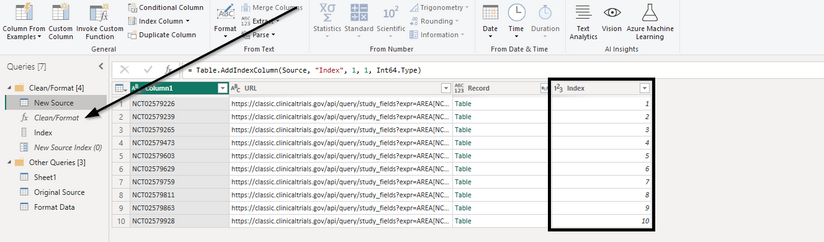
Below is the DAX script. Criticisms are appreciated as I am aware that this script is likely inefficient.
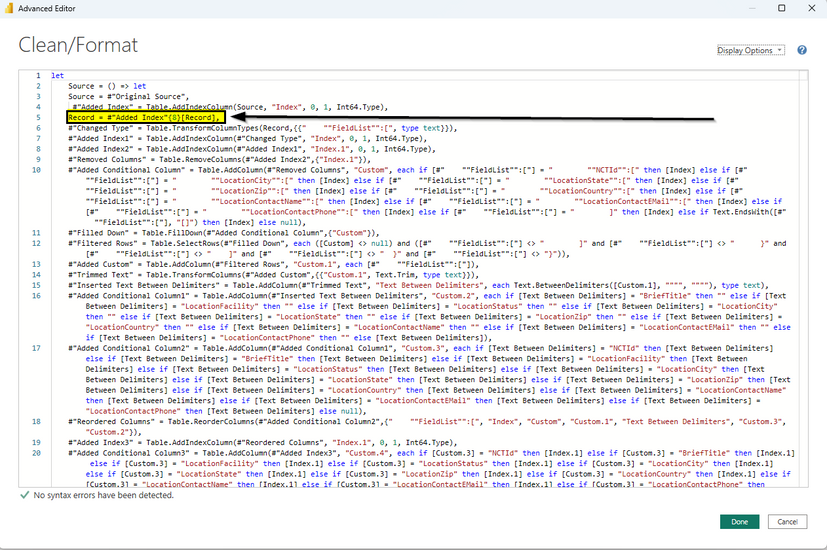
Thanks all.
Solved! Go to Solution.


- Mark as New
- Bookmark
- Subscribe
- Mute
- Subscribe to RSS Feed
- Permalink
- Report Inappropriate Content
let
    expand = (tbl) => Table.SplitColumn(Table.TransformColumns(Table.FromList(tbl, Splitter.SplitByNothing(), null, null, ExtraValues.Error), {"Column1", each Text.Combine(List.ReplaceValue(_,null,"",Replacer.ReplaceValue), "|"), type text}), "Column1", Splitter.SplitTextByDelimiter("|", QuoteStyle.Csv),{"LocationFacilty","LocationStatus","LocationCity","LocationState","LocationZip","LocationCountry","LocationContactName","LocationContactEmail","LocationContactPhone"}),
    Source = Excel.Workbook(File.Contents("C:\Users\xxx\Downloads\10examples.xlsx"), null, true),
    Sheet1_Sheet = Source{[Item="Sheet1",Kind="Sheet"]}[Data],
    #"Added Custom" = Table.AddColumn(Sheet1_Sheet, "URL data", each Json.Document( Web.Contents("https://classic.clinicaltrials.gov/api/query/study_fields?expr=AREA[NCTId]" & [Column1] & " &fields=NCTId,BriefTitle,LocationFacility,LocationStatus,LocationCity,LocationState,LocationZip,LocationCountry,LocationContactName,LocationContactEmail,LocationContactPhone&fmt=json"))[StudyFieldsResponse][StudyFields]{0}),
    #"Expanded URL data" = Table.ExpandRecordColumn(#"Added Custom", "URL data", {"Rank", "NCTId", "BriefTitle", "LocationFacility", "LocationStatus", "LocationCity", "LocationState", "LocationZip", "LocationCountry", "LocationContactName", "LocationContactEMail", "LocationContactPhone"}),
    #"Added Custom1" = Table.AddColumn(#"Expanded URL data", "Custom", each try expand(List.Zip({[LocationFacility],[LocationStatus],[LocationCity],[LocationState],[LocationZip],[LocationCountry],[LocationContactName],[LocationContactEMail],[LocationContactPhone]})) otherwise #table({"LocationFacilty", "LocationStatus", "LocationCity", "LocationState", "LocationZip", "LocationCountry", "LocationContactName", "LocationContactEmail", "LocationContactPhone"},{{"", "", "", "", "", "", "", "", ""}})),
    #"Replaced Value" = Table.ReplaceValue(#"Added Custom1",each [BriefTitle],each List.First([BriefTitle]),Replacer.ReplaceValue,{"BriefTitle"}),
    #"Removed Other Columns" = Table.SelectColumns(#"Replaced Value",{"Column1", "BriefTitle", "Custom"}),
    #"Expanded Custom" = Table.ExpandTableColumn(#"Removed Other Columns", "Custom", {"LocationFacilty", "LocationStatus", "LocationCity", "LocationState", "LocationZip", "LocationCountry", "LocationContactName", "LocationContactEmail", "LocationContactPhone"})
in
    #"Expanded Custom"
This works for the test IDs.
Note 1: because of the empty lists I had to remove nulls with empty strings
Note 2: The second to last ID has no extra data at all, so I had to introduce a dummy stand-in table
- Mark as New
- Bookmark
- Subscribe
- Mute
- Subscribe to RSS Feed
- Permalink
- Report Inappropriate Content
Sample Data/Link to the file:
Here is the link to the file, which includes the sample data. The main items of reference here are the "New Source" table and the "Clean/Format" function:
Expected Results:
I click on the "Table" in the "Clean/Format" column for row 1.
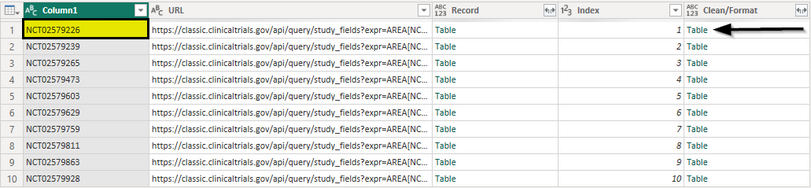
This results are correct:

Then I click on the "Table" in the "Clean/Format" column for row 2:
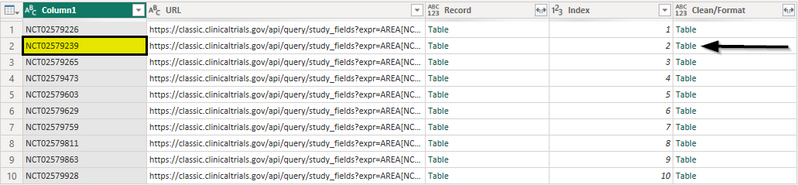
This results are incorrect:

The only way to fix this, is if I manually change the index in my M script from:
Record = #"Added Index"{0}[Record],
to:
Record = #"Added Index"{1}[Record],
I expect each "Table" in the "Clean/Format" column to display information respective to the value in the NCTId column. See the following example.
I click on the "Table" in the "Clean/Format" column for row 7:
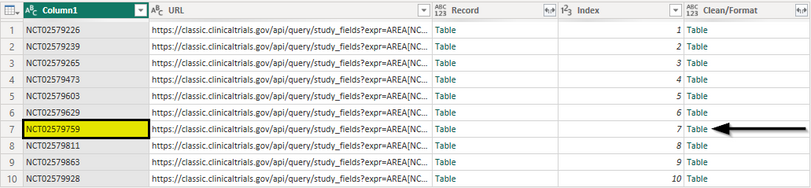
Without MANUALLY changing the M script to:
Record = #"Added Index"{6}[Record],
The following table should display:
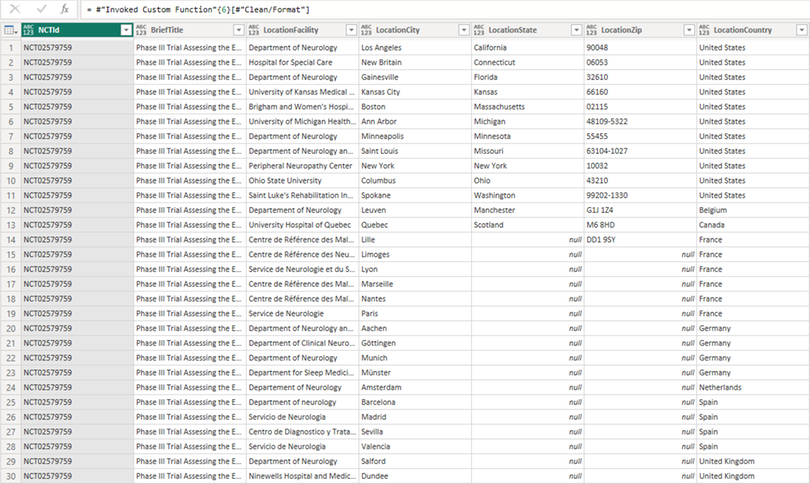
Please let me know if there is any other information that you need to further understand my question/problem!
- Mark as New
- Bookmark
- Subscribe
- Mute
- Subscribe to RSS Feed
- Permalink
- Report Inappropriate Content
can you please provide the "10examples.xlsx" file as well?
- Mark as New
- Bookmark
- Subscribe
- Mute
- Subscribe to RSS Feed
- Permalink
- Report Inappropriate Content
Here is the "10examples.xlsx" file:
Thanks for taking the time to help me with this!
- Mark as New
- Bookmark
- Subscribe
- Mute
- Subscribe to RSS Feed
- Permalink
- Report Inappropriate Content
Thank you.
You seem to be applying a lot of nested (and redundant) transforms, for example
#"Added Custom" = Table.AddColumn(#"Changed Type", "Custom", each Table.AddColumn(#"Changed Type", "Custom", each Table.AddColumn(#"Changed Type", "Add Url", each ...
That's probably making your life harder than necessary. Can you describe what you are ultimately trying to achieve? Fetch the records for your example IDs from the website and put them into a table? Does their API also support other formats besides XML? I see you are reading the XML as CSV and then are trying to interpret that. Impressive but not really how you want to do that. There is a native XML parser in Power Query.
Something like this
let
    Source = Excel.Workbook(File.Contents("C:\Users\xxx\Downloads\10examples.xlsx"), null, true),
    Sheet1_Sheet = Source{[Item="Sheet1",Kind="Sheet"]}[Data],
    #"Changed Type" = Table.TransformColumnTypes(Sheet1_Sheet,{{"Column1", type text}}),
    #"Added Custom" = Table.AddColumn(#"Changed Type", "URL data", each Xml.Document( Web.Contents("https://classic.clinicaltrials.gov/api/query/full_studies?expr=AREA[NCTId]" & [Column1] & "&fmt=xml"))[Value]{0})
in
    #"Added Custom"
- Mark as New
- Bookmark
- Subscribe
- Mute
- Subscribe to RSS Feed
- Permalink
- Report Inappropriate Content
Yeah, this is one of my first times using Power BI so theres a lot of optimization to be done. Their API only supports XML and JSON formats so the aforementioned transforms are just trying to parse the data and assign them to the correct columns/rows.
I fetch the information using the NCTId and then put it into a table, which looks like the screenshot below.
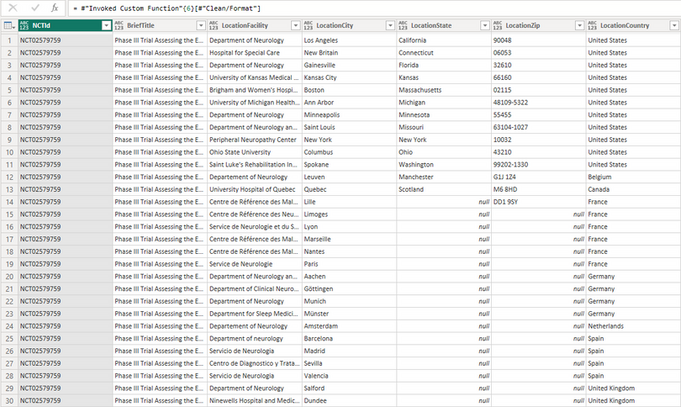
Ultimately, I want to automate this so it makes the call for each NCTId and formats it. The final NCTId list will have 17,000 records so I cannot do this manually!
Thanks again.
- Mark as New
- Bookmark
- Subscribe
- Mute
- Subscribe to RSS Feed
- Permalink
- Report Inappropriate Content
This is how the output looks like
classic.clinicaltrials.gov/api/query/full_studies?expr=AREA[NCTId]NCT02579226&fmt=xml
XML is hierarchical, so you will have to indicate the path to each of the data points you want to extract. There will be some friction as Power BI expects a table whereas XML is hierarchical. Oh wait, I mentioned that already...
- Mark as New
- Bookmark
- Subscribe
- Mute
- Subscribe to RSS Feed
- Permalink
- Report Inappropriate Content
So you're using the full study call, which is used in the table called "Sheet1". You can disregard that.
Look at the table called "Original Source". This utilizes the study fields call, which looks like this:
The "full study" call is easier to format but brings in a lot of unneeded data. The "study fields" call is harder to format but brings in the exact information I need.
- Mark as New
- Bookmark
- Subscribe
- Mute
- Subscribe to RSS Feed
- Permalink
- Report Inappropriate Content
The study field call results are also in JSON which is slighlty easier to handle than XML. Based on your last example which elements of the JSON hierarchy should make it into the final table?
- Mark as New
- Bookmark
- Subscribe
- Mute
- Subscribe to RSS Feed
- Permalink
- Report Inappropriate Content
The elements that need to make it into the final table are in the API call:
So each of the fields listed below need to be their own columns in the final table:
- NCTId
- BriefTitle
- LocationFacility
- LocationStatus
- LocationCity
- LocationState
- LocationZip
- LocationCountry
- LocationContactName
- LocationContactEmail
- LocationContactPhone
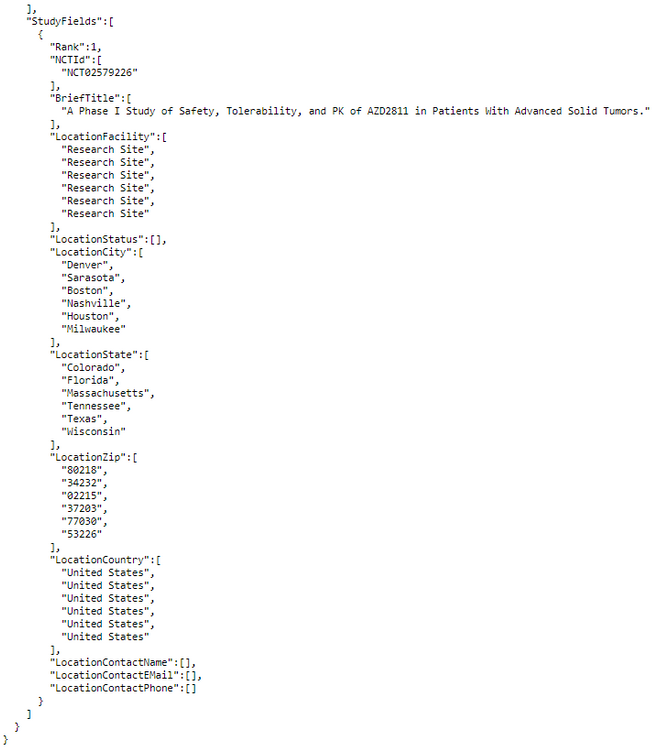
All of those transforms are an attempt to get that original JSON format, shown below, into something easier to work with.
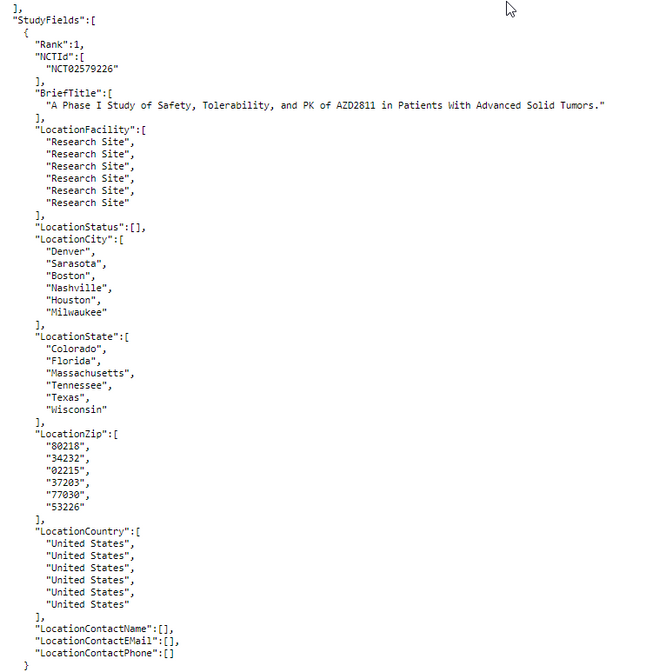
- Mark as New
- Bookmark
- Subscribe
- Mute
- Subscribe to RSS Feed
- Permalink
- Report Inappropriate Content
apart from the first two these fields all have multiple values. You want to expand these to their own rows?
let
    Source = Excel.Workbook(File.Contents("C:\Users\xxx\Downloads\10examples.xlsx"), null, true),
    Sheet1_Sheet = Source{[Item="Sheet1",Kind="Sheet"]}[Data],
    #"Added Custom" = Table.AddColumn(Sheet1_Sheet, "URL data", each Json.Document( Web.Contents("https://classic.clinicaltrials.gov/api/query/study_fields?expr=AREA[NCTId]" & [Column1] & " &fields=NCTId,BriefTitle,LocationFacility,LocationStatus,LocationCity,LocationState,LocationZip,LocationCountry,LocationContactName,LocationContactEmail,LocationContactPhone&fmt=json"))[StudyFieldsResponse][StudyFields]{0}),
    #"Expanded URL data" = Table.ExpandRecordColumn(#"Added Custom", "URL data", {"Rank", "NCTId", "BriefTitle", "LocationFacility", "LocationStatus", "LocationCity", "LocationState", "LocationZip", "LocationCountry", "LocationContactName", "LocationContactEMail", "LocationContactPhone"})
in
#"Expanded URL data"- Mark as New
- Bookmark
- Subscribe
- Mute
- Subscribe to RSS Feed
- Permalink
- Report Inappropriate Content
That is correct. In the first screenshot you'll see how the raw data comes in. In the second screenshot you'll see how I, after many transforms, get it formatted.
However, the issue isnt the formatting. The issue is that this formatting is not applied to each NCTId call when I invoke custom function.
1.
2.

- Mark as New
- Bookmark
- Subscribe
- Mute
- Subscribe to RSS Feed
- Permalink
- Report Inappropriate Content
The custom function is the least of your worries. The transforms require the use of List.Zip to glue your separate result column lists into one table. Aggravated by the fact that some of your lists like LocationContactName are empty.
It's a nice challenge for someone who is familiar with Power Query... but we need to figure this out by learning. I'll see what I can come up with.
- Mark as New
- Bookmark
- Subscribe
- Mute
- Subscribe to RSS Feed
- Permalink
- Report Inappropriate Content
Sounds good!!! I'll take a look at optimizing the transforms.
As always, your help is much appreciated.
- Mark as New
- Bookmark
- Subscribe
- Mute
- Subscribe to RSS Feed
- Permalink
- Report Inappropriate Content
let
    expand = (tbl) => Table.SplitColumn(Table.TransformColumns(Table.FromList(tbl, Splitter.SplitByNothing(), null, null, ExtraValues.Error), {"Column1", each Text.Combine(List.ReplaceValue(_,null,"",Replacer.ReplaceValue), "|"), type text}), "Column1", Splitter.SplitTextByDelimiter("|", QuoteStyle.Csv),{"LocationFacilty","LocationStatus","LocationCity","LocationState","LocationZip","LocationCountry","LocationContactName","LocationContactEmail","LocationContactPhone"}),
    Source = Excel.Workbook(File.Contents("C:\Users\xxx\Downloads\10examples.xlsx"), null, true),
    Sheet1_Sheet = Source{[Item="Sheet1",Kind="Sheet"]}[Data],
    #"Added Custom" = Table.AddColumn(Sheet1_Sheet, "URL data", each Json.Document( Web.Contents("https://classic.clinicaltrials.gov/api/query/study_fields?expr=AREA[NCTId]" & [Column1] & " &fields=NCTId,BriefTitle,LocationFacility,LocationStatus,LocationCity,LocationState,LocationZip,LocationCountry,LocationContactName,LocationContactEmail,LocationContactPhone&fmt=json"))[StudyFieldsResponse][StudyFields]{0}),
    #"Expanded URL data" = Table.ExpandRecordColumn(#"Added Custom", "URL data", {"Rank", "NCTId", "BriefTitle", "LocationFacility", "LocationStatus", "LocationCity", "LocationState", "LocationZip", "LocationCountry", "LocationContactName", "LocationContactEMail", "LocationContactPhone"}),
    #"Added Custom1" = Table.AddColumn(#"Expanded URL data", "Custom", each try expand(List.Zip({[LocationFacility],[LocationStatus],[LocationCity],[LocationState],[LocationZip],[LocationCountry],[LocationContactName],[LocationContactEMail],[LocationContactPhone]})) otherwise #table({"LocationFacilty", "LocationStatus", "LocationCity", "LocationState", "LocationZip", "LocationCountry", "LocationContactName", "LocationContactEmail", "LocationContactPhone"},{{"", "", "", "", "", "", "", "", ""}})),
    #"Replaced Value" = Table.ReplaceValue(#"Added Custom1",each [BriefTitle],each List.First([BriefTitle]),Replacer.ReplaceValue,{"BriefTitle"}),
    #"Removed Other Columns" = Table.SelectColumns(#"Replaced Value",{"Column1", "BriefTitle", "Custom"}),
    #"Expanded Custom" = Table.ExpandTableColumn(#"Removed Other Columns", "Custom", {"LocationFacilty", "LocationStatus", "LocationCity", "LocationState", "LocationZip", "LocationCountry", "LocationContactName", "LocationContactEmail", "LocationContactPhone"})
in
    #"Expanded Custom"
This works for the test IDs.
Note 1: because of the empty lists I had to remove nulls with empty strings
Note 2: The second to last ID has no extra data at all, so I had to introduce a dummy stand-in table
- Mark as New
- Bookmark
- Subscribe
- Mute
- Subscribe to RSS Feed
- Permalink
- Report Inappropriate Content
This looks terrific!
The only issue I ran into was with LocationContactName, LocationContactEmail, and LocationContactPhone. In the following example, LocationContactName pulls in both the contact ("Marissa Erickson") and the Principal Investigator ("Mark Daniels, MD").

If you run the following call for "NCT00097292", you'll see there are more contact names than there are locations due to the Principal Investigator being coupled into the LocationContactName field:
In the screenshot below, you'll see the effect that has the data. To elaborate, "Mark Daniels, MD" is being listed with the "University of California San Francisco" when he is actually a seconday contact at "Childrens Hospital of Orange County", as shown in the first screenshot on this reply.
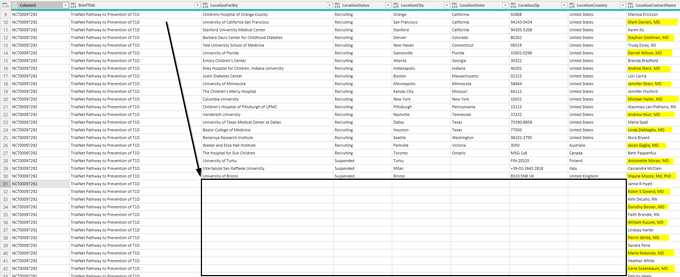
Would it be possible to have a row per contact so that their email and phone number info is not associated with the wrong facility like shown above?
In the screenshot below, you can see how the information gets more difficult to control as this facility has multiple contacts, emails, and phone numbers associated with it.
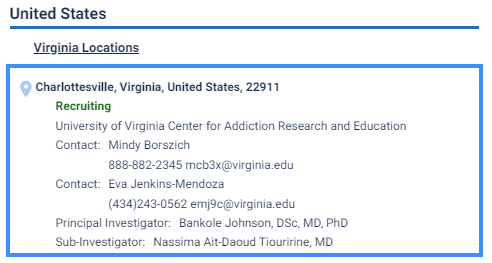
Not sure what the limitations are here. I tried working with an index as well as a conditional column but have had no luck.
You can plug "NCT00097292" and "NCT00006205" into your excel sheet to get the examples I mentioned loaded in.
- Mark as New
- Bookmark
- Subscribe
- Mute
- Subscribe to RSS Feed
- Permalink
- Report Inappropriate Content
Would it be possible to have a row per contact so that their email and phone number info is not associated with the wrong facility like shown above?I have no idea how to know what "wrong facility" means in these cases. One of the problems of flattening JSON or XML data into a tabular format that it often leads to data destruction (ie dropping of data that doesn't fit the target structure). Your JSON is in a format that isn't even a proper hierarchy. Does it look any better in XML?
- Mark as New
- Bookmark
- Subscribe
- Mute
- Subscribe to RSS Feed
- Permalink
- Report Inappropriate Content
Thanks for the response.
I changed the index to 0:
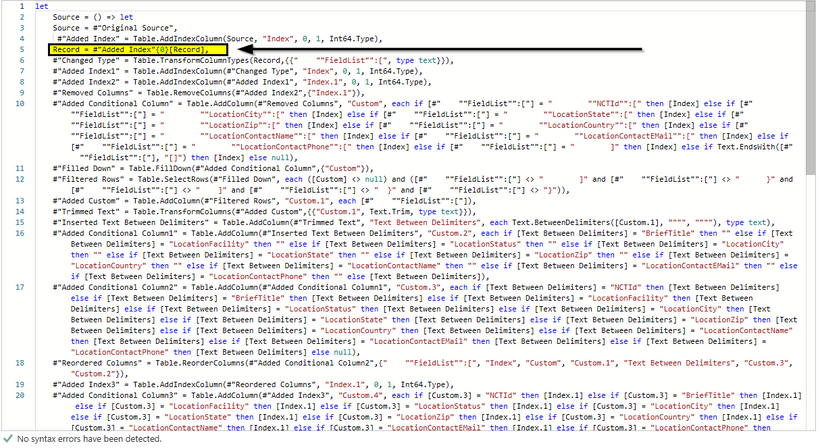
The issue is that all tables in the invoked "Clean/Format" column point to "NCT02579226" instead of their row's respective index number.
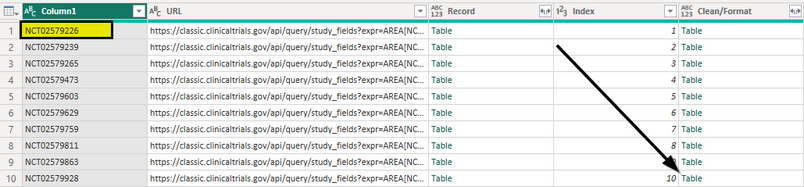
After clicking on the "Table" record in row 10, it shows the info for row 1 (Index 0).

- Mark as New
- Bookmark
- Subscribe
- Mute
- Subscribe to RSS Feed
- Permalink
- Report Inappropriate Content
please provide sample data that covers your issue. Leave out anything not related to the issue.
https://community.fabric.microsoft.com/t5/Community-Blog/How-to-provide-sample-data-in-the-Power-BI-...
Please show the expected outcome based on the sample data you provided.
https://community.fabric.microsoft.com/t5/Desktop/How-to-Get-Your-Question-Answered-Quickly/m-p/1447...
- Mark as New
- Bookmark
- Subscribe
- Mute
- Subscribe to RSS Feed
- Permalink
- Report Inappropriate Content
- This is M script, not DAX
- Row numbers start at 0, not at 1. Change your index definition.

Helpful resources

Power BI Dataviz World Championships
The Power BI Data Visualization World Championships is back! Get ahead of the game and start preparing now!

Power BI Monthly Update - November 2025
Check out the November 2025 Power BI update to learn about new features.

FabCon Atlanta 2026
Join us at FabCon Atlanta, March 16-20, for the ultimate Fabric, Power BI, AI and SQL community-led event. Save $200 with code FABCOMM.

| User | Count |
|---|---|
| 20 | |
| 11 | |
| 10 | |
| 4 | |
| 4 |


| User | Count |
|---|---|
| 32 | |
| 28 | |
| 19 | |
| 11 | |
| 10 |


