FabCon is coming to Atlanta
Join us at FabCon Atlanta from March 16 - 20, 2026, for the ultimate Fabric, Power BI, AI and SQL community-led event. Save $200 with code FABCOMM.
Register now!- Power BI forums
- Get Help with Power BI
- Desktop
- Service
- Report Server
- Power Query
- Mobile Apps
- Developer
- DAX Commands and Tips
- Custom Visuals Development Discussion
- Health and Life Sciences
- Power BI Spanish forums
- Translated Spanish Desktop
- Training and Consulting
- Instructor Led Training
- Dashboard in a Day for Women, by Women
- Galleries
- Data Stories Gallery
- Themes Gallery
- Contests Gallery
- QuickViz Gallery
- Quick Measures Gallery
- Visual Calculations Gallery
- Notebook Gallery
- Translytical Task Flow Gallery
- TMDL Gallery
- R Script Showcase
- Webinars and Video Gallery
- Ideas
- Custom Visuals Ideas (read-only)
- Issues
- Issues
- Events
- Upcoming Events
The Power BI Data Visualization World Championships is back! Get ahead of the game and start preparing now! Learn more
- Power BI forums
- Forums
- Get Help with Power BI
- DAX Commands and Tips
- Re: How to make RANKX work for columns/different c...
- Subscribe to RSS Feed
- Mark Topic as New
- Mark Topic as Read
- Float this Topic for Current User
- Bookmark
- Subscribe
- Printer Friendly Page

- Mark as New
- Bookmark
- Subscribe
- Mute
- Subscribe to RSS Feed
- Permalink
- Report Inappropriate Content
How to make RANKX work for columns/different categories
Hello,
Could you please help me get this DAX formula working?
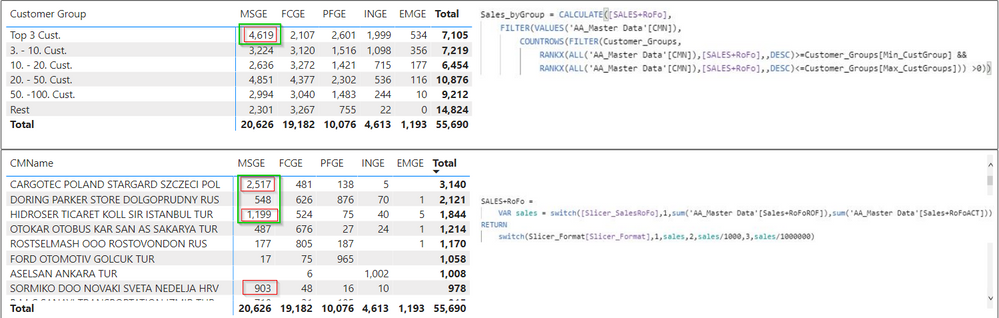
I need a formula which will always display result for Customer Group by total sales for that customer (e.g. for top 3 customers).
I tried to use this one (CMN = Customer):
Sales_byGroup = CALCULATE([SALES+RoFo],

     FILTER(VALUES('AA_Master Data'[CMN]),

            COUNTROWS(FILTER(Customer_Groups,

                 RANKX(ALL('AA_Master Data'[CMN]),[SALES+RoFo],,DESC)>=Customer_Groups[Min_CustGroup] &&

                  RANKX(ALL('AA_Master Data'[CMN]),[SALES+RoFo],,DESC)<=Customer_Groups[Max_CustGroups])) >0))
Thank you,
Tomas
I am sorry but I cannot share the .pbix file. I can make more print-screens if required.
Solved! Go to Solution.
- Mark as New
- Bookmark
- Subscribe
- Mute
- Subscribe to RSS Feed
- Permalink
- Report Inappropriate Content
@AntrikshSharma @AlB Thank you both very much!
I tried your Top 3 formula but it was still showing me wrong result when "Color" was not in the visual.
I managed to get it working by adding a new table
Slicer_CustGroups = DISTINCT(VALUES('AA_Master Data'[CMN]))and a new ranking column.
Customer Grp =
VAR topx = RANKX(ALL(Slicer_CustGroups[CMN]),CALCULATE(SUM('AA_Master Data'[Sales+RoFoACT]),ALL('AA_Master Data'[CMN])),,DESC)
RETURN
SWITCH(TRUE(),topx<=3,"1) Top 3 Customers",topx<=10,"2) 4.-10. Cust.",topx<=20,"3) 11.-20. Cust.",topx<=50,"4) 21.-50. Cust.",topx<=100,"5) 51.-100. Cust.","6) Remaining Cust.")
I know it is not the cleanest solution but it works which is the main thing to me and I can also use it as a slicer.


- Mark as New
- Bookmark
- Subscribe
- Mute
- Subscribe to RSS Feed
- Permalink
- Report Inappropriate Content
Measure Top 3
I see your point but I'm not that sure. I've just run a couple of tests and, strangely enough, I get for both your and my version readings with a higher use of the SE and, seconds later, readings with the complete opposite, a higher use of the FE. I'm dumbfounded by that; the results are not consistent 🤔. I ran the tests on the query for the visual you can get from the Performance analyzer. From what you show, for this case my version seems to be faster. Although I get similar timing performance for both versions in my tests
Measure Top 3 2
If it's the totals you're missing the measure can be modified slightly without additional complexity or impact on performance:
Top 3 2 V2B =
VAR totalSales_ = [Total Sales]
RETURN
    IF (
        ISFILTERED ( Products[Brand] ),
        IF ( RANKX ( ALL ( Products[Color] ), [Total Sales] ) <= 3, totalSales_ ),
        totalSales_
    )
Please mark the question solved when done and consider giving a thumbs up if posts are helpful.
Contact me privately for support with any larger-scale BI needs, tutoring, etc.
Cheers


- Mark as New
- Bookmark
- Subscribe
- Mute
- Subscribe to RSS Feed
- Permalink
- Report Inappropriate Content
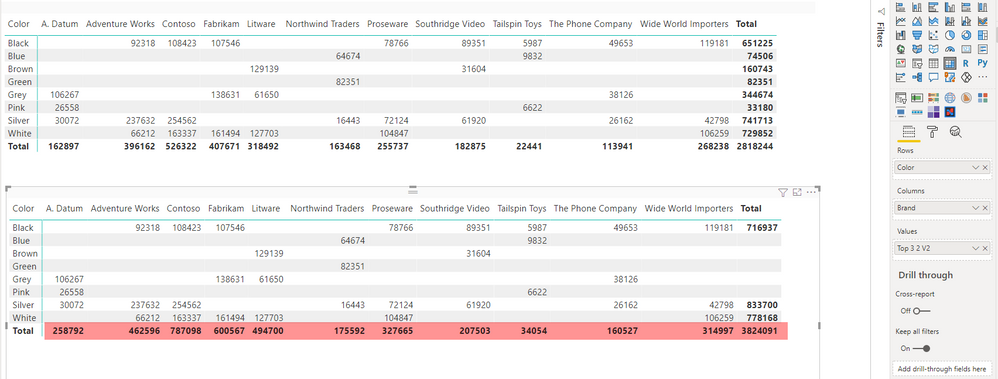
@AlB Not sure how you are doing it, for me it is still the same. Also, all three measures you suggested do not add correctly.
Top 3 V2
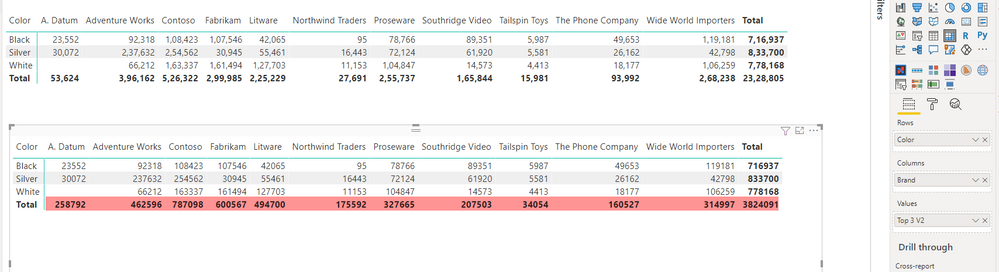
Top 3 2 V2B:

Top 3 2 V2
- Mark as New
- Bookmark
- Subscribe
- Mute
- Subscribe to RSS Feed
- Permalink
- Report Inappropriate Content
Great. I'm still curious as to why the previous solution didn't work. Essentially you're doing the same withing the RANKX. Probably something that is not showing in the examples provided.
I believe you can get the exact same results with simpler measures:
Top 3 V2 =
IF( RANKX(ALL(Products[Color]), CALCULATE([Total Sales], ALL(Products[Brand]))) <=3, [Total Sales])
Top 3 2 V2 =
IF( RANKX(ALL(Products[Color]), [Total Sales]) <=3, [Total Sales])
Please mark the question solved when done and consider giving a thumbs up if posts are helpful.
Contact me privately for support with any larger-scale BI needs, tutoring, etc.
Cheers
- Mark as New
- Bookmark
- Subscribe
- Mute
- Subscribe to RSS Feed
- Permalink
- Report Inappropriate Content
@AlB Measure Top 3 is optimized, most of the work is done in the Storage engine and only 3 queries are executed.
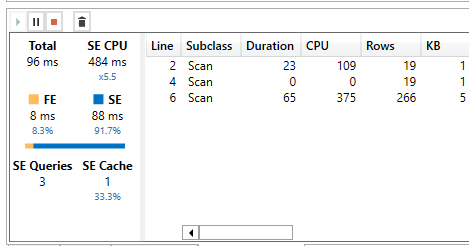
Quries generated by the measure you have suggested:

Measure 2 - agreed is complex in the looks, but I was trying to get the column total as well.

- Mark as New
- Bookmark
- Subscribe
- Mute
- Subscribe to RSS Feed
- Permalink
- Report Inappropriate Content
@AntrikshSharma @AlB Thank you both very much!
I tried your Top 3 formula but it was still showing me wrong result when "Color" was not in the visual.
I managed to get it working by adding a new table
Slicer_CustGroups = DISTINCT(VALUES('AA_Master Data'[CMN]))and a new ranking column.
Customer Grp =
VAR topx = RANKX(ALL(Slicer_CustGroups[CMN]),CALCULATE(SUM('AA_Master Data'[Sales+RoFoACT]),ALL('AA_Master Data'[CMN])),,DESC)
RETURN
SWITCH(TRUE(),topx<=3,"1) Top 3 Customers",topx<=10,"2) 4.-10. Cust.",topx<=20,"3) 11.-20. Cust.",topx<=50,"4) 21.-50. Cust.",topx<=100,"5) 51.-100. Cust.","6) Remaining Cust.")
I know it is not the cleanest solution but it works which is the main thing to me and I can also use it as a slicer.
- Mark as New
- Bookmark
- Subscribe
- Mute
- Subscribe to RSS Feed
- Permalink
- Report Inappropriate Content
@Tomfiki Assuming you are trying to get top 3 based on the grand total, I have prepared a sample file for you, hopefully this gives you some ideas, since you can't share your file. The file is attached below my signature.
First table calculates top 3 based on the column total and second table calculates top 3 for the respective brand ( column )
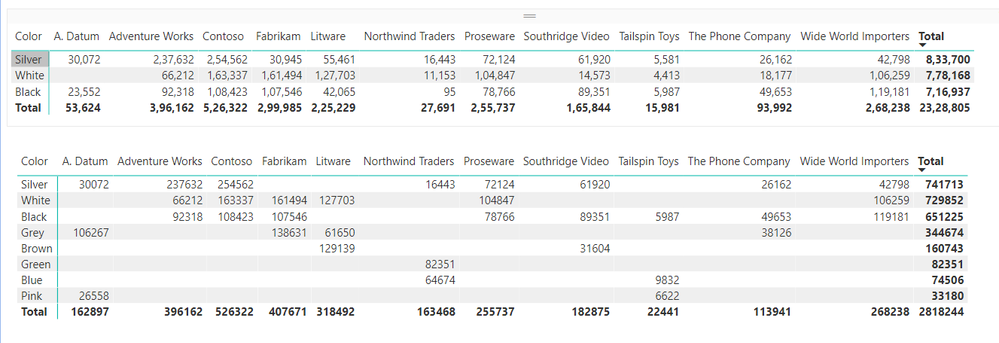
Top 3 =
VAR N = 3
VAR ColorSales =
    ADDCOLUMNS (
        ALL ( Products[Color] ),
        "@Sales", CALCULATE ( [Total Sales], ALLSELECTED ( Products[Brand] ) )
    )
VAR TopBrands =
    TOPN ( N, ColorSales, [@Sales], DESC )
VAR Result =
    CALCULATE ( [Total Sales], KEEPFILTERS ( TopBrands ) )
RETURN
    Result
Top 3 2 =
SUMX (
    VALUES ( Products[Brand] ),
    VAR N = 3
    VAR Result =
        TOPN (
            N,
            CALCULATETABLE (
                ADDCOLUMNS (
                    SUMMARIZE ( Products, Products[Brand], Products[Color] ),
                    "@Sales", [Total Sales]
                ),
                ALL ( Products[Color] )
            ),
            [@Sales], DESC
        )
    RETURN
        CALCULATE ( [Total Sales], KEEPFILTERS ( Result ) )
)
- Mark as New
- Bookmark
- Subscribe
- Mute
- Subscribe to RSS Feed
- Permalink
- Report Inappropriate Content
Sales_byGroup =
CALCULATE (
    [SALES+RoFo],
    FILTER (
        ALL ( 'AA_Master Data'[CMN] ),
        COUNTROWS (
            FILTER (
                Customer_Groups,
                RANKX (
                    ALL ( 'AA_Master Data'[CMN] ),
                    CALCULATE ( [SALES+RoFo], ALL ( 'AA_Master Data'[FieldInColumns] ) ),
                    ,
                    DESC
                ) >= Customer_Groups[Min_CustGroup]
                    && RANKX (
                        ALL ( 'AA_Master Data'[CMN] ),
                        CALCULATE ( [SALES+RoFo], ALL ( 'AA_Master Data'[FieldInColumns] ) ),
                        ,
                        DESC
                    ) <= Customer_Groups[Max_CustGroups]
            )
        ) > 0
    )
)
Please mark the question solved when done and consider giving a thumbs up if posts are helpful.
Contact me privately for support with any larger-scale BI needs, tutoring, etc.
Cheers
- Mark as New
- Bookmark
- Subscribe
- Mute
- Subscribe to RSS Feed
- Permalink
- Report Inappropriate Content
- Mark as New
- Bookmark
- Subscribe
- Mute
- Subscribe to RSS Feed
- Permalink
- Report Inappropriate Content
I'd need the pbix or a mock one with dummy/anonymized data that reproduces the issue
Please mark the question solved when done and consider giving a thumbs up if posts are helpful.
Contact me privately for support with any larger-scale BI needs, tutoring, etc.
Cheers
- Mark as New
- Bookmark
- Subscribe
- Mute
- Subscribe to RSS Feed
- Permalink
- Report Inappropriate Content
Sorry. Looks like I forgot to write down the ALLs 🙄
Sales_byGroup =
CALCULATE (
    [SALES+RoFo],
    FILTER (
        VALUES ( 'AA_Master Data'[CMN] ),
        COUNTROWS (
            FILTER (
                Customer_Groups,
                RANKX (
                    ALL ( 'AA_Master Data'[CMN] ),
                    CALCULATE ( [SALES+RoFo], ALL ( 'AA_Master Data'[FieldInColumns] ) ),
                    ,
                    DESC
                ) >= Customer_Groups[Min_CustGroup]
                    && RANKX (
                        ALL ( 'AA_Master Data'[CMN] ),
                        CALCULATE ( [SALES+RoFo], ALL ( 'AA_Master Data'[FieldInColumns] ) ),
                        ,
                        DESC
                    ) <= Customer_Groups[Max_CustGroups]
            )
        ) > 0
    )
)
Please mark the question solved when done and consider giving a thumbs up if posts are helpful.
Contact me privately for support with any larger-scale BI needs, tutoring, etc.
Cheers
- Mark as New
- Bookmark
- Subscribe
- Mute
- Subscribe to RSS Feed
- Permalink
- Report Inappropriate Content
@AlB
I've tried your change but it still gives me the same (wrong) result as described in original post.

- Mark as New
- Bookmark
- Subscribe
- Mute
- Subscribe to RSS Feed
- Permalink
- Report Inappropriate Content
Hi @Tomfiki
Sales_byGroup =
CALCULATE (
    [SALES+RoFo],
    FILTER (
        VALUES ( 'AA_Master Data'[CMN] ),
        COUNTROWS (
            FILTER (
                Customer_Groups,
                RANKX (
                    ALL ( 'AA_Master Data'[CMN] ),
                    CALCULATE ( [SALES+RoFo], 'AA_Master Data'[FieldInColumns] ),
                    ,
                    DESC
                ) >= Customer_Groups[Min_CustGroup]
                    && RANKX (
                        ALL ( 'AA_Master Data'[CMN] ),
                        CALCULATE ( [SALES+RoFo], 'AA_Master Data'[FieldInColumns] ),
                        ,
                        DESC
                    ) <= Customer_Groups[Max_CustGroups]
            )
        ) > 0
    )
)
where 'AA_Master Data'[FieldInColumns] is, well, the field you have in the columns of your matrix visual
Please mark the question solved when done and consider giving a thumbs up if posts are helpful.
Contact me privately for support with any larger-scale BI needs, tutoring, etc.
Cheers
- Mark as New
- Bookmark
- Subscribe
- Mute
- Subscribe to RSS Feed
- Permalink
- Report Inappropriate Content
Hi @AlB,
Thank you for the reply.
It doesn't work, it gives me this error. I am not sure if I can have 'AA_Master Data'[FieldInColumns] within CALCULATE without ALL/ALLSELECTED/VALUES etc. If I use them, then the result is incorrect, same as in original post.


Helpful resources

Power BI Dataviz World Championships
The Power BI Data Visualization World Championships is back! Get ahead of the game and start preparing now!

Power BI Monthly Update - December 2025
Check out the December 2025 Power BI Holiday Recap!

FabCon Atlanta 2026
Join us at FabCon Atlanta, March 16-20, for the ultimate Fabric, Power BI, AI and SQL community-led event. Save $200 with code FABCOMM.

| User | Count |
|---|---|
| 9 | |
| 5 | |
| 5 | |
| 3 | |
| 3 |


| User | Count |
|---|---|
| 24 | |
| 11 | |
| 9 | |
| 6 | |
| 6 |


