This time we’re going bigger than ever. Fabric, Power BI, SQL, AI and more. We're covering it all. You won't want to miss it.
Learn moreLevel up your Power BI skills this month - build one visual each week and tell better stories with data! Get started
Hi all,
I was wondering if anybody could help me with what I think should be achieved very simply in DAX - I just can't find the right function!
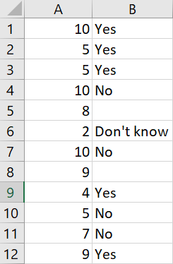
I have two columns of data, let's say Column A and Column B. I'd like to SUM Column A based on the values in Column B.
With the example data below, I'd like to sum Column A for all values in Column B EXCLUDING blanks and 'Don't know'. So my total sum should be only for 'yes' and 'no' and therefore be 65. So my question is: how do I exclude specific values in a column from a calculation?
Any help much appreciated!
Thanks 😊
Solved! Go to Solution.
Result measure =
SUMX ( FILTER ( 'Table', NOT ( 'Table'[B] IN { "D", "" } ) ), 'Table'[A] )
https://www.dropbox.com/s/ou6ab6bsvhri2pe/harriet.pbix?dl=0
Result measure =
SUMX ( FILTER ( 'Table', NOT ( 'Table'[B] IN { "D", "" } ) ), 'Table'[A] )
https://www.dropbox.com/s/ou6ab6bsvhri2pe/harriet.pbix?dl=0
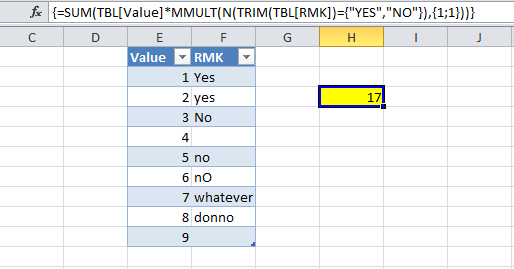
Excel, our oldie but goodie does the trick with ease,
| Thanks to the great efforts by MS engineers to simplify syntax of DAX! Most beginners are SUCCESSFULLY MISLED to think that they could easily master DAX; but it turns out that the intricacy of the most frequently used RANKX() is still way beyond their comprehension! |
DAX is simple, but NOT EASY! |
Thanks for this, but I need to do this within Power BI using a measure
Check out the April 2026 Power BI update to learn about new features.
Sign up to receive a private message when registration opens and key events begin.
If you have recently started exploring Fabric, we'd love to hear how it's going. Your feedback can help with product improvements.
| User | Count |
|---|---|
| 5 | |
| 4 | |
| 3 | |
| 3 | |
| 3 |
| User | Count |
|---|---|
| 10 | |
| 8 | |
| 8 | |
| 6 | |
| 6 |