FabCon is coming to Atlanta
Join us at FabCon Atlanta from March 16 - 20, 2026, for the ultimate Fabric, Power BI, AI and SQL community-led event. Save $200 with code FABCOMM.
Register now!- Power BI forums
- Get Help with Power BI
- Desktop
- Service
- Report Server
- Power Query
- Mobile Apps
- Developer
- DAX Commands and Tips
- Custom Visuals Development Discussion
- Health and Life Sciences
- Power BI Spanish forums
- Translated Spanish Desktop
- Training and Consulting
- Instructor Led Training
- Dashboard in a Day for Women, by Women
- Galleries
- Data Stories Gallery
- Themes Gallery
- Contests Gallery
- QuickViz Gallery
- Quick Measures Gallery
- Visual Calculations Gallery
- Notebook Gallery
- Translytical Task Flow Gallery
- TMDL Gallery
- R Script Showcase
- Webinars and Video Gallery
- Ideas
- Custom Visuals Ideas (read-only)
- Issues
- Issues
- Events
- Upcoming Events
The Power BI Data Visualization World Championships is back! Get ahead of the game and start preparing now! Learn more
- Power BI forums
- Forums
- Get Help with Power BI
- DAX Commands and Tips
- Re: How to create the new columns in the variable ...
- Subscribe to RSS Feed
- Mark Topic as New
- Mark Topic as Read
- Float this Topic for Current User
- Bookmark
- Subscribe
- Printer Friendly Page


- Mark as New
- Bookmark
- Subscribe
- Mute
- Subscribe to RSS Feed
- Permalink
- Report Inappropriate Content
How to create the new columns in the variable table....
Hello.
I have a issue again.
Table1
| ModuleID | | StatusScore | | Sequence | | Loction |
| A1 | 0 | 1 | A |
| A1 | 0 | 2 | B |
| A1 | 1 | 3 | C |
| A2 | 0 | 5 | D |
| A2 | 0 | 3 | E |
| A2 | 0 | 4 | F |
| A3 | 1 | 1 | A |
| A3 | 10 | 2 | B |
| A3 | 1 | 3 | C |
| A4 | 0 | 4 | D |
| A4 | 20 | 5 | E |
| A4 | 0 | 6 | F |
| A5 | 0 | 7 | A |
| A5 | 0 | 8 | B |
| A5 | 0 | 9 | C |
Table2 (remove)
| ModuleID |
| A1 |
................................................................................................................
I would like to create the table by using DAX as like below it
| ModuleID | | SUMStatusScore | | LastSequence | | Location |
| A3 | 12 | 5 | D |
| A4 | 20 | 6 | F |
Create Table=
VAR x0=SUMMARIZE(filter(Table1, not(Table1[ModuleID] in values(Table2[ModuleID])) ,Table1[ModuleID],"SUM_",SUM(Table1[StatusScore]),"LastSequence",MAX(Table1[Sequence])
VAR x1=ADDCOLUMNS(x0, "Location", LOOKUPVALUE(Table1[Loction],Table1[ModuleID], ?????)
RETURN
x1
how can i write the DAX ?
Solved! Go to Solution.


- Mark as New
- Bookmark
- Subscribe
- Mute
- Subscribe to RSS Feed
- Permalink
- Report Inappropriate Content
Okay. Can you try below code now:-
VAR x0 =
SUMMARIZE (
    FILTER (
        Table1,
        NOT ( Table1[ModuleID] IN VALUES ( 'Table2(remove)'[ModuleID] ) )
    ),
    Table1[ModuleID],
    "SUM_", SUM ( Table1[StatusScore] ),
    "LastSequence", MAX ( Table1[Sequence] ),
    "location",CALCULATE(max(Table1[Location]),Table1[Sequence] = MAX ( Table1[Sequence] ))
)
Output:-
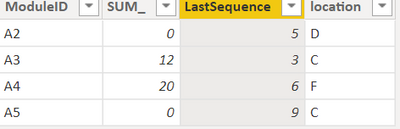
Thanks,
Samarth
Best Regards,
Samarth
If this post helps, please consider accepting it as the solution to help the other members find it more quickly.
Appreciate your Kudos!!
Connect on Linkedin
- Mark as New
- Bookmark
- Subscribe
- Mute
- Subscribe to RSS Feed
- Permalink
- Report Inappropriate Content
Hi @ChoiJunghoon ,
You can create a custom column in table with below :-
filter =
VAR result =
    CALCULATE (
        FIRSTNONBLANK ( Table1[ModuleID], 1 ),
        FILTER (
            ALL ( 'Table2(remove)' ),
            'Table1'[ModuleID] = 'Table2(remove)'[ModuleID]
        )
    )
RETURN
    IF ( result <> BLANK (), "Remove", "Add" )
2. Add all required column and add new filter column as filter :-
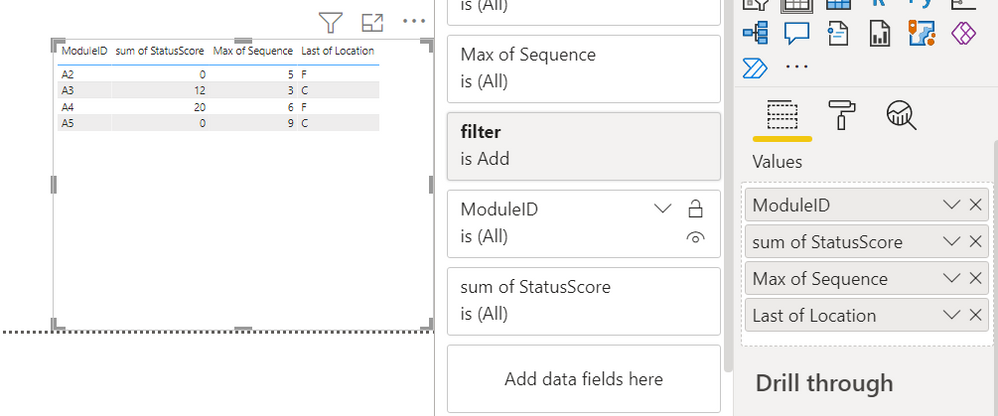
Thanks,
Samarth
Best Regards,
Samarth
If this post helps, please consider accepting it as the solution to help the other members find it more quickly.
Appreciate your Kudos!!
Connect on Linkedin
- Mark as New
- Bookmark
- Subscribe
- Mute
- Subscribe to RSS Feed
- Permalink
- Report Inappropriate Content
Thank you for your reply.
But I must create the table by using DAX.
- Mark as New
- Bookmark
- Subscribe
- Mute
- Subscribe to RSS Feed
- Permalink
- Report Inappropriate Content
Okay, then you can create a table with below dax:-
VAR x0 =
SUMMARIZE (
    FILTER (
        Table1,
        NOT ( Table1[ModuleID] IN VALUES ( 'Table2(remove)'[ModuleID] ) )
    ),
    Table1[ModuleID],
    "SUM_", SUM ( Table1[StatusScore] ),
    "LastSequence", MAX ( Table1[Sequence] ),
    "location", MAX ( Table1[Location] )
)
Output:-
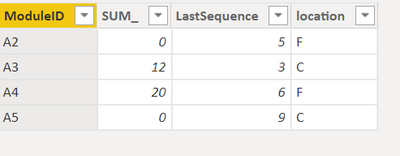
Thanks,
Samarth
Best Regards,
Samarth
If this post helps, please consider accepting it as the solution to help the other members find it more quickly.
Appreciate your Kudos!!
Connect on Linkedin
- Mark as New
- Bookmark
- Subscribe
- Mute
- Subscribe to RSS Feed
- Permalink
- Report Inappropriate Content
Thank you for your reply. but.
Location column can not be applied with the "MAX" function.
Becuase it's not sequencial.
A2 5 D
Could you please check out that.
- Mark as New
- Bookmark
- Subscribe
- Mute
- Subscribe to RSS Feed
- Permalink
- Report Inappropriate Content
Okay. Can you try below code now:-
VAR x0 =
SUMMARIZE (
    FILTER (
        Table1,
        NOT ( Table1[ModuleID] IN VALUES ( 'Table2(remove)'[ModuleID] ) )
    ),
    Table1[ModuleID],
    "SUM_", SUM ( Table1[StatusScore] ),
    "LastSequence", MAX ( Table1[Sequence] ),
    "location",CALCULATE(max(Table1[Location]),Table1[Sequence] = MAX ( Table1[Sequence] ))
)
Output:-
Thanks,
Samarth
Best Regards,
Samarth
If this post helps, please consider accepting it as the solution to help the other members find it more quickly.
Appreciate your Kudos!!
Connect on Linkedin
- Mark as New
- Bookmark
- Subscribe
- Mute
- Subscribe to RSS Feed
- Permalink
- Report Inappropriate Content
Thank you Thank you!!

Helpful resources

Power BI Monthly Update - November 2025
Check out the November 2025 Power BI update to learn about new features.

Fabric Data Days
Advance your Data & AI career with 50 days of live learning, contests, hands-on challenges, study groups & certifications and more!

FabCon Atlanta 2026
Join us at FabCon Atlanta, March 16-20, for the ultimate Fabric, Power BI, AI and SQL community-led event. Save $200 with code FABCOMM.

| User | Count |
|---|---|
| 21 | |
| 10 | |
| 9 | |
| 4 | |
| 4 |


| User | Count |
|---|---|
| 34 | |
| 31 | |
| 19 | |
| 13 | |
| 10 |


