Party with Power BI’s own Guy in a Cube
Power BI is turning 10! Tune in for a special live episode on July 24 with behind-the-scenes stories, product evolution highlights, and a sneak peek at what’s in store for the future.
Save the date- Power BI forums
- Get Help with Power BI
- Desktop
- Service
- Report Server
- Power Query
- Mobile Apps
- Developer
- DAX Commands and Tips
- Custom Visuals Development Discussion
- Health and Life Sciences
- Power BI Spanish forums
- Translated Spanish Desktop
- Training and Consulting
- Instructor Led Training
- Dashboard in a Day for Women, by Women
- Galleries
- Data Stories Gallery
- Themes Gallery
- Contests Gallery
- Quick Measures Gallery
- Notebook Gallery
- Translytical Task Flow Gallery
- TMDL Gallery
- R Script Showcase
- Webinars and Video Gallery
- Ideas
- Custom Visuals Ideas (read-only)
- Issues
- Issues
- Events
- Upcoming Events
Enhance your career with this limited time 50% discount on Fabric and Power BI exams. Ends August 31st. Request your voucher.
- Power BI forums
- Forums
- Get Help with Power BI
- DAX Commands and Tips
- Re: How to create the new columns in the variable ...
- Subscribe to RSS Feed
- Mark Topic as New
- Mark Topic as Read
- Float this Topic for Current User
- Bookmark
- Subscribe
- Printer Friendly Page


- Mark as New
- Bookmark
- Subscribe
- Mute
- Subscribe to RSS Feed
- Permalink
- Report Inappropriate Content
How to create the new columns in the variable table....
Hello.
I have a issue again.
Table1
| ModuleID | | StatusScore | | Sequence | | Loction |
| A1 | 0 | 1 | A |
| A1 | 0 | 2 | B |
| A1 | 1 | 3 | C |
| A2 | 0 | 5 | D |
| A2 | 0 | 3 | E |
| A2 | 0 | 4 | F |
| A3 | 1 | 1 | A |
| A3 | 10 | 2 | B |
| A3 | 1 | 3 | C |
| A4 | 0 | 4 | D |
| A4 | 20 | 5 | E |
| A4 | 0 | 6 | F |
| A5 | 0 | 7 | A |
| A5 | 0 | 8 | B |
| A5 | 0 | 9 | C |
Table2 (remove)
| ModuleID |
| A1 |
................................................................................................................
I would like to create the table by using DAX as like below it
| ModuleID | | SUMStatusScore | | LastSequence | | Location |
| A3 | 12 | 5 | D |
| A4 | 20 | 6 | F |
Create Table=
VAR x0=SUMMARIZE(filter(Table1, not(Table1[ModuleID] in values(Table2[ModuleID])) ,Table1[ModuleID],"SUM_",SUM(Table1[StatusScore]),"LastSequence",MAX(Table1[Sequence])
VAR x1=ADDCOLUMNS(x0, "Location", LOOKUPVALUE(Table1[Loction],Table1[ModuleID], ?????)
RETURN
x1
how can i write the DAX ?
Solved! Go to Solution.


- Mark as New
- Bookmark
- Subscribe
- Mute
- Subscribe to RSS Feed
- Permalink
- Report Inappropriate Content
Okay. Can you try below code now:-
VAR x0 =
SUMMARIZE (
    FILTER (
        Table1,
        NOT ( Table1[ModuleID] IN VALUES ( 'Table2(remove)'[ModuleID] ) )
    ),
    Table1[ModuleID],
    "SUM_", SUM ( Table1[StatusScore] ),
    "LastSequence", MAX ( Table1[Sequence] ),
    "location",CALCULATE(max(Table1[Location]),Table1[Sequence] = MAX ( Table1[Sequence] ))
)
Output:-
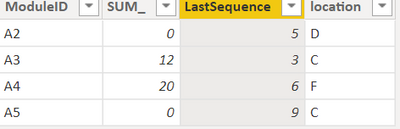
Thanks,
Samarth
Best Regards,
Samarth
If this post helps, please consider accepting it as the solution to help the other members find it more quickly.
Appreciate your Kudos!!
Connect on Linkedin
- Mark as New
- Bookmark
- Subscribe
- Mute
- Subscribe to RSS Feed
- Permalink
- Report Inappropriate Content
Hi @ChoiJunghoon ,
You can create a custom column in table with below :-
filter =
VAR result =
    CALCULATE (
        FIRSTNONBLANK ( Table1[ModuleID], 1 ),
        FILTER (
            ALL ( 'Table2(remove)' ),
            'Table1'[ModuleID] = 'Table2(remove)'[ModuleID]
        )
    )
RETURN
    IF ( result <> BLANK (), "Remove", "Add" )
2. Add all required column and add new filter column as filter :-
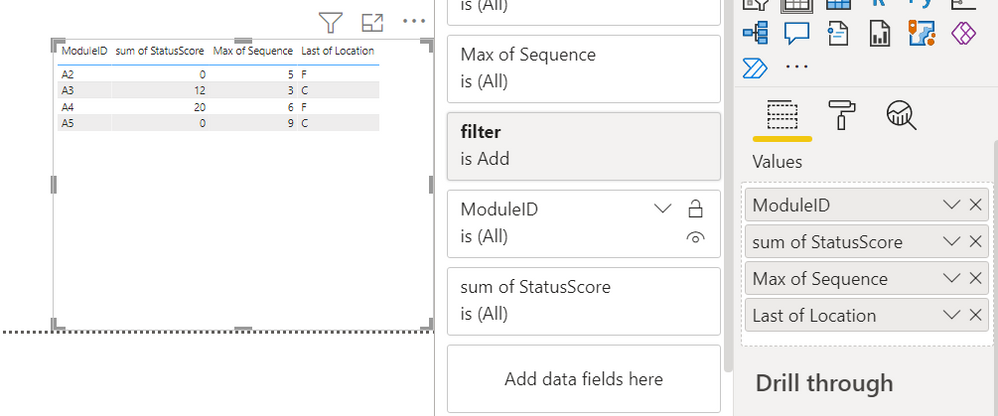
Thanks,
Samarth
Best Regards,
Samarth
If this post helps, please consider accepting it as the solution to help the other members find it more quickly.
Appreciate your Kudos!!
Connect on Linkedin
- Mark as New
- Bookmark
- Subscribe
- Mute
- Subscribe to RSS Feed
- Permalink
- Report Inappropriate Content
Thank you for your reply.
But I must create the table by using DAX.
- Mark as New
- Bookmark
- Subscribe
- Mute
- Subscribe to RSS Feed
- Permalink
- Report Inappropriate Content
Okay, then you can create a table with below dax:-
VAR x0 =
SUMMARIZE (
    FILTER (
        Table1,
        NOT ( Table1[ModuleID] IN VALUES ( 'Table2(remove)'[ModuleID] ) )
    ),
    Table1[ModuleID],
    "SUM_", SUM ( Table1[StatusScore] ),
    "LastSequence", MAX ( Table1[Sequence] ),
    "location", MAX ( Table1[Location] )
)
Output:-
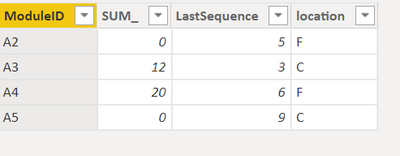
Thanks,
Samarth
Best Regards,
Samarth
If this post helps, please consider accepting it as the solution to help the other members find it more quickly.
Appreciate your Kudos!!
Connect on Linkedin
- Mark as New
- Bookmark
- Subscribe
- Mute
- Subscribe to RSS Feed
- Permalink
- Report Inappropriate Content
Thank you for your reply. but.
Location column can not be applied with the "MAX" function.
Becuase it's not sequencial.
A2 5 D
Could you please check out that.
- Mark as New
- Bookmark
- Subscribe
- Mute
- Subscribe to RSS Feed
- Permalink
- Report Inappropriate Content
Okay. Can you try below code now:-
VAR x0 =
SUMMARIZE (
    FILTER (
        Table1,
        NOT ( Table1[ModuleID] IN VALUES ( 'Table2(remove)'[ModuleID] ) )
    ),
    Table1[ModuleID],
    "SUM_", SUM ( Table1[StatusScore] ),
    "LastSequence", MAX ( Table1[Sequence] ),
    "location",CALCULATE(max(Table1[Location]),Table1[Sequence] = MAX ( Table1[Sequence] ))
)
Output:-
Thanks,
Samarth
Best Regards,
Samarth
If this post helps, please consider accepting it as the solution to help the other members find it more quickly.
Appreciate your Kudos!!
Connect on Linkedin
- Mark as New
- Bookmark
- Subscribe
- Mute
- Subscribe to RSS Feed
- Permalink
- Report Inappropriate Content
Thank you Thank you!!

Helpful resources

Fabric Community Update - July 2025
Find out what's new and trending in the Fabric community.

Power BI Monthly Update - July 2025
Check out the July 2025 Power BI update to learn about new features.

| User | Count |
|---|---|
| 22 | |
| 11 | |
| 8 | |
| 6 | |
| 6 |


| User | Count |
|---|---|
| 25 | |
| 13 | |
| 11 | |
| 9 | |
| 6 |