cancel
Showing results for 
Search instead for 
Did you mean: 

Data Days is here! Join us now for 60+ days of learning, challenges, and connection. Learn more

Reply
peoplehelpme
Helper I
Helper I

How to create descending or ascending button

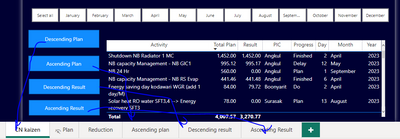
Hi guys , please help me figure this out. I want to create a button for ascending and descending button, but i cant find function to create this

peoplehelpme_0-1693046528145.png


Any clue?

Thanks in advance


3 REPLIES 3
tamerj1
Community Champion
Community Champion

Hi @peoplehelpme 

duplicate the table, one sorted ascending and the other descending. Then create bookmark if each and use tye book mark switch button to switch between the two bookmarks. 

no it now working for me

bacause when i bookmarked it , the month filtering is the problem

peoplehelpme_0-1693046499198.png


@peoplehelpme 

No need to create a new page only copy the visual and use "Selection" to hide and show tables. Use bookmark navigation not page navigation. If you prefer page navigation then you need to sync the slicers. 

Helpful resources

Announcements
Fabric Data Days is here Carousel

Fabric Data Days 2026

Don't miss out on Data Days, June 15 through August 7. Learn Fabric, Power BI, SQL, AI and more.

May Power BI Update Carousel

Power BI Monthly Update - May 2026

Check out the May 2026 Power BI update to learn about new features.

Power BI DataViz World Championships carousel

Power BI DataViz World Championships - June 2026

A new Power BI DataViz World Championship is coming this June! Don't miss out on submitting your entry.