cancel
Showing results for 
Search instead for 
Did you mean: 

Vote for your favorite vizzies from the Power BI Dataviz World Championship submissions. Vote now!

Reply
peoplehelpme
Helper I
Helper I

How to create descending or ascending button

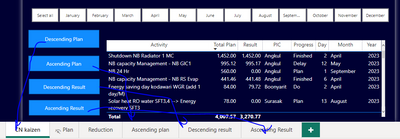
Hi guys , please help me figure this out. I want to create a button for ascending and descending button, but i cant find function to create this

peoplehelpme_0-1693046528145.png


Any clue?

Thanks in advance


3 REPLIES 3
tamerj1
Community Champion
Community Champion

Hi @peoplehelpme 

duplicate the table, one sorted ascending and the other descending. Then create bookmark if each and use tye book mark switch button to switch between the two bookmarks. 

no it now working for me

bacause when i bookmarked it , the month filtering is the problem

peoplehelpme_0-1693046499198.png


@peoplehelpme 

No need to create a new page only copy the visual and use "Selection" to hide and show tables. Use bookmark navigation not page navigation. If you prefer page navigation then you need to sync the slicers. 

Helpful resources

Announcements
Power BI DataViz World Championships

Power BI Dataviz World Championships

Vote for your favorite vizzies from the Power BI World Championship submissions!

Sticker Challenge 2026 Carousel

Join our Community Sticker Challenge 2026

If you love stickers, then you will definitely want to check out our Community Sticker Challenge!

January Power BI Update Carousel

Power BI Monthly Update - January 2026

Check out the January 2026 Power BI update to learn about new features.

FabCon Atlanta 2026 carousel

FabCon Atlanta 2026

Join us at FabCon Atlanta, March 16-20, for the ultimate Fabric, Power BI, AI and SQL community-led event. Save $200 with code FABCOMM.