cancel
Showing results for 
Search instead for 
Did you mean: 

Next up in the FabCon + SQLCon recap series: The roadmap for Microsoft SQL and Maximizing Developer experiences in Fabric. All sessions are available on-demand after the live show. Register now

Reply
chakrared
Regular Visitor

How to Make a Batch ID

Table 1 - 'Source L1 to L3' 

L1L2L3Batch ID...
value1anothervalue1andanothervalue1 
value2...etc...anothervalue2...etc...andanothervalue2...etc... 

All values are text

Table 2 -'L1Distinct'

L1L1Index
value11
value22...etc...

L1 is text, L2 is an index value (Number) Values in L1 are related to L1 in 1st table and are only the DISTINCT values in that tables L1 column

Table 3 & 4 'L2Distinct' and L3Distinct' are same as 'L1Distinct' but for L2 and L3 columns


All I want to do is take the columns 'L1Index' on table L1Distinct, 'L2Index on table L2Distinct and 'L3Index' on table L3Distinct and present them as a sequence in the original table....


So if the numbers where 1, 3, 10 for example I'd like 1310 in the column.


I'm new to DAX and struggling to do this. Any help would be appreciated. (Or even advice on an easier way to make a Batch ID based on all distinct values in each column having the same number ?


Thanks! 

1 ACCEPTED SOLUTION

@chakrared , Please try  a new column in table Source L1 to L3 

New column = related(L1Distinct[L1Index]) & related(L2Distinct[L2Index]) & related(L3Distinct[L3Index])

Share with Power BI Enthusiasts: Full Power BI Video (20 Hours) YouTube
Microsoft Fabric Series 60+ Videos YouTube
Microsoft Fabric Hindi End to End YouTube

View solution in original post

4 REPLIES 4
chakrared
Regular Visitor

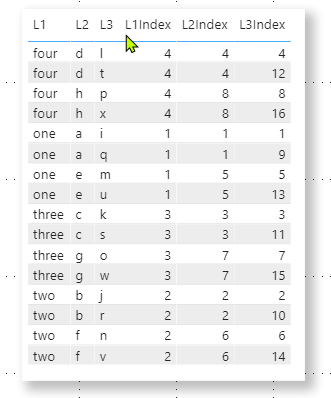
This is an example of the table for visual help

Example of Batches.png

So for example in the last row I'd want to have 2614 as a Batch ID. Problem making this for me with n00b DAX is that these are numbers and that each of the columns is from three seperate tables.


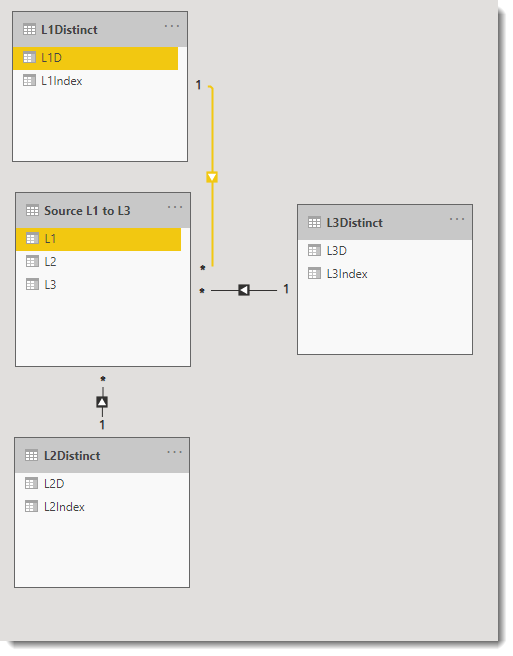
Table relationships are like this: -

Table relationshipsTable relationships

wdx223_Daniel_0-1602574222466.png

wdx223_Daniel_1-1602574252076.png


hope this can help

@chakrared , Please try  a new column in table Source L1 to L3 

New column = related(L1Distinct[L1Index]) & related(L2Distinct[L2Index]) & related(L3Distinct[L3Index])

Share with Power BI Enthusiasts: Full Power BI Video (20 Hours) YouTube
Microsoft Fabric Series 60+ Videos YouTube
Microsoft Fabric Hindi End to End YouTube

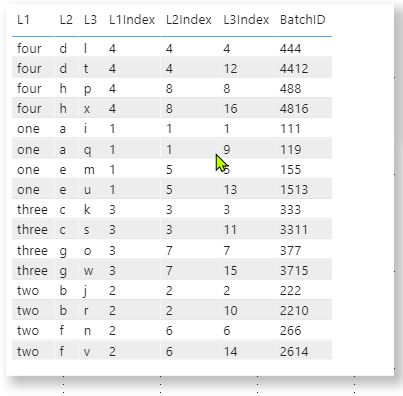
Thank you so much. Works perfectly! 😁

Example of Batches_3.png

Helpful resources

Announcements
New to Fabric survey Carousel

New to Fabric Survey

If you have recently started exploring Fabric, we'd love to hear how it's going. Your feedback can help with product improvements.

Power BI DataViz World Championships carousel

Power BI DataViz World Championships - June 2026

A new Power BI DataViz World Championship is coming this June! Don't miss out on submitting your entry.

Join our Fabric User Panel

Join our Fabric User Panel

Share feedback directly with Fabric product managers, participate in targeted research studies and influence the Fabric roadmap.

March Power BI Update Carousel

Power BI Community Update - March 2026

Check out the March 2026 Power BI update to learn about new features.