FabCon is coming to Atlanta
Join us at FabCon Atlanta from March 16 - 20, 2026, for the ultimate Fabric, Power BI, AI and SQL community-led event. Save $200 with code FABCOMM.
Register now!- Power BI forums
- Get Help with Power BI
- Desktop
- Service
- Report Server
- Power Query
- Mobile Apps
- Developer
- DAX Commands and Tips
- Custom Visuals Development Discussion
- Health and Life Sciences
- Power BI Spanish forums
- Translated Spanish Desktop
- Training and Consulting
- Instructor Led Training
- Dashboard in a Day for Women, by Women
- Galleries
- Data Stories Gallery
- Themes Gallery
- Contests Gallery
- QuickViz Gallery
- Quick Measures Gallery
- Visual Calculations Gallery
- Notebook Gallery
- Translytical Task Flow Gallery
- TMDL Gallery
- R Script Showcase
- Webinars and Video Gallery
- Ideas
- Custom Visuals Ideas (read-only)
- Issues
- Issues
- Events
- Upcoming Events
The Power BI Data Visualization World Championships is back! Get ahead of the game and start preparing now! Learn more
- Power BI forums
- Forums
- Get Help with Power BI
- DAX Commands and Tips
- How can I Create multiple columns selection in Pow...
- Subscribe to RSS Feed
- Mark Topic as New
- Mark Topic as Read
- Float this Topic for Current User
- Bookmark
- Subscribe
- Printer Friendly Page

- Mark as New
- Bookmark
- Subscribe
- Mute
- Subscribe to RSS Feed
- Permalink
- Report Inappropriate Content
How can I Create multiple columns selection in Power BI
Hi Everyone,
I want to provide end user the option to select any column, for example we've sales and want to see sales by Country, State or Customer so that user can select any column that we've added from a single selection.
Thanks,
- Mark as New
- Bookmark
- Subscribe
- Mute
- Subscribe to RSS Feed
- Permalink
- Report Inappropriate Content
Hi @Anonymous ,
Does the replies above solve your problem? If it has been solved, please mark the correct reply as the standard answer to help the other members find it more quickly.Thanks in advance for your kind cooperation!
If it not, would you mind telling me a more detailed description of your needs so that I can help you better?
Hope it helps,
Community Support Team _ Caitlyn
If this post helps then please consider Accept it as the solution to help the other members find it more quickly.
- Mark as New
- Bookmark
- Subscribe
- Mute
- Subscribe to RSS Feed
- Permalink
- Report Inappropriate Content
No I wasn't able to get the correct answer.
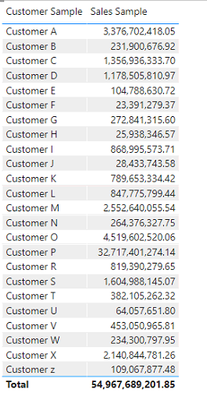
Let me try to expalin again. In this image I am showing sales data against cutomer. but I want provide an option where user can switch different column as well for example category,country, segment etc. same way that we select options in slicer


- Mark as New
- Bookmark
- Subscribe
- Mute
- Subscribe to RSS Feed
- Permalink
- Report Inappropriate Content
So you want to switch between different dimensions in the left column?
- Mark as New
- Bookmark
- Subscribe
- Mute
- Subscribe to RSS Feed
- Permalink
- Report Inappropriate Content
Yes.
- Mark as New
- Bookmark
- Subscribe
- Mute
- Subscribe to RSS Feed
- Permalink
- Report Inappropriate Content
Buttons and bookmarks is the best way to do this in Power BI.
The first link that @amitchandak gave is a good resource for this:
Dynamically Changing A Chart Axis In Power BI Using Bookmarks And Buttons
- Mark as New
- Bookmark
- Subscribe
- Mute
- Subscribe to RSS Feed
- Permalink
- Report Inappropriate Content
Thanks @AlexisOlson , I am aware about the button and bookmarks option but our client don't want to use that
- Mark as New
- Bookmark
- Subscribe
- Mute
- Subscribe to RSS Feed
- Permalink
- Report Inappropriate Content
The only other way I can think of to do this is to create a new table that essentially unpivots the dimensions you want to use into a column that you'd use for the left column in the visual.
This is rather hacky so I don't recommend it and I don't plan to volunteer my time working it out in detail.
- Mark as New
- Bookmark
- Subscribe
- Mute
- Subscribe to RSS Feed
- Permalink
- Report Inappropriate Content
I don't quite understand what you're asking. Can you illustrate or link to an example that behaves the way you're describing?
- Mark as New
- Bookmark
- Subscribe
- Mute
- Subscribe to RSS Feed
- Permalink
- Report Inappropriate Content
Hi @AlexisOlson ,
Sorry for late reply.
Here's an sample, suppose we have these three column in the data like this
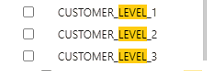
I wan to provide user the flexibility to switch between CUSTOMER_LEVEL_1,2,3 from a single slicer like this without unpivoting the data as I've multiple columns and measure in the orignial data and in some charts we're using these column individually.
Hope that I was able to explain, let me know if these are enough to provide some kind of solution.

- Mark as New
- Bookmark
- Subscribe
- Mute
- Subscribe to RSS Feed
- Permalink
- Report Inappropriate Content
You can create a parameter table with the column names that you want to choose between to use as a slicer and then define a switching measure that reads the slicer selection and outputs different results based on different selections.
I can't tell if this resolves your particular use case or not.
- Mark as New
- Bookmark
- Subscribe
- Mute
- Subscribe to RSS Feed
- Permalink
- Report Inappropriate Content
We can't create parameter for Text data type in power bi
- Mark as New
- Bookmark
- Subscribe
- Mute
- Subscribe to RSS Feed
- Permalink
- Report Inappropriate Content
That's unfortunate. Why not?

- Mark as New
- Bookmark
- Subscribe
- Mute
- Subscribe to RSS Feed
- Permalink
- Report Inappropriate Content
@Anonymous , You can do it using bookmarks or Unpivot the columns
Dynamically change chart axis in Power BI
bookmark -https://blog.crossjoin.co.uk/2018/04/20/dynamically-changing-a-chart-axis-in-power-bi-using-bookmarks-and-buttons/
https://radacad.com/bookmarks-and-buttons-making-power-bi-charts-even-more-interactive
https://www.youtube.com/watch?v=6jeSIRpjv0M
Unpivot means, you need Country, State or Customer to become rows values, then you can filter them in slicer and a new column can be used as the axis
- Mark as New
- Bookmark
- Subscribe
- Mute
- Subscribe to RSS Feed
- Permalink
- Report Inappropriate Content
Thanks for responding,
I know these options but with these options we will provide all the columns but I want to provide 3 or 4 columns, I want to do something similar to tableau parameter that I can further use in calculation, Please let me know if we can achieve something like that.
- Mark as New
- Bookmark
- Subscribe
- Mute
- Subscribe to RSS Feed
- Permalink
- Report Inappropriate Content
Helpful resources

Power BI Dataviz World Championships
The Power BI Data Visualization World Championships is back! Get ahead of the game and start preparing now!

Power BI Monthly Update - December 2025
Check out the December 2025 Power BI Holiday Recap!

FabCon Atlanta 2026
Join us at FabCon Atlanta, March 16-20, for the ultimate Fabric, Power BI, AI and SQL community-led event. Save $200 with code FABCOMM.

| User | Count |
|---|---|
| 14 | |
| 7 | |
| 4 | |
| 4 | |
| 3 |


| User | Count |
|---|---|
| 23 | |
| 10 | |
| 10 | |
| 6 | |
| 5 |


