FabCon is coming to Atlanta
Join us at FabCon Atlanta from March 16 - 20, 2026, for the ultimate Fabric, Power BI, AI and SQL community-led event. Save $200 with code FABCOMM.
Register now!- Power BI forums
- Get Help with Power BI
- Desktop
- Service
- Report Server
- Power Query
- Mobile Apps
- Developer
- DAX Commands and Tips
- Custom Visuals Development Discussion
- Health and Life Sciences
- Power BI Spanish forums
- Translated Spanish Desktop
- Training and Consulting
- Instructor Led Training
- Dashboard in a Day for Women, by Women
- Galleries
- Data Stories Gallery
- Themes Gallery
- Contests Gallery
- QuickViz Gallery
- Quick Measures Gallery
- Visual Calculations Gallery
- Notebook Gallery
- Translytical Task Flow Gallery
- TMDL Gallery
- R Script Showcase
- Webinars and Video Gallery
- Ideas
- Custom Visuals Ideas (read-only)
- Issues
- Issues
- Events
- Upcoming Events
The Power BI Data Visualization World Championships is back! Get ahead of the game and start preparing now! Learn more
- Power BI forums
- Forums
- Get Help with Power BI
- DAX Commands and Tips
- Help needed to create Calculated Column in finding...
- Subscribe to RSS Feed
- Mark Topic as New
- Mark Topic as Read
- Float this Topic for Current User
- Bookmark
- Subscribe
- Printer Friendly Page

- Mark as New
- Bookmark
- Subscribe
- Mute
- Subscribe to RSS Feed
- Permalink
- Report Inappropriate Content
Help needed to create Calculated Column in finding Max\Min\Average for Last Month
Dear PowerBians
I would need some assistance in finding a solution on how to implement below using Calculated Column.
I was able to create using Calulate([Sales],PREVIOUSMONTH([Date])) however it gives as a value and I would like to use it as column for more calculations. Any help would be greatly appretiated.
| Date | Sales | Max of Last Month | Min of Last Month |
| 1/1/2022 | 110 | ||
| 1/2/2022 | 190 | ||
| 1/3/2022 | 138 | ||
| 1/4/2022 | 153 | ||
| 1/5/2022 | 136 | ||
| 1/6/2022 | 127 | ||
| 1/7/2022 | 138 | ||
| 1/8/2022 | 101 | ||
| 1/9/2022 | 192 | ||
| 1/10/2022 | 138 | ||
| 1/11/2022 | 104 | ||
| 1/12/2022 | 115 | ||
| 1/13/2022 | 148 | ||
| 1/14/2022 | 104 | ||
| 1/15/2022 | 184 | ||
| 1/16/2022 | 167 | ||
| 1/17/2022 | 144 | ||
| 1/18/2022 | 161 | ||
| 1/19/2022 | 154 | ||
| 1/20/2022 | 194 | ||
| 1/21/2022 | 159 | ||
| 1/22/2022 | 123 | ||
| 1/23/2022 | 173 | ||
| 1/24/2022 | 194 | ||
| 1/25/2022 | 108 | ||
| 1/26/2022 | 134 | ||
| 1/27/2022 | 135 | ||
| 1/28/2022 | 138 | ||
| 1/29/2022 | 169 | ||
| 1/30/2022 | 111 | ||
| 1/31/2022 | 177 | ||
| 2/1/2022 | 122 | 194 | 101 |
| 2/2/2022 | 192 | 194 | 101 |
| 2/3/2022 | 197 | 194 | 101 |
| 2/4/2022 | 198 | 194 | 101 |
| 2/5/2022 | 114 | 194 | 101 |
| 2/6/2022 | 156 | 194 | 101 |
| 2/7/2022 | 175 | 194 | 101 |
| 2/8/2022 | 130 | 194 | 101 |
| 2/9/2022 | 141 | 194 | 101 |
| 2/10/2022 | 104 | 194 | 101 |
| 2/11/2022 | 132 | 194 | 101 |
| 2/12/2022 | 170 | 194 | 101 |
| 2/13/2022 | 146 | 194 | 101 |
| 2/14/2022 | 116 | 194 | 101 |
| 2/15/2022 | 122 | 194 | 101 |
| 2/16/2022 | 191 | 194 | 101 |
| 2/17/2022 | 167 | 194 | 101 |
| 2/18/2022 | 160 | 194 | 101 |
| 2/19/2022 | 134 | 194 | 101 |
| 2/20/2022 | 157 | 194 | 101 |
| 2/21/2022 | 112 | 194 | 101 |
| 2/22/2022 | 179 | 194 | 101 |
| 2/23/2022 | 118 | 194 | 101 |
| 2/24/2022 | 125 | 194 | 101 |
| 2/25/2022 | 128 | 194 | 101 |
| 2/26/2022 | 117 | 194 | 101 |
| 2/27/2022 | 179 | 194 | 101 |
| 2/28/2022 | 104 | 194 | 101 |
Solved! Go to Solution.


- Mark as New
- Bookmark
- Subscribe
- Mute
- Subscribe to RSS Feed
- Permalink
- Report Inappropriate Content
I opt for non-context-transition func, typically date/time func instead of Time Intelligent funcs in a calculated column in order to avoid "undermining" intrinsic row context or unnecessary filter context altering.
Min LM =
VAR __eolm = EOMONTH( EDATE( DATA[Date], -1 ), 0 )
RETURN
    MINX( FILTER( DATA, EOMONTH( DATA[Date], 0 ) = __eolm ), DATA[Sales] )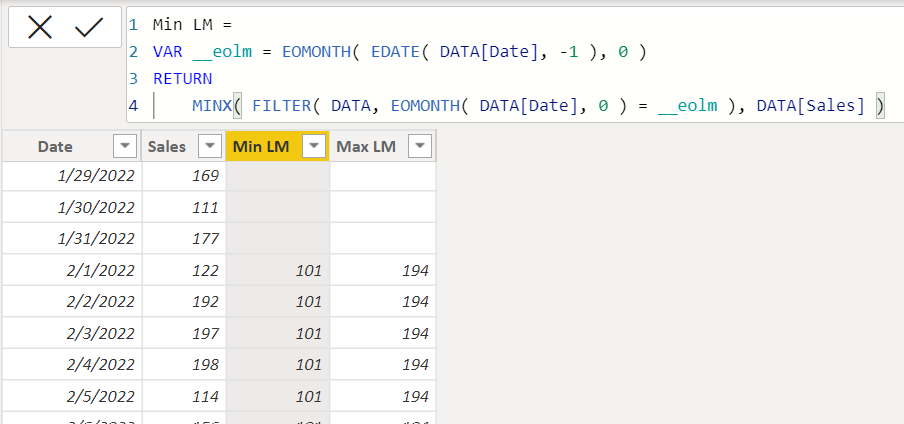
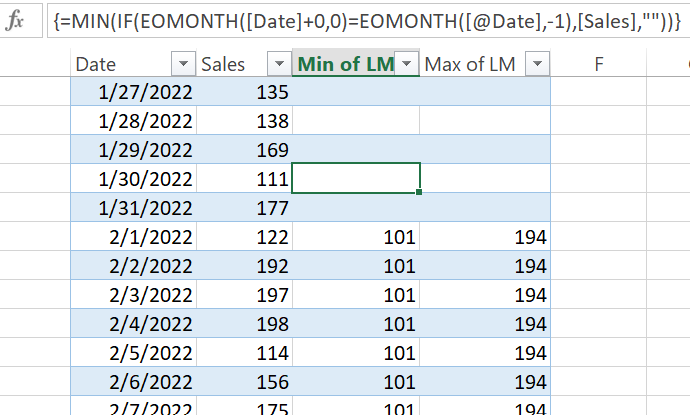
Excel worksheet formula is powerful enough,
| Thanks to the great efforts by MS engineers to simplify syntax of DAX! Most beginners are SUCCESSFULLY MISLED to think that they could easily master DAX; but it turns out that the intricacy of the most frequently used RANKX() is still way beyond their comprehension! |
DAX is simple, but NOT EASY! |


- Mark as New
- Bookmark
- Subscribe
- Mute
- Subscribe to RSS Feed
- Permalink
- Report Inappropriate Content
You are welcome! Would you be able to mark my reply as solved? Thanks!!
- Mark as New
- Bookmark
- Subscribe
- Mute
- Subscribe to RSS Feed
- Permalink
- Report Inappropriate Content
I opt for non-context-transition func, typically date/time func instead of Time Intelligent funcs in a calculated column in order to avoid "undermining" intrinsic row context or unnecessary filter context altering.
Min LM =
VAR __eolm = EOMONTH( EDATE( DATA[Date], -1 ), 0 )
RETURN
    MINX( FILTER( DATA, EOMONTH( DATA[Date], 0 ) = __eolm ), DATA[Sales] )
Excel worksheet formula is powerful enough,
| Thanks to the great efforts by MS engineers to simplify syntax of DAX! Most beginners are SUCCESSFULLY MISLED to think that they could easily master DAX; but it turns out that the intricacy of the most frequently used RANKX() is still way beyond their comprehension! |
DAX is simple, but NOT EASY! |
- Mark as New
- Bookmark
- Subscribe
- Mute
- Subscribe to RSS Feed
- Permalink
- Report Inappropriate Content
Hi:
Here's the file (ignore yesterday qty table). I added date table, fyi.
https://drive.google.com/file/d/1clTMZ_Uasovmi_W9cxuD9RDBsvGrgfck/view?usp=sharing
- Mark as New
- Bookmark
- Subscribe
- Mute
- Subscribe to RSS Feed
- Permalink
- Report Inappropriate Content
Hi:
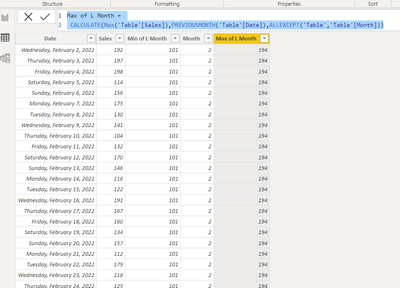
You can first add a calc col for month.(could be a variable) If it's a mutli-year observation then add calc col for month-yr. I am just adding the month in so you can see.
*I'm calling your table ,"Table"
- Mark as New
- Bookmark
- Subscribe
- Mute
- Subscribe to RSS Feed
- Permalink
- Report Inappropriate Content
Thank you very much Whitewater, I was able to create the colum as required.
- Mark as New
- Bookmark
- Subscribe
- Mute
- Subscribe to RSS Feed
- Permalink
- Report Inappropriate Content
You are welcome! Would you be able to mark my reply as solved? Thanks!!

Helpful resources

Power BI Monthly Update - November 2025
Check out the November 2025 Power BI update to learn about new features.

Fabric Data Days
Advance your Data & AI career with 50 days of live learning, contests, hands-on challenges, study groups & certifications and more!

FabCon Atlanta 2026
Join us at FabCon Atlanta, March 16-20, for the ultimate Fabric, Power BI, AI and SQL community-led event. Save $200 with code FABCOMM.

| User | Count |
|---|---|
| 21 | |
| 10 | |
| 9 | |
| 4 | |
| 4 |


| User | Count |
|---|---|
| 34 | |
| 31 | |
| 19 | |
| 12 | |
| 10 |


