FabCon is coming to Atlanta
Join us at FabCon Atlanta from March 16 - 20, 2026, for the ultimate Fabric, Power BI, AI and SQL community-led event. Save $200 with code FABCOMM.
Register now!- Power BI forums
- Get Help with Power BI
- Desktop
- Service
- Report Server
- Power Query
- Mobile Apps
- Developer
- DAX Commands and Tips
- Custom Visuals Development Discussion
- Health and Life Sciences
- Power BI Spanish forums
- Translated Spanish Desktop
- Training and Consulting
- Instructor Led Training
- Dashboard in a Day for Women, by Women
- Galleries
- Data Stories Gallery
- Themes Gallery
- Contests Gallery
- QuickViz Gallery
- Quick Measures Gallery
- Visual Calculations Gallery
- Notebook Gallery
- Translytical Task Flow Gallery
- TMDL Gallery
- R Script Showcase
- Webinars and Video Gallery
- Ideas
- Custom Visuals Ideas (read-only)
- Issues
- Issues
- Events
- Upcoming Events
The Power BI Data Visualization World Championships is back! Get ahead of the game and start preparing now! Learn more
- Power BI forums
- Forums
- Get Help with Power BI
- DAX Commands and Tips
- Re: Generate as a variable within a Measure vs Tab...
- Subscribe to RSS Feed
- Mark Topic as New
- Mark Topic as Read
- Float this Topic for Current User
- Bookmark
- Subscribe
- Printer Friendly Page


- Mark as New
- Bookmark
- Subscribe
- Mute
- Subscribe to RSS Feed
- Permalink
- Report Inappropriate Content
Generate as a variable within a Measure vs Table Help
Hey all,
Need help with a more efficient solution. I'm taking 'sales' and spreading them from the sales date by 12months. Meaning..the same sales number is spread evenly across 12months in order to setup a needed calculation. I'm currently doing this by generating a table and adding a column called 'Date' which provides all of the dates between the sales month and sales month +12. It works fine as a 'table'...but I was wondering if it would work faster as a nested variable within a measure...in order to lower the size of my model and just store it as a temp table within the measure and call out only what I need. Below is the generate code...


- Mark as New
- Bookmark
- Subscribe
- Mute
- Subscribe to RSS Feed
- Permalink
- Report Inappropriate Content
Hi,
Have you followed the DAX formula posted by AlexisOlson to find the solution to your problem?
If so, would you like to mark his reply as a solution so that others can learn from it too?
If you still have a problem, you can post some sample data(without sensitive data) and your expected result.
Thanks in advance!
How to Get Your Question Answered Quickly
Best Regards,
Community Support Team _Robert Qin
If this post helps, then please consider Accept it as the solution to help the other members find it more quickly.
- Mark as New
- Bookmark
- Subscribe
- Mute
- Subscribe to RSS Feed
- Permalink
- Report Inappropriate Content
The issue doesn't seem like it can be resolved by a measure...none of the suggestions work as I need to slice/filter by the dates that don't exist in the model. I think I'm limited to generating a table in order to do this. Please correct me if I'm wrong. Thanks!


- Mark as New
- Bookmark
- Subscribe
- Mute
- Subscribe to RSS Feed
- Permalink
- Report Inappropriate Content
Hi,
What kind of measure are you trying to use this sales in? You are correct that you can create a variable e.g.
Var _sales = DIVIDE([Sales],12)
return
Then simply refer to this in your measure. However depending on the visulization an calculation goals you have you might need to add/remove filters to this variable.
Did I answer your question? Mark my post as a solution!
Proud to be a Super User!
- Mark as New
- Bookmark
- Subscribe
- Mute
- Subscribe to RSS Feed
- Permalink
- Report Inappropriate Content
@ValtteriN The reason I have to spread a sale by month evenly is I have to take the 1st and last month divided by 24 and all months in between divided by 12. I use 'generate' to push the sales out 12months...and I divide the 1st/last month by 24 else 12. The sum of these columns is what I'm after.

- Mark as New
- Bookmark
- Subscribe
- Mute
- Subscribe to RSS Feed
- Permalink
- Report Inappropriate Content
Hi,
I understand your goal a bit better now. Then a suggestion: you could place your GENERATE DAX within a variable and calculate e.g. SUMX of that.
So something like this:
Var _vartable =
SUMX(_vartable,[calculated column])
You can add the calculated column to the vartable using ADDCOLUMNS
_vartable2 =
ADDCOLUMNS(_vartable,"Calculated Column","Place your logic here")
Did I answer your question? Mark my post as a solution!
Proud to be a Super User!
- Mark as New
- Bookmark
- Subscribe
- Mute
- Subscribe to RSS Feed
- Permalink
- Report Inappropriate Content
@ValtteriN Huge help!! I'm 'almost' there I think. I'm getting the correct total...but the 'dates' between Acct Date and Defferred Date in the 'generate statement' doesn't existing in my model...and that Date is what drives the breakout of the total in the measure. When actually generating the table it gave me 'date' to use. In the measure...I don't have 'date' available.
- Mark as New
- Bookmark
- Subscribe
- Mute
- Subscribe to RSS Feed
- Permalink
- Report Inappropriate Content
Hi,
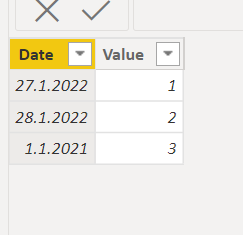
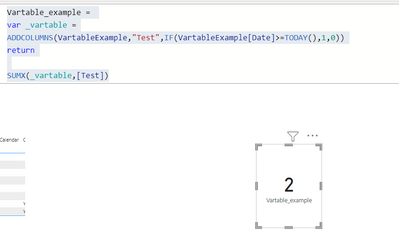
The logic with vartables is quite close to actual calculated tables. You can refer to the column in this variable table by using their names. So if you need the date in your calculate logic you can refer to it using 'Original table'[Date] reference.
Here is an example:
Did I answer your question? Mark my post as a solution!
Proud to be a Super User!
- Mark as New
- Bookmark
- Subscribe
- Mute
- Subscribe to RSS Feed
- Permalink
- Report Inappropriate Content
Yep...I think I'm doing that in my variable. My issue is 'Date' doesn't exist in my model...it only exists in the Generate statement. So once I calculate the measure...I don't have anything in my model to break it out by the generated date. Below is an example of the calculated table..vs the measure. I need to sum by 'Date' once the ECC calc is created.
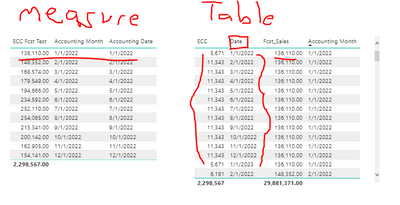
I tried a 'group by' and that didn't change anything. I'm also trying a filter 'Date' = 'Accounting month'. Thought that might get me the correct sum when the Accounting Date is chosen. Neither seem to be changing the sum.

- Mark as New
- Bookmark
- Subscribe
- Mute
- Subscribe to RSS Feed
- Permalink
- Report Inappropriate Content
I'd strongly recommend using a proper date dimension table rather than trying to generate a calendar within a measure.
- Mark as New
- Bookmark
- Subscribe
- Mute
- Subscribe to RSS Feed
- Permalink
- Report Inappropriate Content
@AlexisOlson Thanks. I have a date dimension table based on the sales date. Unfortunately...I don't have the 'spread date' in the underlying data...so there's no 'join' between the generated date in the temp table and the model. I can do that if I stick with the generated table rather than the measure...but trying to make the model more efficient. Are you familiar with how to pass a date filter through a temp table? I have it working for individual selected dates...but not where it'll automatically recognize multiple months
- Mark as New
- Bookmark
- Subscribe
- Mute
- Subscribe to RSS Feed
- Permalink
- Report Inappropriate Content
I'm suggesting something along these lines:
SUMX (
    FILTER (
        DATESBETWEEN (
            dimDate[Date],
            MIN ( 'biplanning Sales_Fcst'[Accounting Month] ),
            MAX ( 'biplanning Sales_Fcst'[Deferred Date] )
        ),
        DAY ( [Date] ) = 1
    ),
    [Forecast Measure]
)- Mark as New
- Bookmark
- Subscribe
- Mute
- Subscribe to RSS Feed
- Permalink
- Report Inappropriate Content
I see,
Now your measure is using current row date as the MIN date. We should able to solve this by using ALL.
e.g. Here I force the table in my previous example to use 1.1.2021 (MIN date) to test for SUMX
Did I answer your question? Mark my post as a solution!
Proud to be a Super User!
- Mark as New
- Bookmark
- Subscribe
- Mute
- Subscribe to RSS Feed
- Permalink
- Report Inappropriate Content
@ValtteriN I'm sorry...I don't think I follow. Just to clarify a bit further...below is a visual of what I need. The dates across the top are 'Acct dates' which are in the model. The Dates in the rows are 'generated' in the table variable. I need the sum of those rows...by Accounting Month.


Helpful resources

Power BI Dataviz World Championships
The Power BI Data Visualization World Championships is back! Get ahead of the game and start preparing now!

Power BI Monthly Update - December 2025
Check out the December 2025 Power BI Holiday Recap!

FabCon Atlanta 2026
Join us at FabCon Atlanta, March 16-20, for the ultimate Fabric, Power BI, AI and SQL community-led event. Save $200 with code FABCOMM.

| User | Count |
|---|---|
| 19 | |
| 13 | |
| 9 | |
| 4 | |
| 4 |


| User | Count |
|---|---|
| 29 | |
| 24 | |
| 16 | |
| 11 | |
| 10 |


