FabCon is coming to Atlanta
Join us at FabCon Atlanta from March 16 - 20, 2026, for the ultimate Fabric, Power BI, AI and SQL community-led event. Save $200 with code FABCOMM.
Register now!- Power BI forums
- Get Help with Power BI
- Desktop
- Service
- Report Server
- Power Query
- Mobile Apps
- Developer
- DAX Commands and Tips
- Custom Visuals Development Discussion
- Health and Life Sciences
- Power BI Spanish forums
- Translated Spanish Desktop
- Training and Consulting
- Instructor Led Training
- Dashboard in a Day for Women, by Women
- Galleries
- Data Stories Gallery
- Themes Gallery
- Contests Gallery
- Quick Measures Gallery
- Notebook Gallery
- Translytical Task Flow Gallery
- TMDL Gallery
- R Script Showcase
- Webinars and Video Gallery
- Ideas
- Custom Visuals Ideas (read-only)
- Issues
- Issues
- Events
- Upcoming Events
To celebrate FabCon Vienna, we are offering 50% off select exams. Ends October 3rd. Request your discount now.
- Power BI forums
- Forums
- Get Help with Power BI
- DAX Commands and Tips
- Filter Out Rows Given List of Values
- Subscribe to RSS Feed
- Mark Topic as New
- Mark Topic as Read
- Float this Topic for Current User
- Bookmark
- Subscribe
- Printer Friendly Page

- Mark as New
- Bookmark
- Subscribe
- Mute
- Subscribe to RSS Feed
- Permalink
- Report Inappropriate Content
Filter Out Rows Given List of Values
Background: We're a trucking company. Driver retention is a big issue for us so, I'm creating some retention analytics for the company to use. I'm working on a count of active drivers given a time context. With the help of some online research, I have the count almost working.
Problem: There is a termination code in our 'Drivers' file. A subset of those codes are for drivers that did not make it out of orientation and, therefore, are never counted as an active driver. I can't remove them at the Power Query level as I need them for other retention related analytics. I need to eliminate them with DAX. I'm trying to add that to the 'Driver Count' measure.
Mr. Googlepants tells me I should be able to use 'NOT' with 'IN' to make this happen. I've yet to be successful with a variety solution examples. This is my latest permutation ...
Driver Count =
CALCULATE (
    COUNTROWS ( Drivers ),
    FILTER (
        VALUES ( 'Drivers'[Hire Date] ),
        'Drivers'[Hire Date] <= MAX ( Dates[Date] )
    ),
    FILTER (
        VALUES ( 'Drivers'[Termination Date] ),
        OR(
            Drivers[Termination Date] >= MIN ( Dates[Date] ),
            ISBLANK ('Drivers'[Termination Date] )
        )
    ),
        FILTER(
        'Drivers',
        NOT 'Drivers'[Termination Code] IN {"LEFTOR","FAILIN","FAILRT","FAILWR","STLEFT","STFLRT","STFLIN","NEVER"}
    )
)
The third filter statement is where I'm having trouble ...
        FILTER(
        'Drivers',
        NOT 'Drivers'[Termination Code] IN {"LEFTOR","FAILIN","FAILRT","FAILWR","STLEFT","STFLRT","STFLIN","NEVER"}
    )
I've tried it without filter and with 'VALUES' as the others filters are done (I understand the logic but not all of the syntax of those, yet).
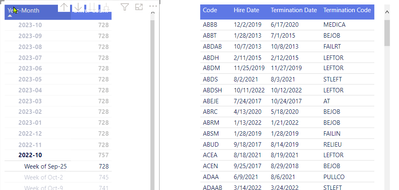
This is what I see as I test the measure. Clearly, the items in the list are still present.

If you wish to view the PBIX, I have created an anonomized version. The 'Driver Count' tab is where the screenshot above was taken from.
If anyone can point me in a direction to learn what I need to do here, it would be greatly apprecieated.
Solved! Go to Solution.
- Mark as New
- Bookmark
- Subscribe
- Mute
- Subscribe to RSS Feed
- Permalink
- Report Inappropriate Content
In the event anyone else runs across this, this is how I resolved my issue.
I never did figure out how to use NOT with IN to filter out the reason codes listed in the example.
I returned to the SQL that created this data and added a Y/N column of "Activated". Any driver with one of the codes listed was never activated. I then filtered by only including those with a 'Y'.
- Mark as New
- Bookmark
- Subscribe
- Mute
- Subscribe to RSS Feed
- Permalink
- Report Inappropriate Content
In the event anyone else runs across this, this is how I resolved my issue.
I never did figure out how to use NOT with IN to filter out the reason codes listed in the example.
I returned to the SQL that created this data and added a Y/N column of "Activated". Any driver with one of the codes listed was never activated. I then filtered by only including those with a 'Y'.


- Mark as New
- Bookmark
- Subscribe
- Mute
- Subscribe to RSS Feed
- Permalink
- Report Inappropriate Content
Hi @quintinh
NOT in this case shall be used as a function not as an operator therefore you need to wrap its argument with brackets
FILTER(
        'Drivers',
        NOT 'Drivers'[Termination Code] IN {"LEFTOR","FAILIN","FAILRT","FAILWR","STLEFT","STFLRT","STFLIN","NEVER"}
)- Mark as New
- Bookmark
- Subscribe
- Mute
- Subscribe to RSS Feed
- Permalink
- Report Inappropriate Content
Thought of another permutation to try ...
    FILTER(
        'Drivers',
        NOT('Drivers'[Termination Code] IN {"LEFTOR","FAILIN","FAILRT","FAILWR","STLEFT","STFLRT","STFLIN","NEVER"})
    )
)
Still no change
- Mark as New
- Bookmark
- Subscribe
- Mute
- Subscribe to RSS Feed
- Permalink
- Report Inappropriate Content
@tamerj1 ... That was a previous permutation until some info from SQLBI told me I did not need them.
I removed them so now the measure looks like ...
Driver Count =
CALCULATE (
    COUNTROWS ( Drivers ),
    FILTER (
        VALUES ( 'Drivers'[Hire Date] ),
        'Drivers'[Hire Date] <= MAX ( Dates[Date] )
    ),
    FILTER (
        VALUES ( 'Drivers'[Termination Date] ),
        OR(
            Drivers[Termination Date] >= MIN ( Dates[Date] ),
            ISBLANK ('Drivers'[Termination Date] )
        )
    ),
    FILTER(
        'Drivers',
        NOT('Drivers'[Termination Code]) IN {"LEFTOR","FAILIN","FAILRT","FAILWR","STLEFT","STFLRT","STFLIN","NEVER"}
    )
)
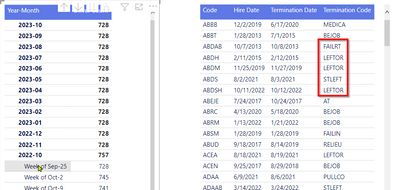
Is that syntactically correct?
The change did not change the results ...
- Mark as New
- Bookmark
- Subscribe
- Mute
- Subscribe to RSS Feed
- Permalink
- Report Inappropriate Content
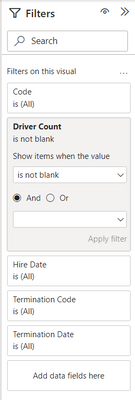
Try to place the measure in the filter pane of the right side table and select "is not blank " then apply the filter.
- Mark as New
- Bookmark
- Subscribe
- Mute
- Subscribe to RSS Feed
- Permalink
- Report Inappropriate Content
Screenshot of filter pane ...
Screenshot of data ...

What does that tell us?

Helpful resources

Power BI Monthly Update - September 2025
Check out the September 2025 Power BI update to learn about new features.

Fabric Community Update - August 2025
Find out what's new and trending in the Fabric community.

| User | Count |
|---|---|
| 15 | |
| 10 | |
| 9 | |
| 5 | |
| 4 |


